TL;DR: Submit your sitemap to Google once. Google will check it again automatically, so there’s no need to resubmit it every time you publish or update a page. Only resubmit it after significant changes, such as a site migration, or when you’ve fixed an error. Remember, submitting a sitemap doesn’t guarantee Google will crawl or index every URL. To help Google discover new pages, make sure they’re linked to from other relevant pages on your website.
A sitemap is a file that lists the pages you want search engines to find. Submitting one to Google Search Console takes a minute, so it’s easy to assume that resubmitting it whenever you publish a post, add a product or run a promotion must help. It doesn’t. If you want the basics first, our guide covers what a sitemap is and how search engines use sitemaps.
Do You Need to Resubmit Your Sitemap Every Time Your Site Changes?
No. Once Google has read your sitemap successfully, it periodically rereads it at its own pace, separate from how often it crawls the rest of your site. Google also describes submitting a sitemap as “merely a hint”: it doesn’t guarantee that Google will download the sitemap or use it to crawl your pages.
“A common misconception is that repeatedly submitting a sitemap will make Google index pages faster. It won’t. If pages aren’t being indexed, we investigate issues like content quality, internal linking and crawlability rather than simply resubmitting the sitemap.” – Paul Pennington, SEO Account Director
What you do need to keep up is the sitemap file itself. If your CMS or SEO plugin generates it automatically, as many do, new pages are added when you publish them and Google will see them the next time it reads the file. There’s nothing to resubmit.
Reading a sitemap also isn’t the same as crawling every page in it: Google says it can take some time to crawl the URLs a sitemap lists. For what decides how often each page is crawled, see our post on how often Google crawls your site.
You can tell Google about a sitemap by submitting it in Search Console or by listing it in your robots.txt file. Google also retired its sitemap “ping” method in 2023, so if an old guide tells you to notify Google by visiting a ping address, that step no longer works.
When Is Resubmitting Worth Doing?
Google says that if you make big changes to a sitemap, you might want to resubmit it. Three situations qualify:
- You’ve migrated your site or changed your URL structure. A large batch of URLs has changed at once, which is the clearest case for a fresh submission. Our website migration guide covers the wider checklist.
- You’ve published a large batch of new pages that nothing links to yet. Check the “Last read” date in the Sitemaps report first. If Google hasn’t read the sitemap since you added them, resubmit it, then link the pages properly.
- Search Console is reporting a sitemap error. If Google can’t fetch a sitemap, it retries for a few days and then stops. Once you’ve fixed the cause, resubmitting asks Google to try again.
Outside these cases, leave it alone. Google doesn’t document resubmitting a working sitemap as a way to speed anything up, so there’s no reason to do it on a timer.
Resubmitting also won’t fix the problems that usually stop a page being indexed: a noindex tag, a canonical tag pointing to another page, a page blocked from Googlebot, or a page nothing links to. Those need fixing on the site itself.
Do You Need a Sitemap at All?
Google says you may not need a sitemap if your site is small (about 500 pages or fewer), is comprehensively linked internally, and doesn’t have many video, image or news pages you want to show in search results. A sitemap is more likely to help if:
- Your site is large. On bigger sites it’s harder to make sure every page is linked from at least one other page.
- Your site is new and has few external links to it. Google has fewer routes in.
- You publish a lot of rich media or news. Video, images and Google News content are the cases Google singles out.
A sitemap helps Google discover URLs, but it doesn’t guarantee they’ll be crawled and indexed, and it doesn’t replace internal links. Google says every page you care about should have a link from at least one other page on your site, and that it uses links both to find new pages and as a signal of how relevant they are. A page that appears only in your sitemap, what we’d call an orphaned page, may still be found, but for most businesses we recommend treating the sitemap as the backup and links as the main route.
“When a local audiologist came to us, Google was struggling to find their pages, despite them being linked in the navigation and included in the sitemap. A crawl revealed that the Wix slide-out menu used JavaScript to load links, making them invisible in the HTML for search engine bots. With no internal linking or footer, Google struggled to discover the rest of the site. We replaced the menu with static navigation, added internal links and introduced a navigational footer. This helped Google discover and index the pages, with the site securing multiple top-three rankings over the following months.” – Jamie Stowe, Senior SEO Account Manager
How to Submit Your Sitemap and Check It’s Working
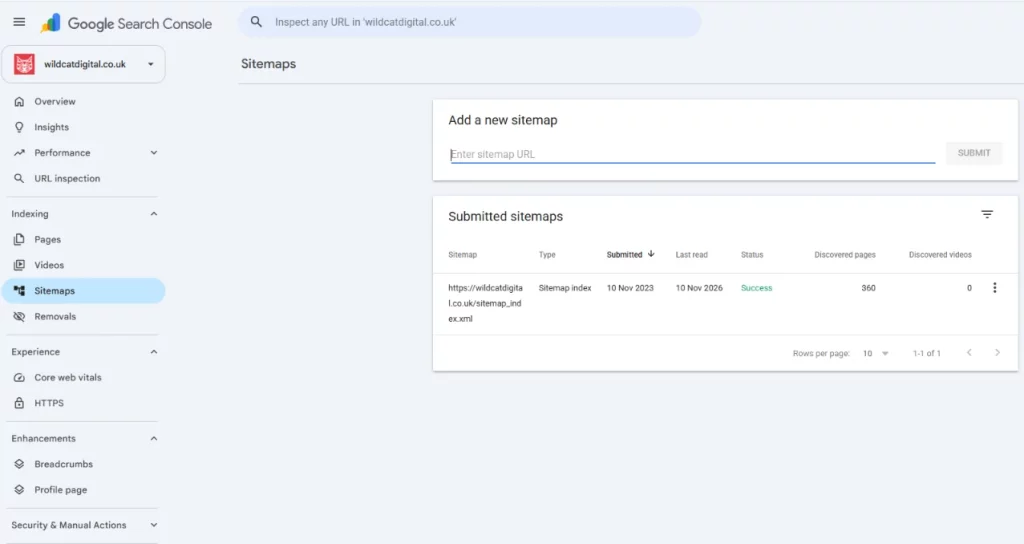
- Find your sitemap’s address. A common location is yourdomain.com/sitemap.xml, but it depends on your CMS or plugin, and it may also be listed in your robots.txt file.
- Open the Sitemaps report. In Google Search Console, open the Sitemaps report, usually found under Indexing in the left-hand menu. You need to be an owner of the property to submit a sitemap.
- Submit it. Paste the address into “Add a new sitemap” and click Submit.
- Check the status. “Success” means Google fetched and read the sitemap without errors. “Couldn’t fetch” or a message about errors means it needs attention. The report also shows when Google last read the sitemap and how many URLs it found, so compare that number with the pages you expect.
If there’s a problem, fix the cause first: check that the file loads at its address, isn’t blocked from Googlebot, and lists only the canonical URLs you want in search results. Then resubmit. Checking back every so often is more useful than resubmitting on a schedule.
TOP TIP: Before you resubmit anything, try to reach your newest page by clicking through from your homepage, without using search or your sitemap. If you can’t get there, no resubmission will fix the real problem. Add a link from a page Google already visits often, such as a main category page or a related post. Google’s own advice is the same: every page you care about should be linked from at least one other page on your site.
Sitemap FAQs
Do I need to resubmit my sitemap every time I publish a blog post?
No. If your sitemap updates automatically, Google picks up the new post the next time it reads the file. Linking the post from somewhere on your site, such as your blog index or a related post, gives Google a second route to it.
How do I update my sitemap in Search Console?
You don’t edit it there. Update the sitemap file on your site, which your CMS or SEO plugin usually does for you, and Google rereads it on its own schedule. The Sitemaps report shows when it last did, and you can resubmit after a big change.
Can I submit a sitemap too often?
Google doesn’t say that repeat submissions cause harm, but it doesn’t say they help either. Unless you’ve made a big change or fixed an error, there’s no documented benefit.
How big can a sitemap be?
A single sitemap can list up to 50,000 URLs and be up to 50MB uncompressed, according to Google. Larger sites split their URLs across several sitemaps and submit them together with a sitemap index file.
How Wildcat Handles This
A sitemap can’t make up for pages nothing links to, so when we review a site’s crawlability as part of a technical SEO audit early in a campaign, we look at the sitemap, the internal linking and the site structure together.
The most useful thing you can give us is access to your Search Console property, because that’s where the Sitemaps report shows when Google last read your sitemap and how many URLs it found. What you get back is a clear picture of whether your important pages can be reached through links as well as the sitemap, and which fixes to prioritise first.
If you’re not sure your new pages are being found, you can arrange a free consultation and we’ll talk through what’s going on.