
GA4 event tracking involves monitoring key user interactions (e.g., file downloads, clicks, scrolls) to understand how organic users engage with your website and how you can improve their experience. It provides you with invaluable insights into user behaviour, helping you to improve engagement, boost conversions and enhance user experience.
The most crucial actions should be marked as ‘key events’ (e.g. , form fills, phone calls, purchases) so you can see which pages have the biggest impact on your business.
Without event tracking, it’s very difficult to make data-driven decisions about future SEO efforts.
In the rest of this guide, we’ll break down what GA4 events are, the different types, how to track them in GA4 and much more – including a helpful GA4 event tracking checklist so you can be sure you’re on the right track.
Jump to section:
- What Is an Event in GA4 and Why Is It Important for SEO?
- Types of Events in GA4
- How to Track Events in GA4
- What Is a Key Event in GA4?
- How to Add Key Events in GA4
- Best Events to Track in GA4 for SEO
- GA4 Event Tracking Checklist
- How GA4 Event Data Can Impact SEO Decisions
- Next Steps with Wildcat Digital
TL;DR:
- GA4 can be used to track user behaviour, not just traffic
- Event tracking helps you understand what users do after they land on a page
- Enquiries, purchases and other key user actions that are crucial to your business should be marked as ‘key events’
- Enhanced Measurement should be enabled for increased automatic event tracking
- While some events are tracked automatically by GA4, you’ll likely need to set up custom events via GTM for specific user actions that are relevant to your business
What Is an Event in GA4 and Why Is It Important for SEO?
In Google Analytics 4 (GA4), an event refers to any distinct user interaction or occurrence. This could be something as simple as a page view or a specific contact form submission. In fact, every action in GA4 is classified as an event.
According to Google:
“An event allows you to measure a specific interaction or occurrence on your website or app.”
GA4 events are crucial for SEO because they help you understand how users interact with your site and what actions they take. They allow you to measure ‘key events’ (formally known as conversions), directly linking traffic to desired business goals. This gives you an insight into what type of users convert best and where they typically do this, helping to inform future SEO strategies.
Put simply, events help SEOs move beyond simply tracking traffic, helping them understand user behaviour and how this traffic translates into meaningful actions, whether that be a purchase or a service enquiry.
Learn more about this topic in our pillar page, ‘GA4 & Measurement for SEO’.
Types of Events in GA4
In GA4, events can be broadly divided into 2 categories: events which are collected automatically and events that require implementation. We’ll go into these in more detail below.
The following events are collected automatically by GA4.
Automatically Collected Events
These events are collected automatically when you set up GA4 for your website or app.
Here are some of the most useful examples of automatically collected events for SEO:
| Event | Trigger | Parameters | SEO Benefit |
|---|---|---|---|
| session_start | When a user first visits and engages with the website | session_id, page_location, traffic_source | Tracks SEO-driven traffic and acquisition sources |
| scroll | When a user scrolls to 90% of a page’s depth | percent_scrolled | Measures content engagement and depth of interest |
| page_view | When a page loads or is viewed | page_location, page_referrer, page_title | Identifies top-performing SEO landing pages |
| user_engagement | When a page is in focus for more than 1 second | engagement_time_msec | Indicates content quality and dwell time |
| view_search_results | When a user performs a search using your site’s internal search | search_term | Uncovers keyword opportunities and content gaps |
Enhanced Measurement Events in GA4
These events are collected automatically when you set up GA4 for your website or app, and you enable enhanced measurement.
To enable enhanced measurement, follow these steps in GA4:
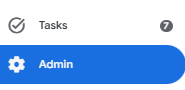
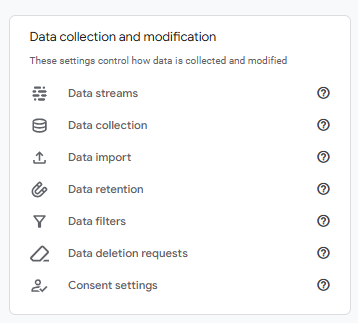
- Under Admin, click Data Streams (under Data collection and modification)
- Click on your data stream
- Under Enhanced measurement, slide the blue switch to On to enable enhanced measurement

Here are some of the most useful examples of enhanced measurement events for SEO:
| Event | Trigger | Parameters | SEO Benefit |
|---|---|---|---|
| outbound_click | When a user clicks a link leading to an external domain | link_url, link_domain | Reveals external click behaviour and user intent |
| video_start | When a user starts playing an embedded video | video_title, video_url | Shows engagement with video content |
| video_progress | When a user reaches 10%, 25%, 50%, or 75% of a video | video_percent, video_title | Measures depth of video engagement |
| video_complete | When a user watches a video to the end | video_title | Indicates high content engagement |
| file_download | When a user clicks to download a file (e.g. PDF) | file_name, file_extension | Tracks engagement with downloadable assets |
| form_start | When a user begins interacting with a form | form_id, form_name, form_destination | Indicates intent and helps identify form drop-offs |
| form_submit | When a user successfully submits a form | form_id, form_name, form_destination | Tracks conversions and lead generation from SEO |
The following events require manual implementation.
Recommended Events
These events must be implemented, but they have predefined names and parameters, which means that they appear directly in standard reports. Recommended events are not sent automatically and need to be manually implemented (typically using Google Tag Manager – we cover this in more detail later on).
Here are some of the most useful examples of recommended events for SEO:
| Event | Trigger | Parameters | SEO Benefit |
|---|---|---|---|
| login | When a user signs in | method | Helps identify returning users driven by SEO content |
| sign_up | When a user creates an account | method, signup_source | Tracks conversions from organic traffic |
| generate_lead | When a user submits a lead form or enquiry | value, currency, form_id | Measures SEO-driven lead generation |
| purchase | When a user completes a transaction | transaction_id, value, currency, items | Links SEO traffic to revenue and sales performance |
| view_item | When a user views a product or service page | item_id, item_name, price | Identifies high-intent SEO landing pages |
| view_item_list | When a user views a list of products or services | item_list_id, item_list_name, items | Shows which SEO category/list pages attract attention |
| select_item | When a user clicks a product/service from a list | item_list_name, item_id | Shows which SEO pages drive product interest |
| add_to_cart | When a user adds an item to basket | item_id, item_name, value | Tracks purchase intent from organic traffic |
| begin_checkout | When a user starts the checkout process | value, currency, items | Measures SEO contribution to conversion funnel progression and helps identify drop-offs |
Custom Events
Like recommended events, custom events also need to be implemented via Google Tag Manager, but they don’t have predefined names or parameters, so they don’t appear in standard reports. These are events that you define and should only be used when no recommended events work for your tracking needs.
Here are some examples of custom events that you could set up to help track your SEO efforts.
| Event | Trigger | Parameters | SEO Benefit |
|---|---|---|---|
| phone_call_click | When a user clicks a phone number link | phone_number, page_path, click_location | Tracks phone enquiries from organic traffic |
| email_click | When a user clicks an email link | email_address, page_path, click_location | Measures direct contact intent from SEO visitors |
| cta_click | When a user clicks a call-to-action button | cta_name, cta_location, page_path | Tracks engagement and conversion actions from SEO pages |
| chat_start | When a user starts a live chat interaction | chat_provider, page_path | Captures high-intent engagement from organic users |
| mailing_list_signup | When a user subscribes to a newsletter | form_id, signup_source, page_path | Tracks SEO-driven audience growth and retention |
How to Track Events in GA4
While automatically collected events and enhanced measurement events are both recorded by default (provided the enhanced measurement toggle is enabled), recommended and custom events require implementation using Google Tag Manager.
Tracking Recommended or Custom Events with Google Tag Manager
1. Identify the Required Recommended or Custom Events
- First, review the official GA4 Recommended Events documentation to identify if there are any recommended events that are suitable for your tracking needs.
- If none of the recommended events are suitable, you will need to use custom events.
2. Implement Required Events Using GTM
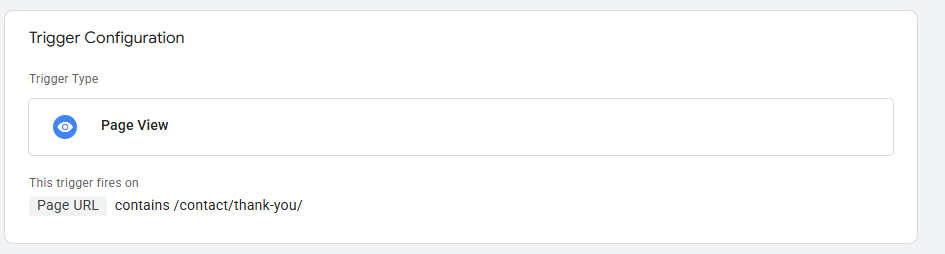
- Create a trigger in GTM – define the user action (e.g., a CTA button click or a specific form submission). The screenshot below shows a trigger based on a contact form thank you page view – a common and simple way to track contact form submissions.
- Create a tag – choose Google Analytics: GA4 Event
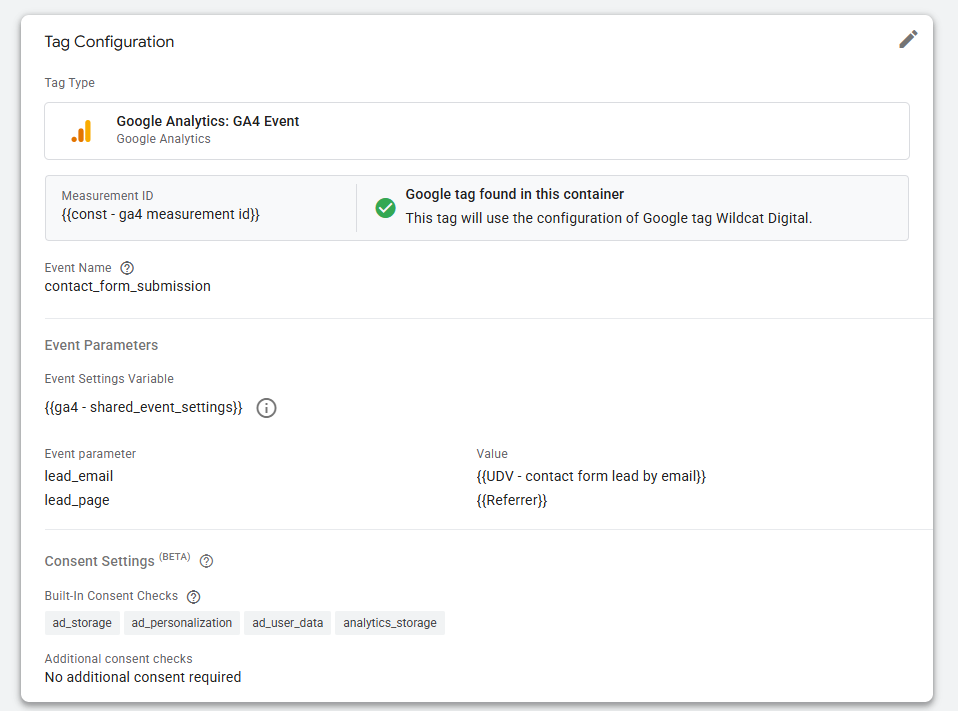
- Configure the tag – enter a recommended event name or a custom event name (use lower_snake_case) and your GA4 measurement ID
- Add parameters – add required and optional event parameters to enable more detailed reporting
- Publish – save and publish your container
3. Verify Implementation
- Use the Preview mode in GTM to verify that your tag is firing correctly
- Verify in GA4 DebugView to ensure the data is received.
- Check the Realtime report in GA4 and check whether the implemented events appear correctly
Lastly, you should mark the event as a ‘key event’ if it’s a high-value action – we go into more detail on what a key event is and how to set one up below.
What Is a Key Event in GA4?
A key event in GA4 is a user interaction that’s crucial to your business goals. Common key events include:
- Purchases
- Form fills
- Email clicks
- Phone call clicks
- Email sign-ups
- Chat messages
Don’t mark all events as key events – only mark events that align with business goals, and these are typically events that constitute a sale (e.g., a purchase) or a potential sale (e.g., a form fill or phone call).
Is a Key Event the Same as a Conversion?
In GA4,’ key events’ used to be called ‘conversions’, and many people still refer to them as this, even though this terminology is outdated. Officially, the term ‘conversion’ is now reserved for key events that are imported into Google Ads campaigns and used to optimise bidding and report on performance.
Put simply, both key events and conversions refer to the business-critical user actions, but key events are used in GA4, and conversions are used in Google Ads.
Learn more about effective SEO lead reporting in our blog, ‘How to Track Lead Quality from SEO’.
How to Add Key Events in GA4
Marking existing events in GA4 as ‘key events’ (formally called conversions) is simple:
- Go to Admin -> Data display -> Events
- Locate the event you want to mark as a ‘key event’ in the Existing Events table
- Toggle the switch in the Mark as key event column
If you have recently created the event in GTM, you will need to wait for the event to populate the Existing Events table, which can take over 24 hours.
Best Events to Track in GA4 for SEO
For Service-Based Businesses:
- form_start – Identifies interest even if users don’t complete forms
- form_submit – Core SEO conversion event (key event)
- generate_lead – Standardised conversion event for enquiries (key event – can be used instead of form_submit)
- phone_call_click – Tracks SEO-driven phone enquiries (key event)
- email_click – Measures direct contact intent from organic traffic (key event)
- chat_start – Captures leads from live chat (key event)
For E-commerce Businesses:
- view_item – Tracks product/service page interest from SEO traffic
- view_item_list – Shows performance of category/listing pages
- select_item – Measures clicks from SEO category pages
- add_to_cart – Captures purchase intent from organic visitors
- begin_checkout – Tracks progression into buying journey
- purchase – Core revenue event tied to SEO performance
GA4 Event Tracking Checklist
Use this helpful checklist to ensure that you are maximising GA4 event tracking to monitor SEO performance:
How GA4 Event Data Can Impact SEO Decisions
GA4 event tracking provides significantly deeper insights than relying on just traffic metrics (such as active users and page views). By tracking key user actions, SEOs can understand user intent and learn what content drives desirable behaviour.
| GA4 Event | What It Shows | SEO Decision It Supports | Example Action |
|---|---|---|---|
| page_view + scroll | Whether users actually consume content | Content quality vs. ranking alignment | Improve or restructure pages with high traffic but low scroll depth |
| view_search_results | What users are searching on your site | Keyword demand and content gaps | Create new pages targeting high-volume internal searches |
| cta_click | Whether users engage with key actions | Effectiveness of on-page messaging | Test new CTAs or reposition them higher on the page |
| generate_lead / form_submit | Which pages generate enquiries | SEO conversion performance | Prioritise pages that drive leads, not just traffic |
| phone_call_click / email_click | Direct contact intent | High-intent SEO landing pages | Optimise pages generating offline conversions |
| view_item / add_to_cart (ecommerce) | Product interest and purchase intent | Product page SEO effectiveness | Improve underperforming product pages with high views but low conversions |
| begin_checkout / purchase | Revenue from organic traffic | ROI of SEO activity | Focus SEO efforts on high-revenue landing pages |
| chat_start / chat_missed | Engagement vs lost opportunities | UX + conversion friction | Improve response time or chat placement on key pages |
Next Steps with Wildcat Digital
Setting up effective event tracking in GA4 is just the first hurdle; knowing how to analyse this event data and use it to inform future SEO strategies is where the real progress is made….
At Wildcat Digital, we are experts at setting up comprehensive event tracking (whether you’re a nationwide e-commerce business or a local service provider). Every decision we make is backed up by tangible data, ensuring that you see real results.
Get in touch with our team today to learn more about how we can help your business succeed with effective GA4 event tracking and expert data analysis.

Kezia Humphries
SEO Executive