
Updating your website can seem overwhelming but avoiding it is not the solution. Ensuring your website theme and plugins are up-to-date is so important in the current digital landscape and with the rise in malicious hackers. But, what happens if you don’t update your website theme?
By not updating your website theme you are making your website vulnerable to malicious malware attacks. This can result in your website being hacked. You also run the risk of damaging your online reputation by losing SEO rankings or breaking your website when software is not working properly.
Keep reading to find out more about the risks of not updating your website as well as how to update your website theme.

Why is It Important For You to Update Your Website Regularly?
Updating your website regularly is an essential step of maintaining a well-managed website in the modern digital landscape. The importance goes above and beyond the aesthetic of the website and involves more technical aspects. Read on to learn the main reasons why it is important to complete website updates regularly.
- Reputation & Authority
Keeping your website up to date can help with your authority in your niche. In SEO, ensuring you provide the most useful and up-to-date content for your targeted keywords is important to maintain your rankings. If you consider it from a user perspective, by not providing them with the information they require, users will simply click off your site. This can result in Google dropping your rankings.
But it doesn’t stop there, by not updating your website or plugins regularly you can also experience technical issues such as slower site speed and even navigational problems. Site speed and navigation are also ranking factors that can impact whether a user stays on your site. Once again, risking decreasing your reputation in your industry and domain authority with Google.
For more information on the different Google ranking factors and how they can impact your online present or authority, take a read of our informative blog by clicking here.
- Website Security
Ensuring your website plugins and themes are kept up-to-date can also help with website security. Often, when updates for your theme are released it is to address new security threats and protect your website. Therefore, by not updating them regularly your website will be lacking the necessary software to fight off dangerous malware attacks.
In 2023, Securi research identified that 39.2% of CMS applications were outdated at the time of infection with malicious malware.
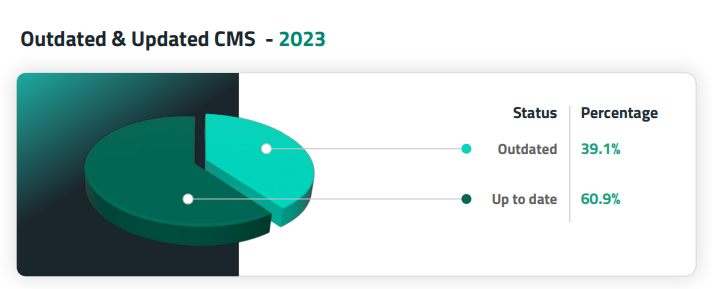
The research shows that there is a direct correlation between not completing a website update and being vulnerable to attacks online.
- Prevention of Expensive Web Development Work
When your website theme is not kept up-to-date, it is more prone to technical issues and crashes. Updating a plugin or a theme can be done without too much technical skill and a little guidance, but as soon as a site breaks it can be a lot more complex. Often, these are the scenarios where you will require the expertise of a developer which can be costly. Consequently, keeping your website up-to-date can be the difference between having to hire an expert to restore your website.

What are the Common Risks Associated With Updating Your Website Theme?
Now that you know the importance of updating your website theme, there are certain risks you need to be aware of before you complete the update. To help you out, our technical team has detailed some of the most common risks.
Loss of Content
Losing content when completing a website update can be quite common, depending on your CMS. What makes this worse is that often content is irretrievable which is detrimental to rankings and organic traffic. The best advice for avoiding this is to complete a backup of your site through your hosting and getting a good understanding of your CMS before you complete any update.
Breaking Your Website
When processing a website update, you run the risk of the new software not being compatible with your CMS. Usually, this is because website themes and plugins are not always designed with the focus of being compatible with other themes or plugins. In worse case scenarios this can take your website down completely.
Drop in SEO Rankings
Making significant changes to your website can result in a drop in your SEO rankings. This is significant because SEO rankings are what help draw users to your site organically to help conversions. This is why a backup is always recommended when updating website themes and plugins.
Security Issues
Whilst we have discussed that not completing a website update can result in security risks, it is important to note that updates can still cause security risks. This is because updates can cause unforeseen issues with themes or plugins which leave gaps for malicious hackers to infiltrate.

How Do I Update My WordPress Theme?
At this point, you are well-versed on the risks of not updating your website as well as the risks of updating your website. Now it’s time to learn how you update your website theme safely. Read our useful guidance below.
Preparation: Complete a Website Backup
Arguably, the most important step in updating your website theme is to complete a backup through your hosting service. This preparation step is essential in ensuring you don’t lose vital content and features of your website if something goes wrong. Usually, regular backups are included in your website hosting package and are automatic. But when you are completing something as risky as a website update we recommend you double check with your provider if a backup has been completed.
Option 1: Automatic Website Updates
Automatic wordpress theme updates are a great option if you don’t want to worry about the risks mentioned above. Plus you don’t need to monitor if your website needs updating because it will just do it itself. It is important to highlight that to enable this feature, you will need WordPress 5.5 or above.
Follow the steps below to enable automatic wordpress theme updates.
- Login to the backend of your WordPress website
- Select Appearance and then Themes on your website theme banner
- In the theme, select Enable auto-updates and save
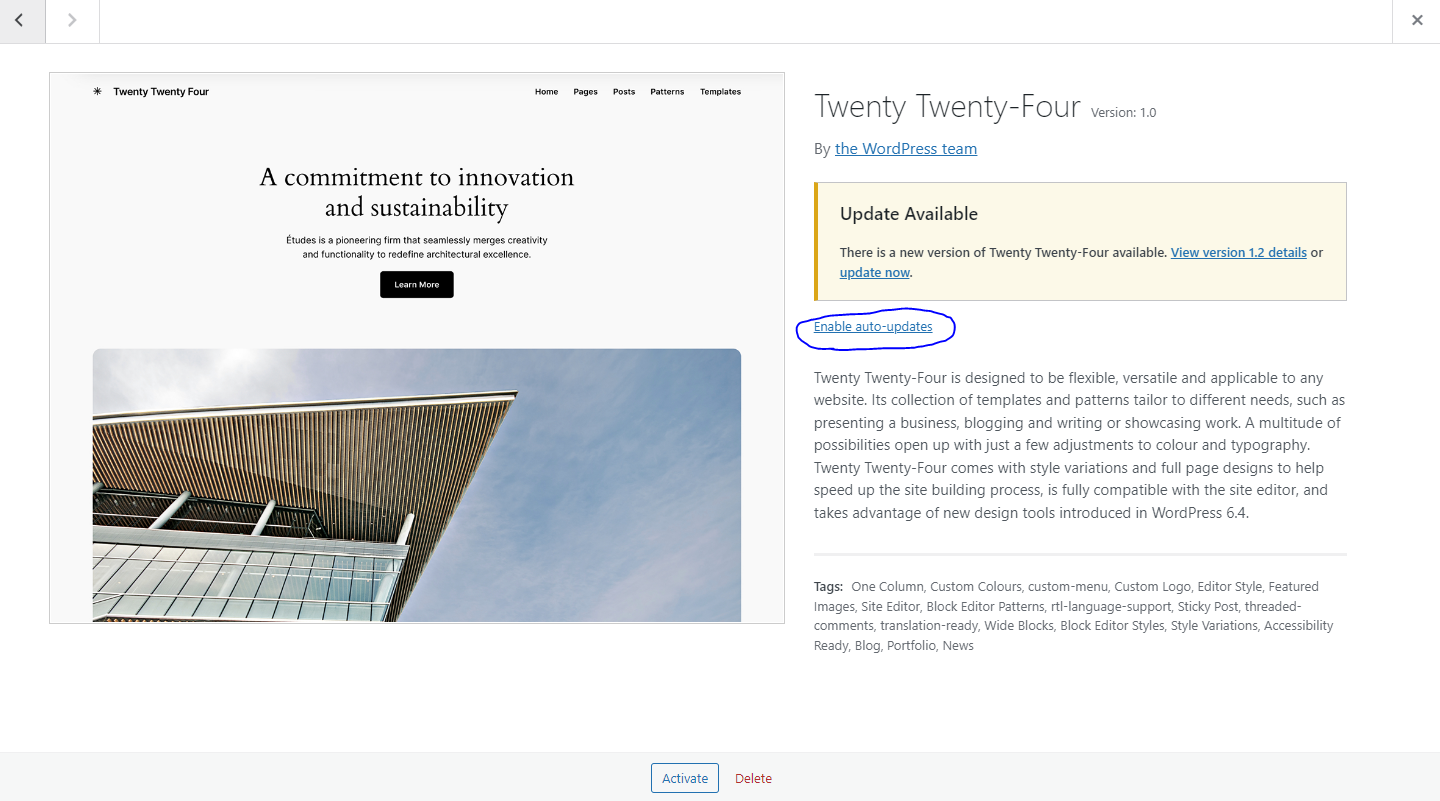
It is important to note that if the website is not using a Child theme this might cause the loss of some custom-made changes to the theme files.
Option 2: Manual Website Update
Typically when people download a website theme, they make customisations so that it suits their aesthetic and requirements. Due to this there are some more complex steps that you need to follow. Read on below to learn more.
For Themes With a Child Theme:
- Create a full backup of your files via a FTP (file transfer protocol) or in your hosting provider dashboard panel
- Login into your website backend
- Upload the theme
- Check if everything on the website is showing correctly
For Themes Without a Child Theme:
- Create a full backup of your files via a FTP (file transfer protocol) or in your hosting provider dashboard panel
- Login into your website backend
- Upload the theme
- Re-apply the custom changes you applied to the updated theme files
- Check if everything on the website is showing correctly

Boost Your Online Presence with Wildcat Digital
As part of our service, we regularly educate clients on best practices to ensure your online presence is improving. This can include expanding your knowledge on website updates. Contact us today to discuss how we can work together to boost your online presence and maintain your rankings.

Molly Sturgeon
Senior SEO Account Manager