
If you’ve ever tried searching for a local business or service, the chances are you’ve come across a Google map pack. These are the results page (SERP) features that show the top three businesses relevant to your query, alongside their location on a map. They’re an important part of local SEO, given that they dominate the SERP and most users don’t scroll past them – especially on mobile. So, how do you rank in Google’s map pack?
To improve your ranking in Google’s map pack, start by optimising your Google Business Profile with accurate info, photos and reviews. Use local keywords on your site, build citation and backlinks from trusted local sources, and implement local schema.
Of course, there’s a little more to it, but don’t worry. In this post, we’ll go through each strategy in detail, explain why it matters, and give you some actionable tips to help your business rise to the top of local search results. Ready to start showing up where it counts? Let’s dive in.
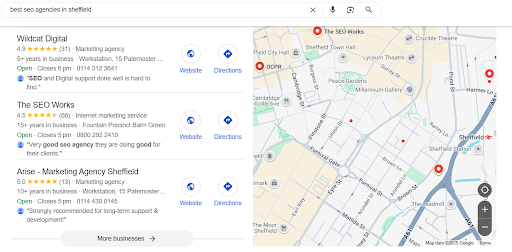
Claim and Optimise Your Google Business Profile
Before you can optimise your business profile, you’ll need to create one or claim an existing listing. If your company has any kind of online presence, there’s a strong chance that Google has already created a listing for you. If not, no problem – you can easily set one up yourself. Here’s how to do both of those:
Claiming a Profile
- Open Google and search for your business.
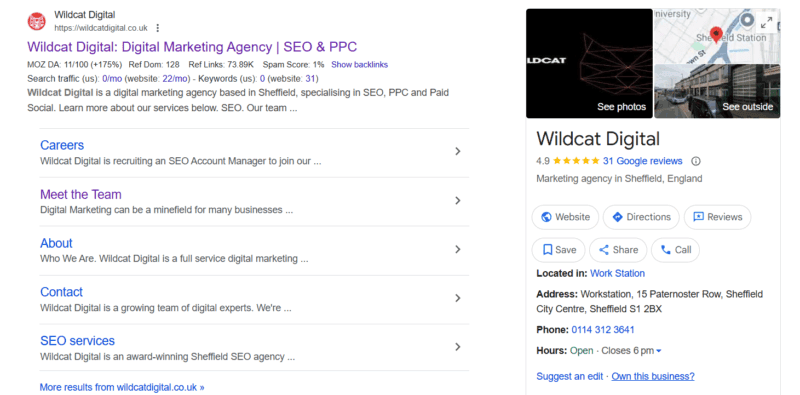
2. In the side panel, look for “Own this business?” and follow the link.
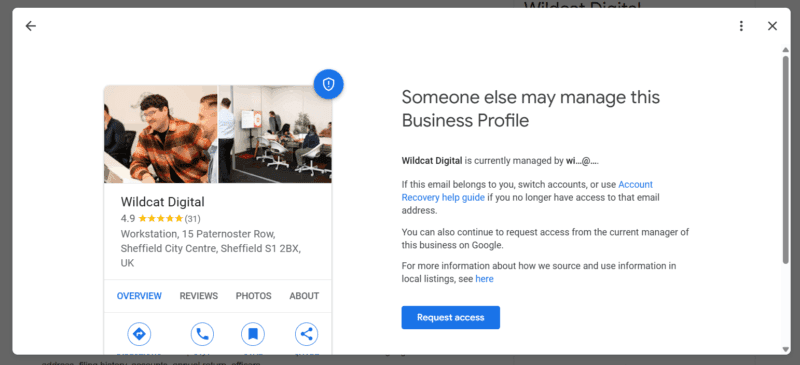
3. Clicking the link will trigger a pop-up, through which you can request access to the profile.
4. Select a verification method (e.g. postcard, call or email) and follow the verification steps.
5. Once verified, you can access and maintain your Google business profile.
Creating a Profile
- Head over to google.com/business and sign in with your Google account.
- Search for your business, and if it doesn’t exist, create a new one.
- Provide your business name, address, service area and contact information.
- Verification normally involves a postcard sent to your physical address.
- When you’re verified, you can add details like business hours, descriptions and photos to enhance your profile.
Add Your Business Details
Now that you have access to your profile, you’re able to optimise it. Generally, this means adding information about your business – more is better. That said, there are a few things to bear in mind while you’re working your way through this. Here’s what you’ll want to consider:
- Be consistent with your name and address – Google wants to showcase trustworthy businesses in its map pack, and a big indicator of trust is showcasing the same phone number and email listed across different platforms.
- Use a local phone number – For instance, if your business is based in Sheffield, you’ll want to use a 0114 landline number. Anything else could raise eyebrows (as far as Google is concerned).
- Keep your hours updated – You’ll notice that businesses in Google’s map pack have their opening hours on show. Updating them regularly tells Google that you’re active and trustworthy.
- Write a business description – The description on your profile should communicate clearly what your business does and in a tone that aligns with your brand. To help your site rank, you should also include relevant keywords here.
- Make sure your business is in the right category – In terms of ranking, this is another important factor. Make sure you choose a primary category that aligns with your business to show up for relevant searches.
- Add photos – Google showcases photos in its listings, which might be because they’re an important indicator of trust. Reading about a business is okay, but seeing what they do is even better.
Gather More (and Better) Reviews
If you’ve been paying attention, you’ll notice that we’ve mentioned trust a few times. That’s because it’s a core part of Google’s algorithm, which is designed to return the most authoritative sites for a particular query. And as far as indicators of trust go, they don’t get much stronger than customer reviews, so you’ll want to watch out for these.
This is an area of SEO that crosses over with marketing as it’s understood by most people. That is, you won’t get sparkling reviews on their own; you’ll have to be proactive in asking for them. A good place to start would be asking your regular or repeat customers to leave some kind words on your business profile.
But that’s not all. You’ll also want to respond to any negative reviews you receive. You can’t do much about changing or removing them, but a reply shows that you respond well to criticism and that you actively look to resolve complaints. It can seem daunting at first, but unless your service is truly dreadful, you won’t receive many negative reviews, so channel your energy into gaining positive ones.
Consistent Local Citations & Local Backlinks
By citations, we mean mentions of your business name on the web, along with other information – bonus points if these mentions are linked back to your site (for more on this, see our post: What Are Backlinks and Why Are They Important?). You can check how many you have already and where you’re receiving them from with a keyword research tool like Semrush.
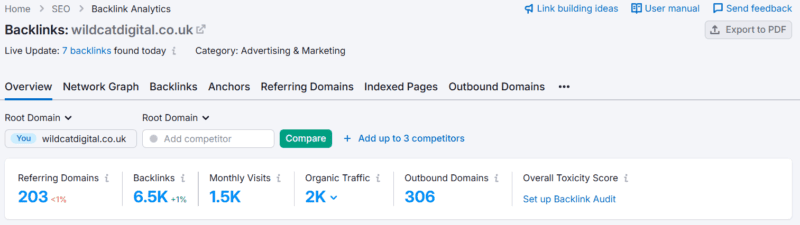
Citations are important because they help search engines like Google build a picture of your business, where it operates, and, as we keep coming back to, how trustworthy it is. When reviewing your backlinks and mentions, you’ll want to check for anything that looks suspicious and disavow the link if necessary.
Likewise, you can give your local online presence a boost by building links and citations from other local websites. You don’t have to be a PR expert to pull this off – some examples of readily available links and mentions include:
- Directories (e.g., Yellow Pages, Citysearch)
- Social media
- Online review websites (e.g., Yelp, Tripadvisor)
- Local blogs, forums and news outlets
While some backlinks are better than others (see our post: What Is the Difference between Follow and Nofollow Links?), there’s certainly no harm in getting a few extra mentions as far as local SEO goes.
Use Local Keywords on Your Website
Back to on-page SEO now. If you want to rank for a keyword, your website needs to have content that reflects its search intent. And as far as local SEO goes, that’s no different. The difference lies in including geographic qualifiers in the keywords you target. That’s the difference between “digital marketing agencies” and “digital marketing agencies in sheffield.” If you serve more than one area, then you might want to create location-specific pages for each of them.
Post Regularly on Your Google Business Profile
Lots of businesses claim and optimise their profile, only then to completely forget it exists. In our opinion, that’s a big mistake! Posting updates at least a couple of times a month, especially those relating to offers or events, signals to Google that you’re engaged and relevant. It’s also more likely to convert users and get clicks through to your site.
Embed Google Maps on Your Contact Page
Another quick win – at least as far as local search goes – is to embed a Google map on your website’s contact or location page. It acts as a strong local relevance signal, reinforcing your presence and helping you rank more prominently in geographically targeted searches. What’s more, it improves usability by confirming you’re close by and giving directions should users want to visit your location.
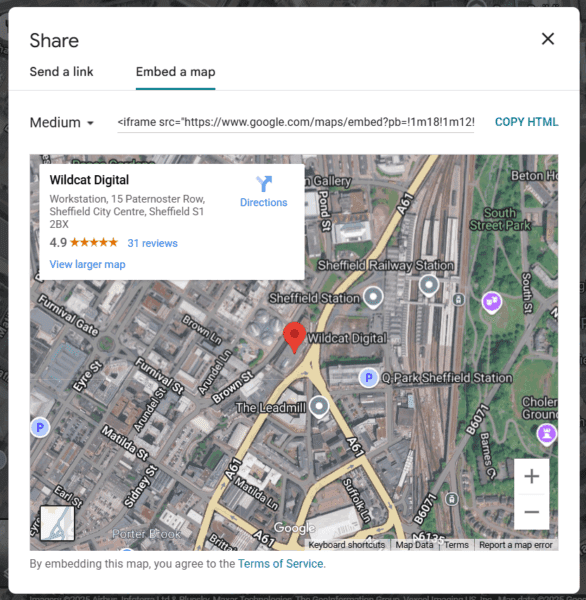
If you manage your website without a developer – as many local businesses do – you’ll be glad to know that embedding a map is actually pretty simple. Just follow these steps:
- Go to Google Maps and search for your business.
- Click the “Share” button in the left-hand panel.
- Select “Embed a map” and choose your preferred size.
- Copy the HTML embed code.
- Paste it into your website’s contact or location page using your site editor’s HTML or code block function.
It’s as easy as that!
Ranking in Map Packs: Small Steps, Big Local Impact
Ranking in Google’s Map Pack doesn’t require an enormous budget – just the right strategy and consistent effort. By claiming and optimising your Google Business Profile, gathering quality reviews and embedding local signals, you’re already half way there. These small steps make a big difference, and following up with regular updates gives you every chance of ranking where it counts.
Of course, if you’d like a hand with this, we’re here to support you. At Wildcat Digital, we help local businesses punch above their weight online by building search-friendly websites that rank. Whether you’re just starting with SEO or looking to improve your existing strategy, our team can give you the edge you need to stand out in a crowded market. Want to hear what we could do for you? Give us a call or check out our case studies to see how we’ve done it for others.

Paul Pennington
SEO Account Director