
A canonical tag tells search engines which page they should prioritise when crawling a website where there are duplicate or very similar web pages. They are located within your HTML and are extremely useful for Search Engine Optimisation (SEO) to fix cannibalisation issues, remedy duplicate pages, help your site’s overall ranking performance and ensure search engines receive consistent signals about which pages should be indexed.
So, when you encounter a website with multiple canonical tags, how do you audit canonical tags for SEO?
When looking at your canonical tags, there are 3 important factors that you need to consider. These are:
- Recording each page that has a canonical tag
- Ensuring that the tag is placed correctly and directs crawlers to the correct landing page
- Checking for any technical issues that are preventing the page from being crawled.
Naturally, we all want our websites to perform to the best of their ability. A website producing duplicate URLs for the same page is a common occurrence that will need to be addressed to ensure that your rankings aren’t penalised.
To help guide you through your canonical tag audits, we’ve written this short guide. Simply keep reading to learn more.
Jump To:
- How Do You Audit Canonical Tags?
- Key Canonical Checks to Complete During an Audit
- What Are the Different Types of Canonical Issues?
- Why Do I Need to Audit Canonical Tags?
How Do You Audit Canonical Tags?
If you have canonical tags implemented on your website, it’s important that you regularly audit them to ensure that they are running correctly.
Key Point: Improper use of the canonical tag, or failing canonical tags, can significantly damage your rankings and overall website performance.
For example, if your canonical tag directs crawl bots to a URL that has since been redirected, your tag will fail. Changes in your ever-growing website are normal, and a canonical audit is a simple way to ensure that everything is running as smoothly as possible.
Beginning a Canonical Tag Audit
The first step in conducting your canonical audit is to find the most practical way to check the status of your existing tags. If you have a short list of existing tags, then you may choose to do this manually.
For larger websites, using a software tool to run a site-wide audit is the best and most time-efficient method to ensure everything is running as it should.
Checking Your Tags Manually
To check your tags manually, you simply need to inspect the page. To do this, right-click on the page and select ‘View page source’. From here, you can use the search feature by pressing ‘Ctrl + F’ to search for ‘canonical’. Your tags (if present) will be highlighted for you to easily locate.

Once your tag is identified, you need to ensure that the tag uses the correct URL (preferably the original page source) and is located in the correct section of your HTML, which should be in the <head>.
If everything looks good in your HTML, you then need to check the actual page and the content within it. This includes ensuring that your links aren’t broken and running the URL through Google Search Console to ensure that there are no technical issues that are preventing the page from being crawled.
Using Software to Conduct a Site Audit
Alternatively, if you have a large website, or want to explore if any other URLs on your website are facing duplication problems, then using software to inspect your site may be the best way to audit your tags.
Here, you can run your website through software such as Screaming Frog, Moz or SiteBulb to identify any issues. Typically, these types of software will be able to detect and report if a page requires a tag added to fix any technical issues, or if an existing tag is broken.
This is a preferred method of audit to ensure that no pages on your website are missed.
Read more on identifying technical issues with your website by reading our blog: Technical SEO & Site Health: How to Build a Search-Friendly Website
Key Canonical Checks to Complete During an Audit
To complete a comprehensive canonical audit, it is crucial to determine that every page on your website declares a valid, self-referencing or correctly targeted canonical tag that matches your internal linking and sitemap structures.
Below are some of the most important aspects of a canonical audit.
Page-Level Canonical Accuracy
To ensure page-level canonical accuracy, confirm that:
- Standard, unique pages use self-referencing tags that point to themselves as the canonical URL.
- All ‘rel=canonical’ links use absolute paths instead of relative paths.
- Each page contains only one canonical tag to prevent search engines from ignoring conflicting declarations.
- Canonical tags point to live, indexable pages rather than pages returning 4xx or 5xx errors, or redirects.
Canonical Consistency with Internal Linking
It is also important to audit your website’s internal links for the following:
- Ensure internal links point directly to the canonical URL rather than a variant.
- Avoid redirect chains where internal links lead to URLs that immediately 301 or 302 redirect to the canonical version, as this wastes crawl budget and dilutes link equity.
- Confirm that parameter-based URLs link cleanly or use canonicals to pass link equity to the main category page.
Canonical Consistency with Indexation Signals
- You must also check that every URL listed in your XML sitemap matches the canonical version declared on the page itself.
- To identify any unintended mismatches, you must also check Google Search Console to compare the URLs that Google selects against user-declared canonicals.
Conflicting Technical Signals
Finally, to ensure no conflicting technical signals are damaging your website’s performance, you must check:
- There are no instances of both canonical and noindex tags on the same page.
- URLs designated as canonical targets are not blocked from crawling via your robots.txt file.
- Multilingual or regional annotations point to valid canonical URLs for each specific language version rather than alternate or redirected paths.
What are the Different Types of Canonical Labels?
When you are conducting your site audits, there are a variety of different canonical tag labels that you need to be aware of. We’ve listed all the essential information below:
Non-Indexed – Requires Fix
Non-indexed canonical warnings imply that the page the tag is directed to is non-indexable. This is a technical issue that will need to be resolved.
Multiple – Requires Fix
This is a warning that indicates that multiple pages are tagged to be directed to in the canonical. This will need to be amended to just one targeted URL.
Missing – Requires Fix
A ‘missing’ label means that this page requires a canonical tag to be set.
Self-Referencing
This page has a canonical tag set, and the URL specified within the tag is the same page that has been crawled. Google recommends that we always add a self-referencing canonical to a page when there is no canonical set.
Canonicalised
If a page is flagged as ‘canonicalised’, then a tag is present that is instructing crawl bots to index a different page that is not the current URL.
Contains
This identifies that the page has a canonical set.
Why Do I Need to Audit Canonical Tags?
If you do not audit your canonical tags, then you run the risk of technical failures penalising your ranking ability. This could be through pages being unable to index correctly, crawl bots being unable to correctly navigate your website, or duplicate content causing cannibalisation issues on essential landing pages.
This is an essential technical skill that those within SEO should learn more about to fix what are extremely common issues.
Learn more about the importance of completing a canonical tag audit by reading our blog: How Do Canonical Tags Affect SEO?
Wildcat Insight: Canonical Audit Findings
Below is a section of a canonical audit completed by a member of the Wildcat Digital team, identifying an issue with indexable placeholder URLs without a canonical:
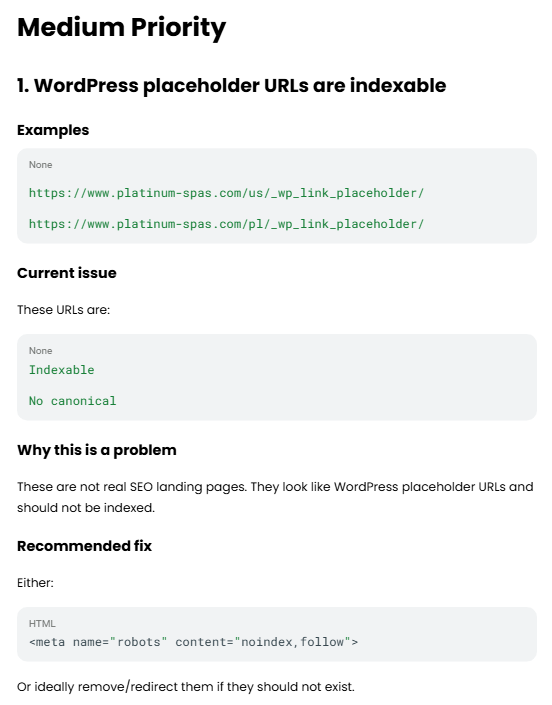
These placeholder URLs cause an issue for SEO as it wastes crawl budget, splits link equity, and can trigger duplicate content penalties.
The fix implemented by the team was to remove and redirect any placeholder from the Google index using the robots.txt file, helping to ensure that Google receives consistent signals about which pages should be indexed and ranking.
In Summary:
- Canonical tags for pages on your website can either be recorded manually or using a crawler to run a site-wide audit.
- You must then verify that tags are used correctly, conducting several essential checks to confirm that the correct URL is identified by crawlers.
- Pages must also be audited to identify any technical issues with canonical tags that may be preventing the correct page from being indexed.
Get Help with Your Canonical Tags From the Experts at Wildcat Digital
If you’re having trouble with your canonical tags, let the expert team at Wildcat Digital help. We are an experienced team of SEO experts who are ready to help any website achieve its best potential. Simply explore our website to learn more, or get in touch with us today to receive your free consultation.