
With small tweaks and sizable updates alike regularly made to the search algorithm by Google, it can be hard to know which SEO practices are current and will help your site perform well in organic results. Occasionally, your focus will need to shift away from particular elements, even if they’ve played a large part in your marketing strategy for years.
FAQs are just one example of the staples of what we know as good SEO content, but do they and the associated structured data still make a difference to organic performance?
Frequently Asked Questions (FAQs) do still matter for SEO in the current landscape, as they help to:
- Improve user experience
- Target long-tail, conversational keywords
- Increase internal linking
By providing benefits for both users and search engines, FAQs can help to increase organic traffic and move your site up in the rankings.
Structured data, or schema, associated with FAQs used to be a quick SEO win, but is no longer the driver of rich results on the results page. It remains a helpful tool for content interpretation, but doesn’t lead to additional search features for your site.
In this blog, we’ll take a deeper dive into the current search landscape, how FAQs and their schema fit in, and the best steps to take for your site.

What Are FAQs?
The term ‘FAQ’ stands for ‘Frequently Asked Question’. This is a list of common questions and their clear answers that try to cover most of the information a user would want to know about a product, service, or topic.
FAQs are a great place to put any additional information that might not fit naturally into your content, but that either you feel is important for a customer, or that you often get contacted about.
FAQs are now commonplace across many websites, but you might also find them in product manuals, emails, or even on social media.
Why Are FAQs Helpful?
FAQs are helpful to have on your website for a couple of reasons, even before considering their SEO benefits.
Better User Journeys: Clear information helps to keep users on your page and guides them to converting.ctured data markup helps Google read and understand your content, increasing your chances of ranking well.
Fewer Calls: Customers find answers on their own, instead of needing to get in touch with you.
Staff Focus: Your staff can spend less time answering questions that could have easily been answered online, and get to help sort the more complicated issues.
Instant Help: Users can get the information they need right away, so they can make a decision on booking or buying without the wait.
Removing Doubts: Quick details about delivery or refunds, for example, can help push users to convert quicker.
How Do I Find FAQ Ideas?
Anticipating what questions your customers might want to know the answer to isn’t as complicated as you might think. Here are a few of the methods the Wildcat team uses to make sure we’re balancing both SEO value and improvements to the user experience.
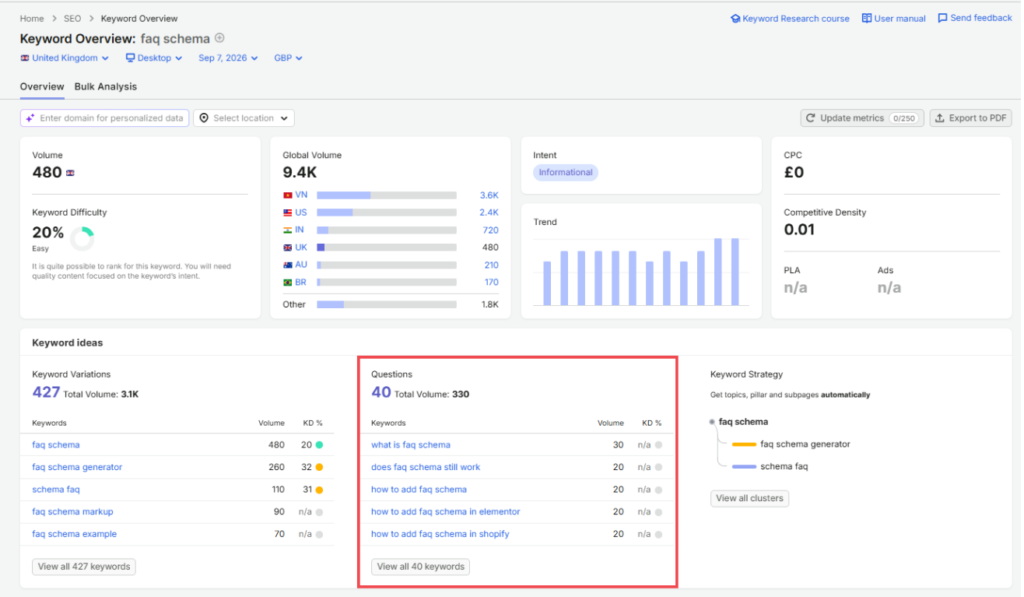
Semrush
Type your page’s target keyword into Semrush – whether it’s a blog, product page, or a service page. Scroll down, and you’ll find a set of related questions. Choose some of the most relevant ones to your business to add to your content.
Remember – the search volume of each question represents the potential traffic you could bring to your site, so be sure to balance relevance and volume when picking your FAQs.
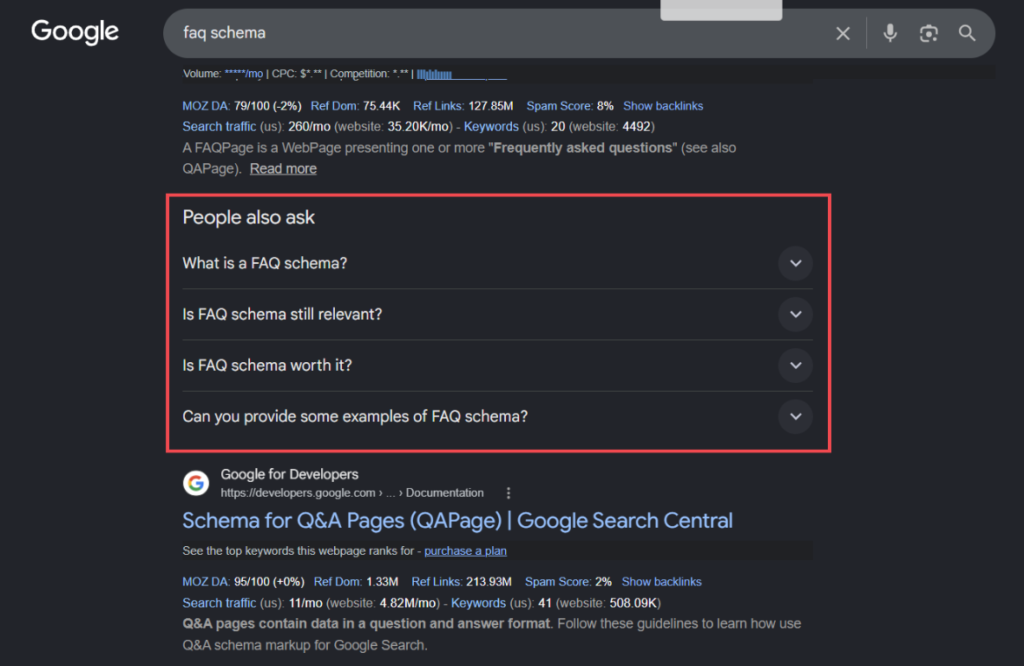
People Also Ask
If you’re struggling to find relevant queries in Semrush, try the ‘People Also Ask’ sections of Google’s results pages. Type your keyword into the search bar, and scroll down to look for additional queries in dropdown boxes. Pick some of the most relevant ones, and you can start building your bank of FAQs.
Your Customers
Using real-life data from your customers is a great way to understand what your ideal audience might be searching for.
You don’t even have to ask them directly! Send a message to your marketing, customer service, or sales team to find out some of the common questions or pain points potential customers come to them with.
Not only are you capturing any potential customers that may be searching for answers, but this content could also serve as a resource for your internal teams and a place for them to signpost customers to find out more at their own pace.
Existing Pages
The pages of your website can also help you to come up with some additional ideas for FAQs. Take a look at the main body of the content on the page you’re creating FAQs for – are there any sections that could be summarised easily in a question and answer format?
For example, a service page about local SEO would likely benefit from an FAQ like “What is local SEO?”
Alternatively, take a look at your blogs. Use headings from blogs about the FAQ page’s topic, and simplify them into questions. This also provides a great place to link out to your blog posts.
Intuition
This method of building FAQs has become more popular for us as SEO has moved into the AI era. Customers are now searching in a much more conversational style, rather than only inputting the most relevant keywords.
For example, instead of searching “improvements for SEO ranking drops”, users are now much more likely to search “How do I improve my SEO rankings after a big drop?”
Think about how a customer might ask a question on a call or at an in-person meeting, or what questions you might have if you were looking for this service or product. You can often gain valuable FAQs by putting yourself in their shoes, or thinking back to your previous interactions.
How Long Should An FAQ Be?
There isn’t a set length for an FAQ answer, but it’s important to keep in mind its function. Users are looking for a quick answer to their question, often a yes or no if possible, so the answer should be as long as it needs to be without added waffle.
This is especially the case in the AI search landscape, where FAQs can be used to inform an answer to a user’s query. Users aren’t looking for a background on the whole topic, just clarity on their question, with the option to click through to a more in-depth explanation if needed.
Try to keep it to around two or three sentences, and direct users to a page that offers a more in-depth explanation, like a blog, or to contact your team if it’s a more technical topic that you find is easier to understand in a conversation.
What If I Don’t Have An Answer?
An important thing to remember: don’t rule out an FAQ simply because you can’t give a definitive answer. If there’s traffic potential, find a way to provide useful guidance — even if you’ll need more information from the customer to give a fully tailored response.
Think of these FAQs as opportunities to get your business in front of potential customers, demonstrate your expertise and USPs, and give them a reason to remember you. Even if they’re not ready to become a customer today, a helpful answer can put your business on their radar and keep you in the running when the opportunity arises.
FAQ Examples
Bad Example
Q: Are FAQs Still Relevant?
A: Yes.
Good Example
Q: Are FAQs Still Relevant?
A: Yes! FAQs are still relevant for SEO for a number of reasons:
- More keyword targeting opportunities
- More query coverage
- Additional internal linking
- Improved user experience
Read our blog to find out more about why you should still be using FAQs in your content: Do FAQs And FAQ Schema Still Matter For SEO?
Why?
The good example above provides enough information to answer the user’s original query and add some context, whilst linking to a different page that goes into more detail. It also bolds the part of the answer that directly answers the question, so it’s easy for users to scan and find their answer.
The bolded section and clear, concise answer offer the perfect combination for AI engines or LLMs to find your question and answer, and offer it to users, with a link to the source page – especially when supported by FAQ schema.
The bad example might leave a user wanting to know a little bit more and assuming that your site doesn’t have that information, so they’re likely to go back to their search engine and look for that on a different website.
What Is FAQ Schema?
FAQ schema is a form of structured data that helps computers, programs, or algorithms to sort, search, and analyse the information you present in your content. It labels each question and its accepted answer in a machine-readable format.
It’s important to distinguish FAQ schema from FAQ rich results. FAQ schema is the code you add to your website to describe your FAQ content to search engines. FAQ rich results are the expandable questions and answers that Google used to display directly in its search results.
Previously, adding FAQ schema to your pages would help any site get its questions and answers directly onto the results page – in the form of an FAQ snippet. However, that doesn’t mean FAQ schema and rich results are the same thing — schema is the underlying structured data, while the rich result is a search feature that Google no longer displays.
Want to find out more about schema and how your website could benefit? Check out our blog: “What Is Schema In SEO?”
Is FAQ Schema Still Relevant?
Yes – but not for the reason it once was.
Google reduced the FAQ rich results visibility for everyday sites in 2023, mostly restricting it to major government and health-related websites. This changed once again in May 2026, when support for FAQ rich results was removed entirely.
The absence of expandable question and answer boxes on the results page doesn’t mean you should no longer be using FAQ schema, though. Structured data helps translate your website’s content into something easily understood by machines, making it equally as useful in the AI search era.
Search engines and AI platforms alike still use your structured data to understand page context, relationships between entities within your business, and direct question-and-answer pairs that can be pulled through into AI-generated answers.
Read: Is Structured Data A Google Ranking Factor?
How Do I Add FAQ Schema To My Site?
Adding any kind of schema to your website can look intimidating at first thanks to its code-like format, but it’s often fairly straightforward. There are multiple different ways to add FAQ schema to your website, but you’ll first need to generate and validate it.
How Do I Create FAQ Schema?
There is a range of different guidance for creating FAQ schema online, but here are a couple of our favourite methods to keep it simple.
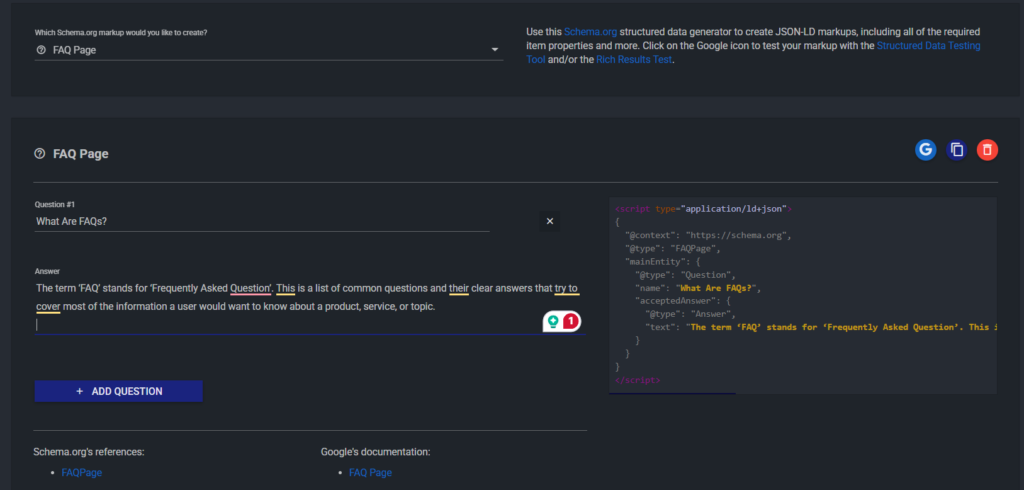
Schema Markup Generator
Schema Markup Generator is a super simple way of generating your FAQ schema. Copy and paste the questions and answers you’ve written into the generator, and the right code will be generated for you.
AI
Another option for generating your FAQ schema is using AI. Input a prompt similar to the one below with your questions and answers, and you will receive FAQ schema code similar to the one created by Schema Markup Generator.
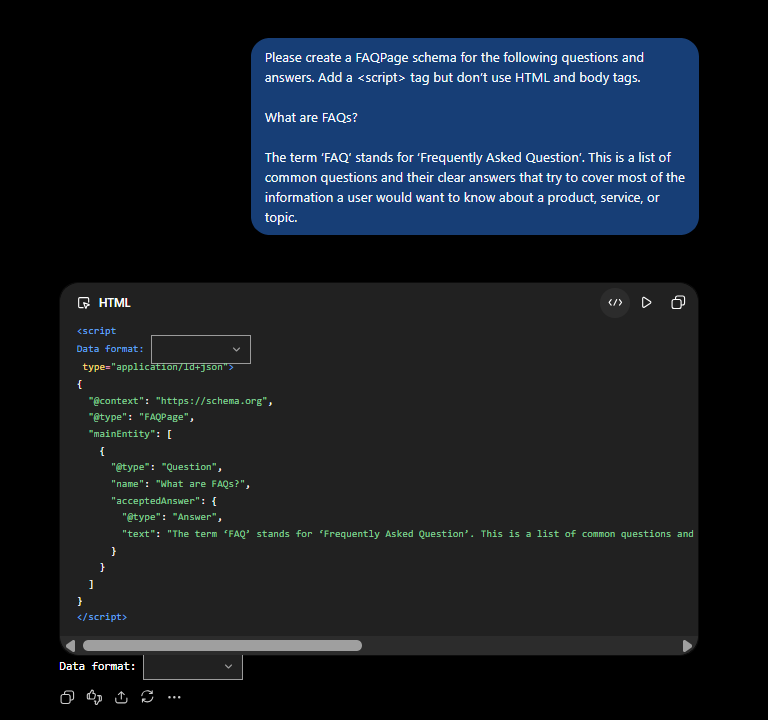
How Do I Validate My FAQ Schema?
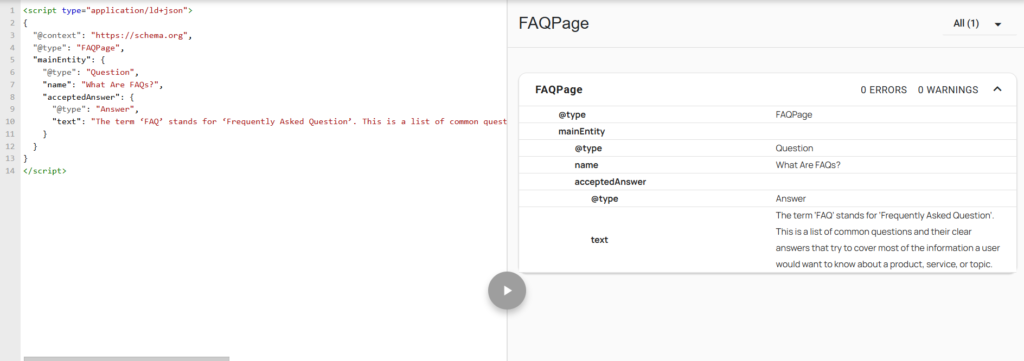
However you choose to create your FAQ schema code, it’s good practice to validate it before implementing it on your site. The schema.org validator works by taking a copy of the code and identifying any errors or warnings that might cause issues when you implement the schema.
If any issues are identified, try inputting the code back into an AI search engine like ChatGPT and asking it to fix any errors.

How Do I Implement Schema?
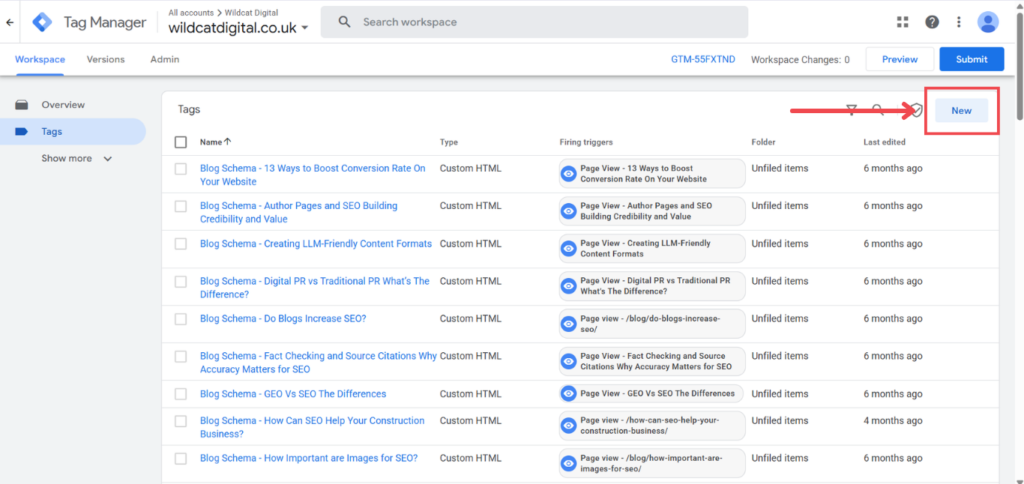
Once your schema code has been validated and no issues are present, it’s time to implement it! One of the easiest methods, and one we often use here at Wildact, is adding it to your site through Google Tag Manager.
If you want to find out about other methods of implementing schema, and some common mistakes, check out our blog: How To Add Schema To Your Website
Our Step-By-Step Guide To Adding FAQ Schema Using GTM
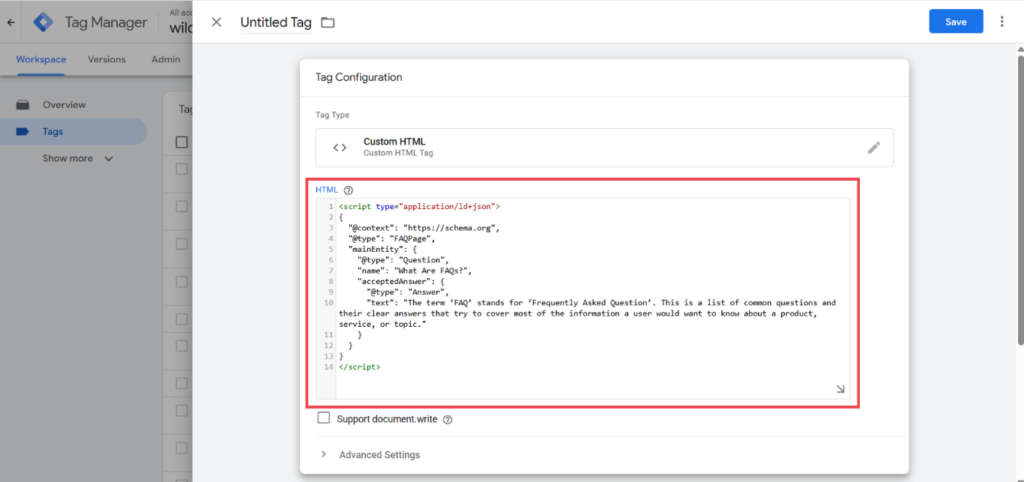
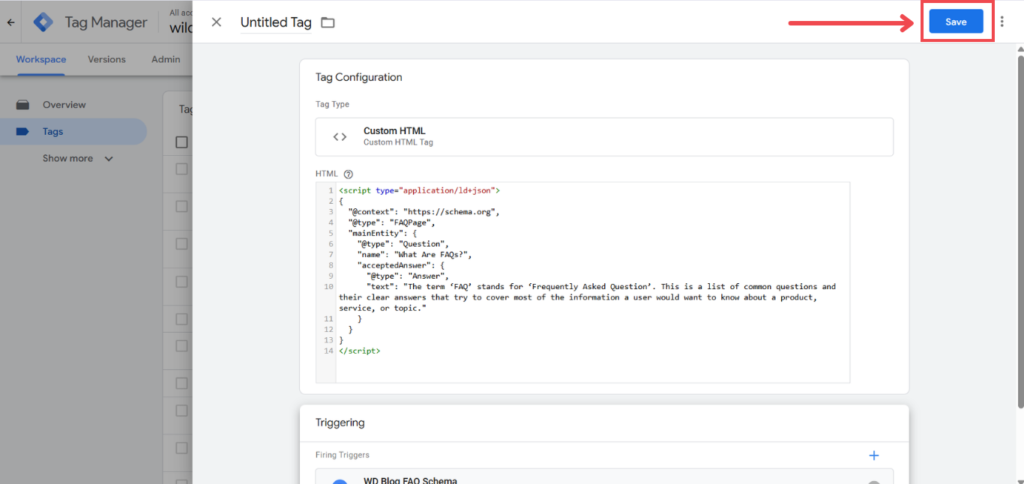
- Create a new tag in Google Tag Manager.
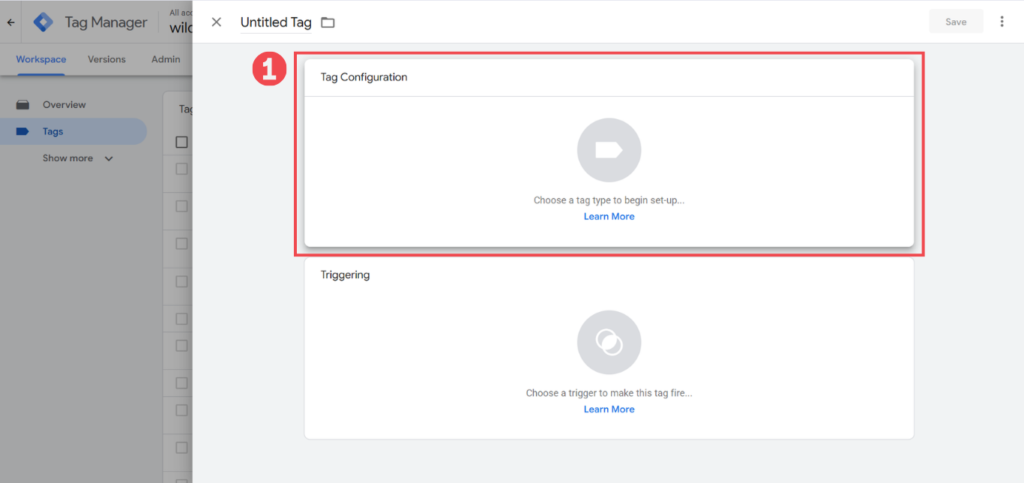
2. Select Custom HTML as the tag type.
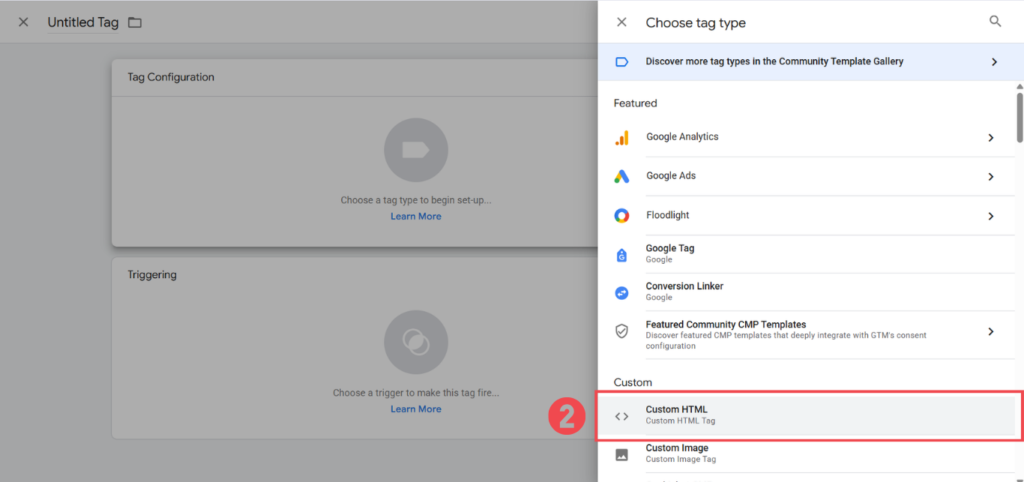
3. Copy your validated FAQ schema code into the empty box.
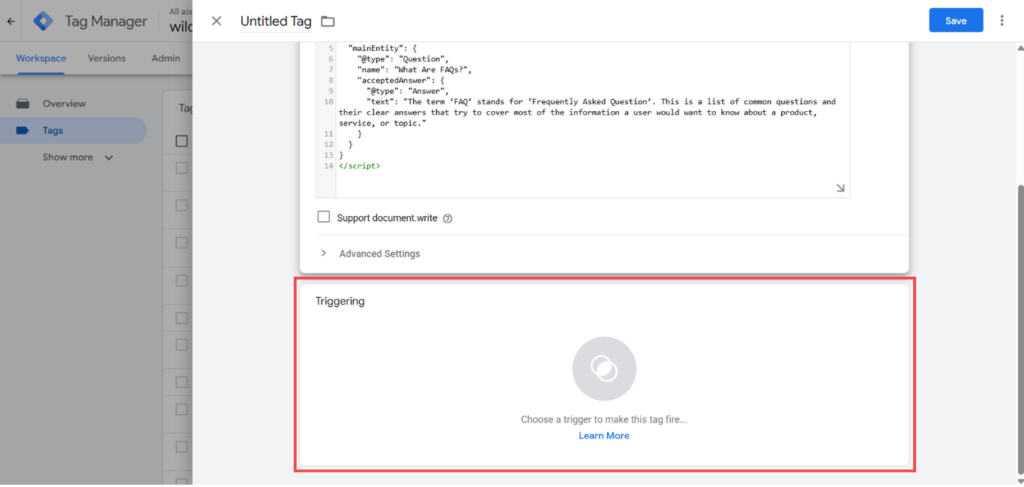
4. Create a new trigger.
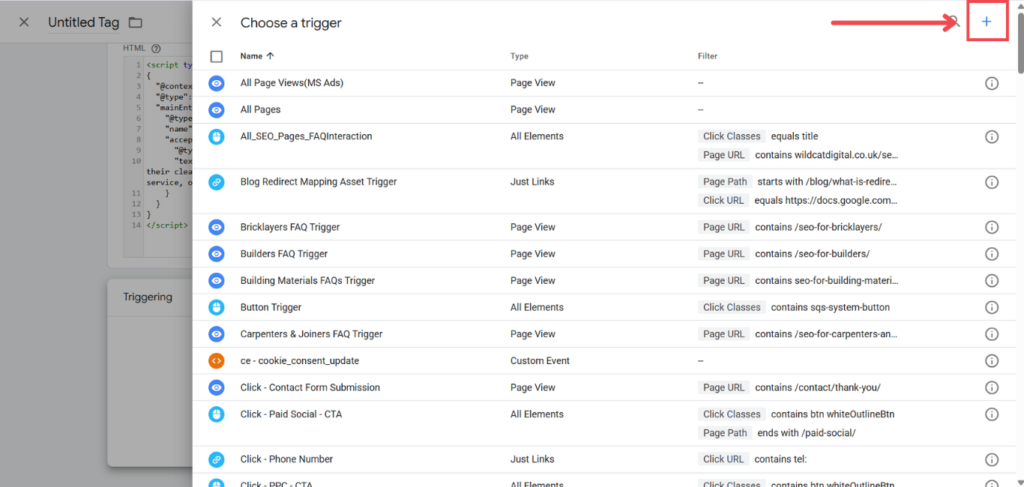
5. Select Page View as the trigger type.
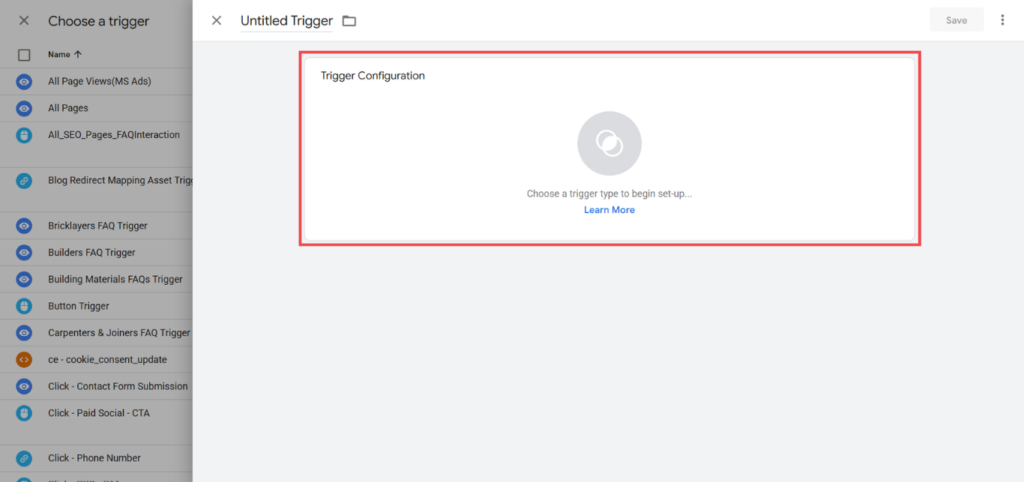
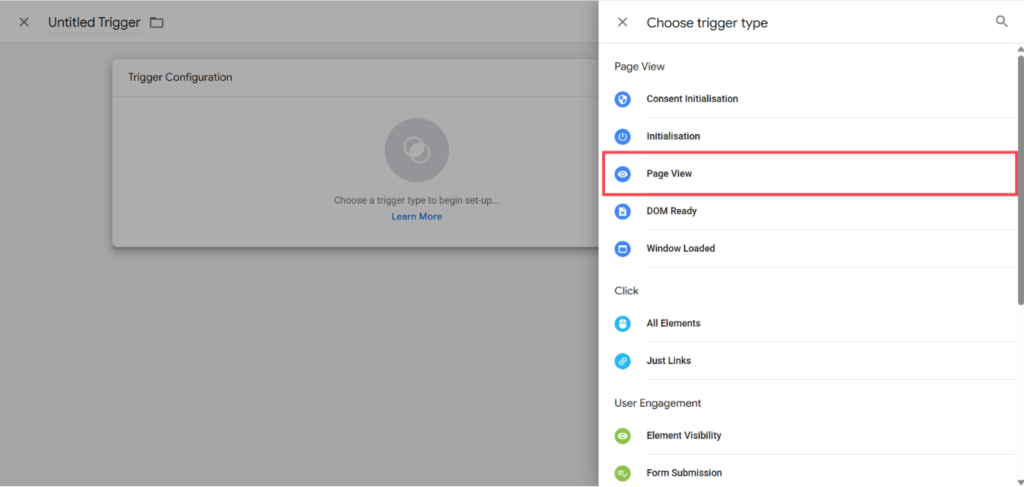
6. Select the option to trigger on Some Pages.
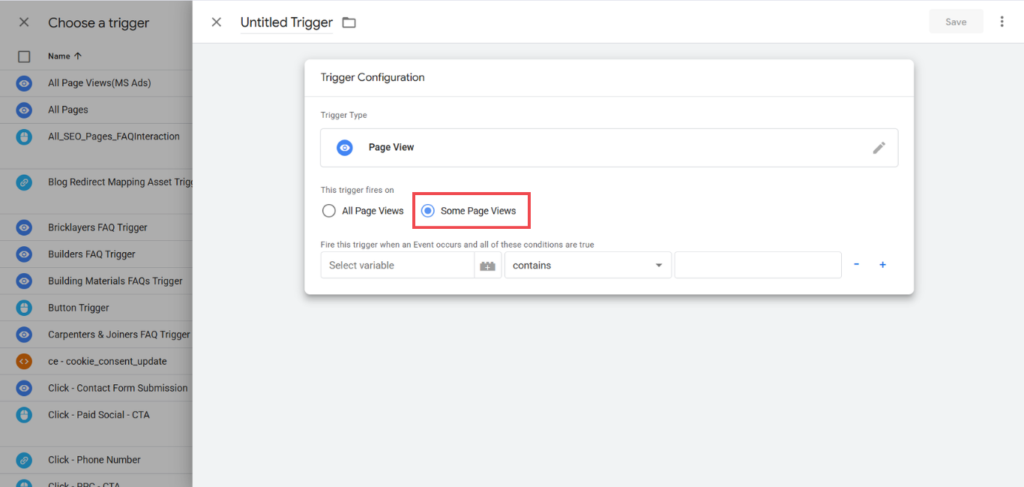
7. Set the conditions for the trigger.
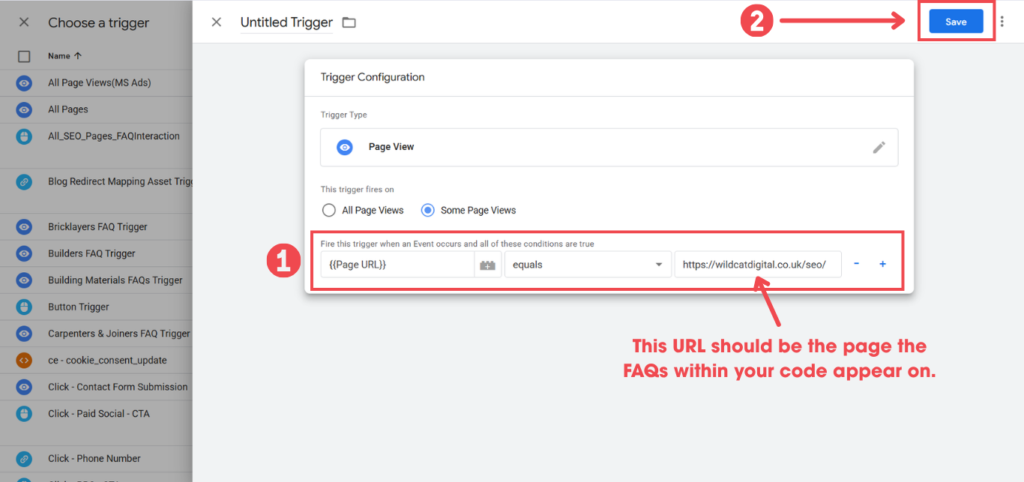
8. Save the tag.
Our Top Tips:
- Be sure to name both the trigger and the tag itself clearly, allowing you to identify the page and type of schema right from the main pages.
- Make sure everything is working properly both now and in the future with our helpful guide: How To Test And Monitor Structured Data
Quick Recap: Should I Still Be Adding FAQs And FAQ Schema To My Site?
Yes! FAQs are a really quick way to answer the queries of your potential customers, whilst providing additional opportunities to target keywords and link to other pages on your site. They also give you a place to target the more conversational questions that are popular in AI search, especially on more commercially-focused pages where they may not fit into the main content naturally.
If you’re going to take the time to write FAQs for your pages, you should also create FAQ schema too! Even though FAQ rich results have been deprecated, structured data still helps both traditional and AI search engines understand your content and the link between different areas of your business.
The key takeaway: Add FAQs because they’re useful content for your users. Add FAQ schema to help machines understand that content. Don’t add it expecting a Google FAQ rich result.
Help Your Website Perform From Every Angle With Wildcat Digital
FAQs and related schema are just one way to improve both your site’s SEO performance and user experience. Implementing them doesn’t have to be complicated, but it might be hard to find the time to manage this alongside every other element of search performance internally.
That’s where we come in! At Wildcat Digital, our team includes experts across every area of SEO and PPC. We keep on top of the changing landscape, adapting your campaign to suit your business goals and budget, no matter what Google’s guidelines introduce.
Get in touch with us today to hear how we can help your business, or check out our pricing calculator!

Amy Varley
SEO Executive