June 5, 2026

What is Schema in SEO?

Written by
Lucy Young

Schema markup is how you let the search engines know exactly what is on your site. Think of it as Google’s language. Using structured data (code), systems like AI and search engines can read, understand, and index your site’s content better. 

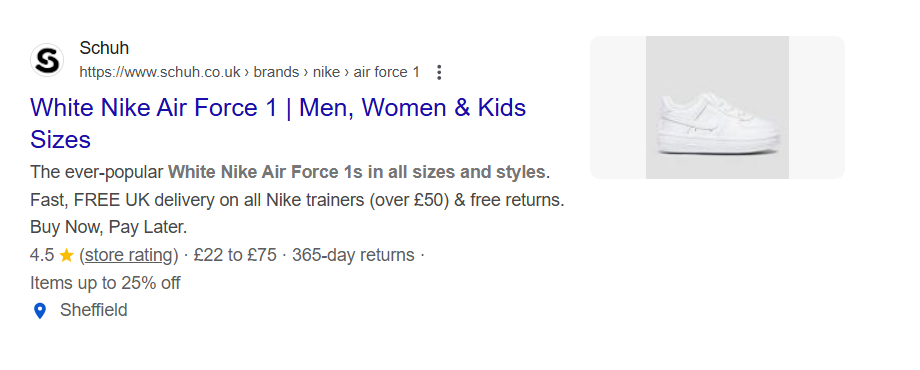
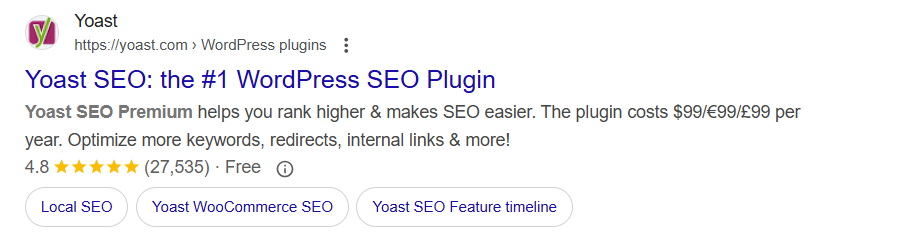
Using schema markup on your pages also makes the content eligible to show in enhanced search results known as rich snippets. These are something referred to as rich results and include things such as star ratings, price tags, and product stock count.
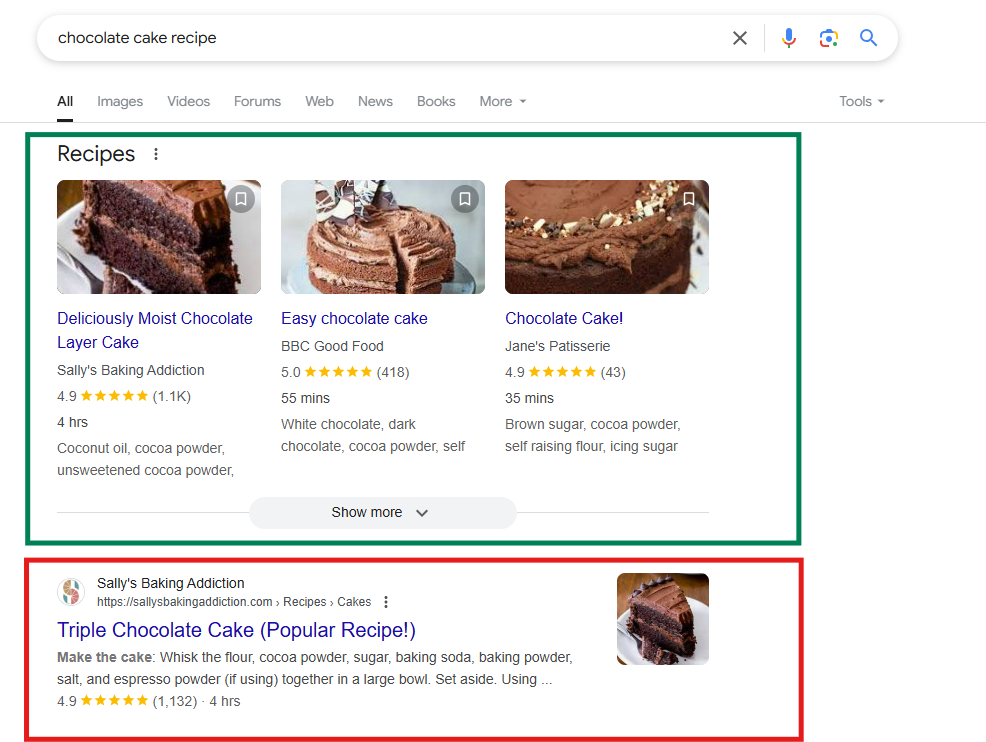
 

In the example above, Google has displayed an image, author, star rating, review count, cooking time and recipe ingredients in a dedicated Recipes section. For the above search results, this Recipes section appears before the rest of the search results, allowing you to gain a competitive edge over your competitors.

Here’s a quick introduction to schema markup and why it’s so important to SEO:

  • Schema markup (or structured data) is code you can add to your website to help search engines understand the context and meaning of your content. 
  • This allows your pages to appear as rich snippets in the search engine results, which are more engaging for users and can increase your CTR and traffic. 
  • To create structured data, you can either do it yourself or use an online tool or CMS plugin. 
  • To implement schema, you can do it manually by adding the structured data to your website’s code, using a plugin or using Google Tag Manager. 
  • There are many different types of schema, with some of the most commonly used ones being organisation, breadcrumb, FAQ and product schema. 

Why Do We Need Schema Markup?

Although search engines are very powerful tools, they don’t have the same visual and linguistic understanding of content as humans. This means they require additional information to read, identify and categorise content. Although a human might look at a list of ingredients and quantities and intuitively understand that they’re looking at a recipe, search engines lack this intuitive understanding.
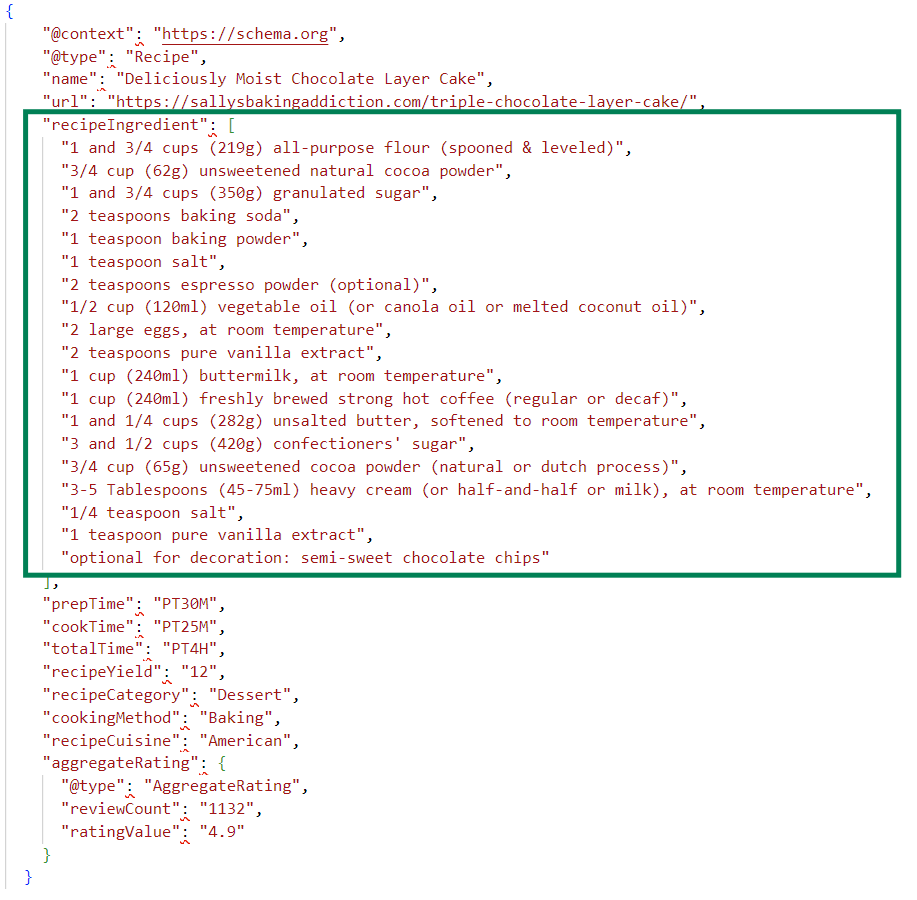
Adding recipe schema and including recipe ingredients (pictured above) helps search engines understand that a particular webpage is a recipe and should be shown for relevant recipe searches. Without schema, search engines would find it much more difficult to understand the meaning of content. 

Schemas can be applied to pages through encodings, such as RDFa, Microdata, and JSON-LD. Google supports all three languages; however, JSON-LD is preferred as it is the easiest to understand. 

What is Schema.org?

Schema.org is an independent, community-driven project that helps people add structured data to their web pages. It provides a collection of schemas that are used to apply structured data markup to different types of content, such as recipe schema, product schema and organisation schema. Since 2011, Schema.org has collaborated with search engines, such as Google, Yahoo, Bing and Yandex, to create, maintain and promote schemas. 

What Does Schema Markup Do?

It’s important to understand that although schema can help boost the content on your site by helping Google and other search engines to understand the context, it is not a ranking shortcut. 

Adding the correct schema markup to your content, e.g., FAQ schema to FAQs, product markup schema to your product pages, etc., can increase the chances of the content showing in rich results and help search engines and AI algorithms understand your content. 

Take a look at our article, “Is Structured Data a Google Ranking Factor?” for a more in-depth discussion.

The Main Types Of Schema In SEO

There are currently hundreds of schema type available, according to Schema.org, but most websites only need a small number of them. Here’s an overview of the most common types of schema:

  • Local Business Schema
  • Organisation Schema
  • Recipe Schema
  • Product Schema
  • Breadcrumb Schema
  • Blog Schema
  • Review Schema
  • Person Schema
  • Video Schema
  • FAQ Schema

We’ll go into some of these in a bit more detail below. 

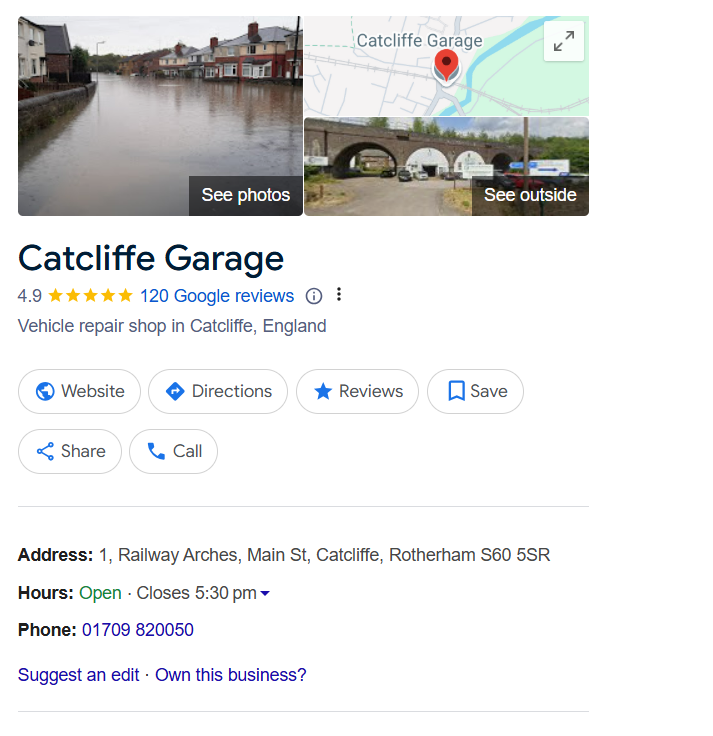
What is Local Business Schema?

Local Business Schema is a structured data markup that provides search engines with additional information about a local business. This includes:

  • Name 
  • Type of business 
  • Phone number
  • Address 
  • Opening hours 
  • geoCoordinates
  • Reviews 
  • Additional information, such as menus or reservations for restaurants

As a general rule, you should implement Local Business schema on your homepage. If you have more than one location, we have some advice about the best practice for implementing Local Business schema in our blog, ‘Should You Add Local Business Schema on Every Page?’.
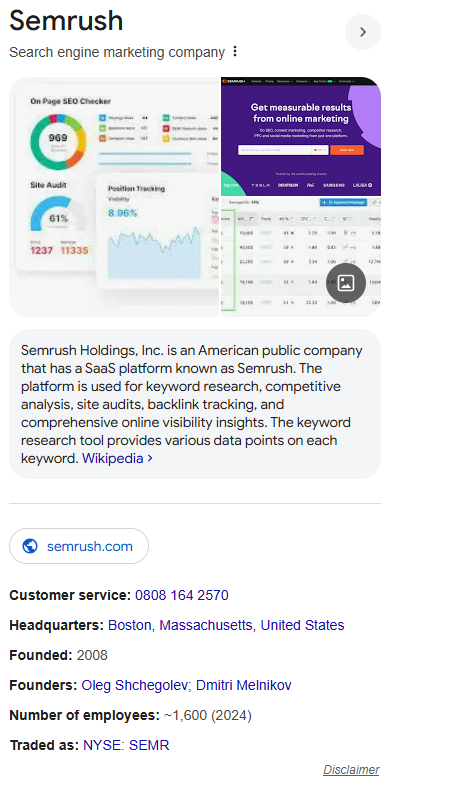
What is Organisation Schema?

Organisation Schema is fairly similar to Local Business Schema, but it can be used for any type of organisation, company or business. It provides search engines with detailed information, including:

  • Name 
  • Organisation type
  • Logo 
  • Website 
  • Phone number
  • Address 
  • Founder 
  • Founding date 
  • Number of employees
  • Headquarters 
  • Social media links

Organisation schema is typically implemented on the home page or About Us page. 
What is Product Schema?

Product Schema is a type of structured data markup that provides detailed information about a product being sold on a website. Implementing product schema helps search engines better understand products and display them in rich snippets in search results. Here is some information that can be included in product schema:

  • Product name
  • Price
  • Type 
  • Image
  • Brand
  • Shipping
  • Description 
  • Stock Keeping Unit (SKU)
  • Offers
  • Reviews

Specific product schema should be added to individual product pages, but aggregated product information can also be added to category pages using Item List structured data.

What is Breadcrumb Schema?

Breadcrumb Schema is structured data that helps search engines understand the hierarchy and navigation of a website. It does this by defining the path that a user must follow to get to a specific page. Breadcrumb schema allows Google to display breadcrumb navigation in search results. In the example below, this looks like www.bbc.com > news > world. 

The key elements that need to be implemented are::

  • BreadcrumbList
    • itemListElement
  • ListItem
    • Item
    • Name
    • Position

Breadcrumb schema should be added to any page where you have breadcrumb navigation visible to the user (in the header or at the top of the page). Each page will need its own breadcrumb schema to reflect its position in the website hierarchy. 

What is Review Schema?

Review Schema is used to mark up reviews on a website to help search engines understand ratings and reviews of products and services. When implemented correctly, it can help rich snippets appear in search results. Review schema should be added to all pages with reviews. Here’s what is typically included in review schema:

  • Product/service being reviewed
  • Review rating 
  • Number of reviews 
  • Reviewer
  • Review text
  • Date published 

What is FAQ Schema?

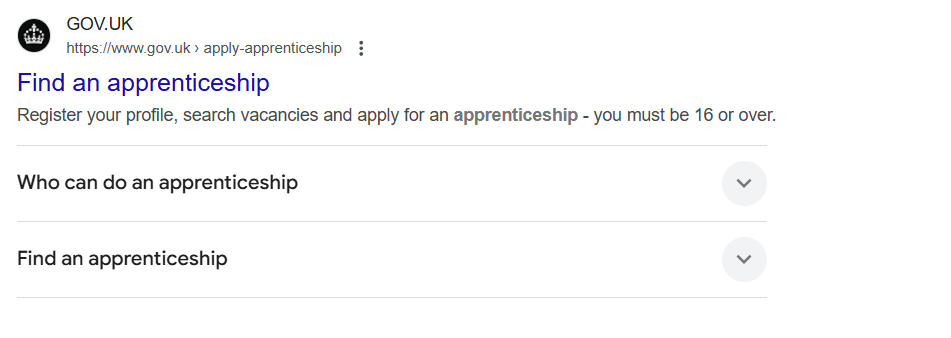
FAQ Schema helps search engines understand frequently asked questions and display them as rich snippets (since 2023, these have often been displayed by Google from authoritative government and health websites). This schema should be added on dedicated FAQ pages and all other pages with FAQs, such as service pages, product pages, category pages and blogs. 
If you’re looking for information on adding schema to your site, take a look at our instructions in our article, “How To Add Schema To Your Website”.

Entity SEO and How Schema Helps Machines Interpret Content

Entity SEO is how you help search engines understand why people, locations, products/services, and topics are mentioned on your website. The “entity” in question is a thing that search engines can recognise – like your business name or the author of a blog.

Using entity SEO throughout the content on your site is important because search engines and AI tools like LLMs don’t read websites in the same way a human does. For example, a human can narrow down the meaning of a page by reading it naturally, but a search engine needs more clues. This is where schema markup can help.

By using structured data for entity SEO and AI search, you are giving search engines structured information about your content – think of it as speaking in their “language”. This will clearly label key details such as your business name, address, services, and products, which, in turn, allows the machines to interpret your content correctly and connect it to the right topics and searches. 

The easier your content is to understand, the higher the chance that search engines and AI tools will categorise and display it correctly, so it shows up in the right places when people are searching for what you offer. However, this does not guarantee higher rankings; it simply supports stronger content clarity and can help your pages to become eligible for rich search results.

How To Check Whether Schema is Working Correctly

Once you’ve added schema to your website, it’s important to check that it has been implemented correctly. Even small errors in the code can stop search engines from reading your structured data properly, meaning your page may not be eligible for rich results.

One of the easiest ways to test your schema is by using Google’s Rich Results Test. You can either enter the live URL of the page or paste your structured data code directly into the tool. This will show whether Google can detect your schema to show it in the rich results, as well as indicating any errors it may have spotted and ways to fix them.

You can also use the Schema Markup Validator from Schema.org. This is useful for checking whether your structured data is valid from a wider Schema.org point of view, rather than only looking at the rich results Google supports. If there are errors or warnings, the tool will highlight the areas that need fixing. Usually these errors have occurred during the implementation stage, likely meaning that the schema was not implemented correctly.

If your website is already connected to Google Search Console, you could also check the Enhancements section. This shows structured data issues across your site, including pages with valid markup, pages with warnings and pages with errors.

Implement Schema With Help From Wildcat Digital

At Wildcat Digital, our team of technical SEO experts can create and implement a range of structured data to increase the likelihood that your pages appear as rich results and help you get ahead of your competitors. We will use schema, alongside other aspects of technical SEO and an effective content strategy, to help improve your keyword rankings, traffic and ultimately conversions. 

Get in touch with a member of our friendly team to learn more or visit our Technical SEO page for more information.


Post by

Lucy Young

Will Hitchmough

Founder

Our founder, Will Hitchmough, worked at a number of high profile Sheffield Digital Agencies before founding Wildcat Digital in 2018. He brings an extensive knowledge of all things related to SEO, PPC and Paid Social, as well as an expert knowledge of digital strategy.

Digital Marketing can be a minefield for many businesses, with many agencies ready to take your money without knowing how to deliver results. I founded Wildcat Digital to deliver digital success to businesses with smaller budgets in a transparent way.

Rich Ayre

Head of Growth

Rich joined us in May 2024 to head up our growth team. With years of experience helping other agencies to grow, Rich joins us at an exciting time as Wildcat is working on a five-year plan to become one of the biggest agencies in the UK.

Outside of work, Rich is a father to three children, which keeps him very busy! He’s also recently started running again to keep fit and loves a bit of DIY.

Sarah Tyree

Head of Digital

Sarah joined Wildcat in January 2025, bringing over seven years of SEO expertise to the team. With a background in Fashion Communication and Promotion, she has worked both in-house and at agencies, covering a range of digital marketing specialisms before focusing on SEO.

Passionate about all things search, Sarah thrives on helping brands grow their online presence.

Outside of work, she enjoys walking her dog, running, and shopping for vintage clothing.


Amelia Ashman

Office Manager

Amelia joined Wildcat Digital in January 2025, bringing extensive experience in HR, Health & Safety, Facilities Management and IT Support. Previously an Operations Manager at The University of Sheffield, she has a strong background in creating efficient and well-organized work environments.

Specialising in HR, Health & Safety, and Facilities Management, Amelia ensures the Wildcat Digital team has the resources and support needed to thrive. Whether managing office operations, maintaining compliance, or fostering a positive workplace culture, she keeps everything running smoothly.

Outside of work, Amelia loves trying new things, traveling, camping, and walking. She also enjoys socialising and exploring new places with friends and family. Her adventurous spirit and proactive approach make her a valued member of the team.

Siena Russell

Client Success Coordinator

Siena joined us in 2023 with a background in sales and digital marketing. She leads on client relationships across the company, ensuring that our customers are happy throughout their journey with us, from their initial consultation through to onboarding and beyond. 

Outside of work, Siena enjoys travelling and getting stuck into the local culture. She likes to make the most of her experiences and particularly enjoys watching sunrises and sunsets from beautiful locations around the world.

Paul Pennington

SEO Account Director

Paul has a strong background in SEO, having previously founded and ran a successful eCommerce business, as well as running a personal blog that achieves an average of 17K users per month. Paul’s knowledge of SEO is extensive, with a strong emphasis on client handling and technical SEO.

Outside of work, Paul enjoys spending time with his family and staying active with weight lifting and combat sports.

Dariusz Baczyk

Team Lead & Technical SEO Account Manager

With a degree in Computer Science and SEO experience dating back to 2017, Dariusz has a wide range of SEO skills and knowledge. His specialist knowledge of Technical SEO has firmly landed him the title of Wildcat’s Technical Wizard, and he has recently taken on the responsibility of Team Leader for the Panthers Team.

In his spare time, Dariusz loves hiking, experimenting and trying new coffees and loves learning new things. He is currently learning more about CRO and AI and how this could benefit our clients.

Molly Sturgeon

Team Lead & Senior SEO Account Manager

With a background in sales, Molly is a natural Account Manager, brilliantly handling any issues that come her way. Having joined us as a Digital Marketing Executive, and working part-time through her final year of University, Molly is a shining example of how hard work pays off. She is now an SEO Account Manager with a particular interest in Content and Client Management. 

In her spare time, Molly loves to get out in nature, hiking and exploring the Peak District. She also loves cooking and likes to unwind with a bit of yoga.

Libby Oldale

PPC Team Leader

Libby joined Wildcat in 2021 as our first PPC hire. With a degree in Digital Media Production, a Master’s in Digital Media Management and previous experience in Social Media Management, Libby hit the ground running and has since climbed the ranks to Senior PPC Account Manager and has a particular interest in the eCommerce sector.

Outside of work, Libby likes gaming, and cooking and likes to keep active by lifting weights.

Jamie Stowe

Senior SEO Account Manager

With a degree in Film and TV production, and a varied career history, Jamie made the move to marketing with a Masters degree in Digital Media Management. He has since worked in SEO at Agencies across Sheffield, before joining Wildcat and working his way up to SEO Account Manager. Jamie has a particular interest in backlinks and Digital PR and has recently gained a client a valuable backlink from Forbes!

In his spare time, Jamie is an avid foodie and loves trying new restaurants and cuisines. He also loves to travel and spent a year travelling to Australia after university.

Jasmine Savery

SEO Account Manager

Jasmine joined Wildcat in 2022 with a strong background in SEO and Account Management. At the time, she was finishing up a Level 4 Apprenticeship in Digital Marketing from the Chartered Institute of Marketing, and has since worked her way up to SEO Account Manager. Jasmine excels at content writing and promotion, and particularly enjoys finding creative ways to join the dots on multi-channel campaigns.

In her spare time, Jasmine volunteers at a charity, helping combat loneliness & social isolation experienced by older neighbours. Outside of Wildcat, she owns a catering company, Savery Grazing, creating delicious grazing tables & platters for a range of events. She also loves skiing and exploring the Peak District.

Jon Herdman

Senior SEO Executive

After spending ten years managing businesses, restaurants, cafes and event spaces across Sheffield, Jon decided to change careers and joined Wildcat as an SEO Executive in 2022. He especially enjoys the client management side of the job, helping them to understand digital marketing and ways in which they can build their business’s presence online. 

Outside of work, Jon likes to keep fit with running, badminton and football, and also loves music. 

Andy Blanchard

Senior SEO Executive

Andy joined Wildcat in 2023 after starting his digital marketing career in-house for a local Sheffield company. Since joining, he has developed a strong interest in Technical SEO and has strong skills in Account Management. 

Outside of work, Andy loves music and plays in a couple of bands. He also enjoys rock climbing, cycling, photography and good food.

Tom Brookes

PPC Executive

Before joining Wildcat, Tom worked across different industries, building skills in sales and customer service. He later developed a passion for digital marketing whilst working on personal marketing projects and freelance ventures, and gained numerous certifications in PPC and Social Media. 

Outside of work, Tom enjoys staying active by going to the gym and hiking. He also loves travelling and motorbiking.

Kezia Humphries

Senior SEO Executive

Kezia joined us in July 2024 after completing a CIM Certificate in Digital Marketing and gaining experience in Content SEO at another Sheffield agency.

In her spare time, Kezia loves to get outdoors, bouldering, hiking and travelling.

Alex Hickling

Senior PPC Executive

Alex joined Wildcat Digital in December 2024 as a Senior PPC Executive, bringing a strong background in Paid Media, Paid Social, and Programmatic advertising. With a degree in Business & Marketing and Google Ads certifications, she has the expertise to craft high-performing campaigns that drive results.

Before joining Wildcat Digital, Alex worked at two leading agencies in Leeds, honing her skills across various digital advertising platforms. Her analytical mindset and strategic approach help businesses maximize their online presence and advertising budgets.

Outside of work, Alex enjoys spending time with her dog, Lola, and going on walks with her dog walking group. She’s also a keen footballer and loves playing five-a-side whenever she gets the chance. Her enthusiasm and team spirit make him a great addition to the Wildcat Digital team.

Amy Varley

SEO Executive

Amy joined Wildcat in 2024 with a background in journalism, having worked as a News Editor and Editor-in-Chief at The Sheffield Tab. She is naturally interested in Content SEO and research, so will no doubt prove to be a content power-house.

In her spare time, Amy loves watching crime shows, listening to music and hanging out with her dog, Eddie!

Reiss Mason

SEO Executive

Reiss joined the Wildcat Digital team in July 2025, with a background in journalism and digital content, Reiss brings both creativity and technical know-how to the team.

After graduating with a Journalism Studies BA from the University of Sheffield, where he also served as Games Editor and Deputy Editor for the student-run newspaper – Reiss jumped straight into the world of climate tech communications.

Outside of work, Reiss loves crochet, swimming, playing guitar, and diving into both video and board games. He’s always up for picking up new skills and trying new things – which makes him a perfect fit for our team!

Lucy Young

Senior SEO Executive

Lucy joined the WildcatDigital Team in August 2025, with solid SEO experience and a creative edge from her work in wedding videography, a combination that brings both strategic insight and storytelling flair to the team.
When she’s not deep in keyword research or editing stunning wedding footage, you’ll probably find Lucy exploring new places on long walks or unwinding with a few books.

Bekky Croson

Office Assistant

Bekky joined the WildcatDigital Team in October 2025, with over a decade of customer-facing experience – including running her own vegan café.

Bekky brings a wealth of energy and expertise to the team. When she’s not keeping things running smoothly in the office, you’ll find her cooking up a storm for friends or playing hockey with the Sheffield Women’s squad.

Bianca Croitoru

PPC Account Manager

Bianca joined the WildcatDigital Team in October 2025, having worked with charities from £100k to £7M, blue-collar lead gen businesses, and clothing e-commerce brands – building multi-channel marketing strategies that flow seamlessly, Bianca will be a real asset to the team.

When she’s away from the office, Bianca loves diving into holistic health experiments… and indulging her inner conspiracy theorist (or truth seeker, depending on who you ask).

Fiorela Imerai

SEO Account Director

Fiorela joined the WildcatDigital Team in October 2025, she joins us with a strong background in SEO and Digital PR, helping UK and global brands grow their online presence and strengthen their reputation.

Outside of work, you’ll usually find her cooking, exploring new places, or “just browsing” flights… that she’ll probably end up booking!

Eviee Taylor

SEO Senior Executive

Eviee joined the WildcatDigital Team in January 2026 and has a background in marketing and SEO for the education and theatre industries, with a keen passion for writing and accessibility.

She is also a keen crafter, theatre-goer and certified cat lady!

Liv Hardwick

Content & Proposal Writer

Liv joined the WildcatDigital Team in June 2025, with a strong background in financial admin and client care, Olivia is taking an exciting step into the creative world – and we’re so glad she’s doing it with us!

She’s currently studying content creation through her apprenticeship with Wildcat, and already bringing fresh energy and creativity to the team.

Outside of work, Olivia runs her own BIAB nail business, loves reformer Pilates, long walks, and is a member of a competitive dance team.

More blogs.

View all

Building Topical Authority: Content Depth vs Content Breadth in SEO

June 11, 2026

As the modern landscape of search engines continues to evolve, so too does the content we see online. Whereas for…

Andy Blanchard

Content

How Do I Track my Keyword Positions on Google?

June 10, 2026

Once you've identified the keywords you want your website to rank for, the next step is understanding how those keywords…

Olivia Hardwick

Knowledge Hub
Technical SEO

How to Manage Google Reviews for Local SEO

June 9, 2026

Google Reviews are a core pillar of local SEO strategies because they provide one of the clearest indicators of trustworthiness…

Reiss Mason

Knowledge Hub
Technical SEO