
When creating the website for your business, no doubt SEO and user experience (UX) are both key considerations during the design and development process. These two disciplines are often competing with each other regarding which brings more benefit to a website, and each approach has its own merits. But what impact (if any) does user experience have on SEO? Why is UX design so important in SEO?
Implementing a User Experience (UX) strategy that prioritises website users and page experience can significantly improve website rankings. This is because search engines like Google take into consideration a large number of ranking factors, some of which can be improved with effective UX design.
Keep reading to find out more about how UX can be implemented into an SEO strategy, including the potential advantages of effective UX design.

What Is the Difference Between User Experience (UX) and SEO?
In simple terms, UX aims to make a customer’s experience as positive as possible, while SEO aims to rank a website higher to draw in more users from a search engine results page. So SEO might help someone to land on your service page, but UX ensures they can quickly understand what you offer and how to get in touch once they arrive.
UX is therefore centred around making sure those users who visit the website are able to easily interact with the on-page content. UX is a broad term that can encompass the entirety of a company’s website, products, services and staff. A website with a successful UX design will keep users on a website for longer, increase conversions and provide an enjoyable journey for customers. However, as Google regularly updates its core algorithm, the similarities between SEO and UX only increase.
User Experience and Its Impact on SEO
Reviewing a website’s UX can have an impact on page experience and subsequently SEO. The main goal of both UX and SEO, therefore, becomes common to both disciplines: create websites that efficiently cater to user needs. If your website is visually pleasing, easy to navigate, and customers can quickly spot what they are looking for, they are more likely to stick around. The key aspects of UX that influence SEO are:
- Navigation and structure: A user-friendly layout with clear sections and easy-to-find information can increase time spent on the website, therefore increasing user engagement.
- Mobile friendliness: In 2019, Google started indexing ‘mobile-first’, meaning your website will be crawled by Google as though it is a mobile user. Your website needs to be mobile responsive and functional on all devices. Think of adding things such as touch-sensitive buttons.
- Page speed: A fast-loading website will stop users from bouncing straight back off. If you have a poorly designed site with images that slow down your speed, this can impact your retention rate.
- Content readability: If the content is of high-quality, it needs to be easy to read, too. Ensure headings are visible and background colours don’t clash with the text colour. If people can’t read it, they won’t stick around.
When search engines like Google see people interacting with your site and sticking around, this signals to them that you are providing a useful service to your users, and they will treat your website more favourably.
Common UX Issues on SEO Pages
When a website is built with SEO in mind and little UX considerations, there are a few common issues that arise, which can have a negative knock-on effect for the site.
Unclear Headlines
Although your content may be keyword-rich and industry-relevant, if your site lacks a clear hierarchical structure, it can make it difficult to navigate for both users and search engines. If a heading doesn’t clearly explain what the page is about, users may not scroll further to find the information they need.
Ensure that content is easy to follow with a strong structure by using clear headings that stand out from the rest of the text. For example, the image below is taken from the Wildcat Digital website, showing a clear subheading that clearly stands out from the rest of the content and also explains what the section below it will consist of.

Poor Site Structure
Just like poor headings affect the hierarchical structure of a website, a weak overall structure, such as overly complex menus that take over the screen, content that isn’t easy to find, or a layout that is not simple to navigate, can harm user retention and experience. This is because users may not stick around long enough to find what they’re looking for if it’s difficult to locate.
A site layout needs to flow and be super easy to follow. A user shouldn’t need to jump around the page to get the information they need. This is the same for being able to find the content they’re looking for with ease. If the content is not clearly labelled in a menu, or even accessible through a menu at all, customers may go elsewhere. That’s why it’s important to keep an eye on your menu and navigation bars, too. Keep them simple, or if you do need a lot of pages, keep them organised in clearly labelled drop-down menus with relevant name tags.
Below is an example of a drop-down menu with clear navigational headings.

Poor Internal Linking/Broken Links
Websites with strong internal linking are great for UX and SEO, allowing search engines to crawl and understand the website easily, as well as adding value to the information the user is reading. However, not all pages on your website will be relevant to the content you have uploaded. For example, you don’t want to write a piece of high-quality content about training a puppy and have a link leading them off the page to a piece about cat food; the two are not relevant.
Every link you place in your content needs to add value to the topic you are discussing. Double-check all your links to make sure they are relevant to the content and that they are working. A broken link, especially one that does not redirect the user to the correct page, may result in them going elsewhere for the information they need.
Missing CTAs
Users like to have everything at their fingertips. If they like your service or your products, they want to be able to quickly find a way to enquire/purchase/contact you. If your website lacks easy-to-spot call-to-action buttons (CTAs), you may miss out on a vital conversion, as users may leave the site instead.
Ensure all your CTAs are clear in terms of design (the colour doesn’t blend into the background of the site), but also what the CTA says. For example, if your button leads to the contact page, it could say something like “get in contact with us’. This makes it super clear where the button leads to.
If you want to learn more about conversion rate optimisation (CRO), take a look at our dedicated article: “Why CRO Is Important in SEO”.
Accessibility
Websites now need to conform to the accessibility standards, meaning that every user should be able to access and use the site equally. They need to be able to recognise and use your site using the senses available to them. For example, someone with impaired sight will greatly benefit from contrasting colours and the ability to make the screen larger without the website structure breaking. Things like alt text and video captions also provide alternative ways for people to view the visual content on your site.
Some key UX considerations that will help to make your website more accessible are:
- Users with visual impairments who rely on colour contrast
- Structuring content for screen readers
- Using a logical website structure
- Use of descriptive elements such as alt text
- Ensuring your website is easy to navigate using keyboard shortcuts
This helps ensure all users can access your content regardless of how they browse your website.
Common UX Issues Checklist
Use the checklist to see if your pages might have UX issues.
Website UX Checklist
What An Improved UX Looks Like
Nowadays, when building or improving websites, UX is taken into consideration alongside SEO. This is to ensure the site is not only search engine optimised, but also user-friendly, making it simple for them to use, nice to look at, and easy to find the information they are looking for.
Below is an example of a very old version of the site, eBay.
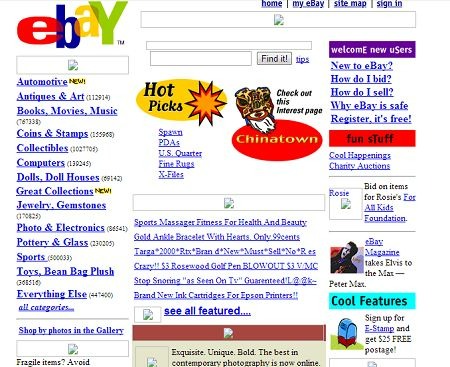
Not only does it look very different from how it does today, but you can see where improvements were made for UX. For example, in the image above, the layout is clustered and hard to follow, with hardly any site hierarchy. Some of the colours used behind the text make it difficult to read the content, and although the clickable links are obvious, they are clustered and placed together in a way that may be overwhelming.
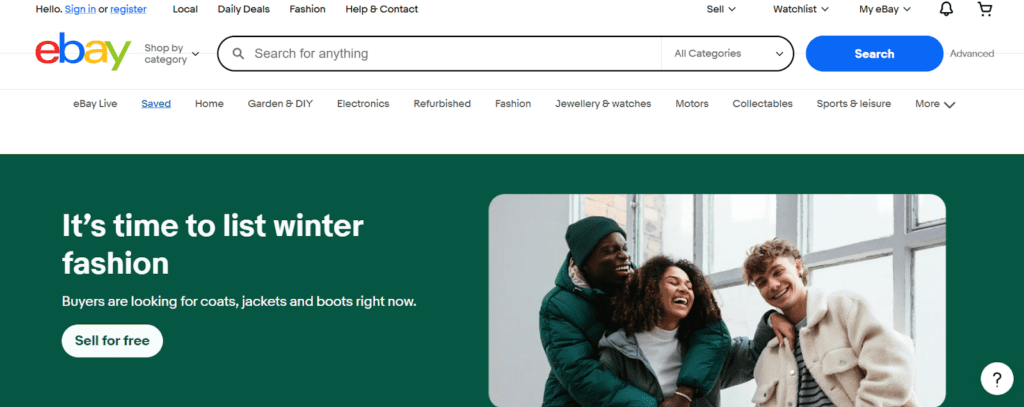
The site they have today is more visual, with clear pictures, as well as an easy-to-follow site structure and navigation bar that is simple to understand. There are many CTA buttons across the site, too, making it convenient for the user when scrolling through. Improvements like these help users navigate the site and find what they need with ease.
Where To Start When Improving UX For SEO
If you’re reviewing your website to see the improvements you could make, consider starting with:
- Key services pages: Make sure these pages are simple to follow, that there are ample CTA’s throughout that are easy to spot, that all information on your services is on the page and easy to read, and that everyone can access the pages. Services pages are your main money-makers, so you need them to be appealing but also easy to use so that customers stick around and perform the next steps to convert into a sale/enquiry.
- Mobile layout and load speed: Most users search via a mobile device. Ensure your website works across mobile just as well as it does on desktop, and that the load speed is fast. If your website is hard to use on mobile or takes forever to load, users will likely leave your site for another.
- Navigation and internal linking: Make sure it’s easy to navigate your whole site, with a strong site structure that makes sense. Internal linking should be obvious and easy to spot, too. If people struggle to find the information they need, they won’t stick around.
- Contact or enquiry paths: If you want enquiries or customers to contact you, you need to make it easy for them. Place CTA’s throughout your site that are obvious to spot and don’t take a lot of scrolling to reach. If a user can’t spot a way to contact you straight away, they may not bother.
How Can I Develop an SEO Strategy that Includes UX?
Considering the fact that SEO and UX have an increasingly similar primary objective, it can be fairly straightforward to integrate UX into an existing SEO strategy. For example:
- Mobile-first indexing – By ensuring that your website utilises a responsive design that displays the same content for both mobile and desktop, you can simultaneously improve both user experience and SEO.
- Page speed – As page speed is a key ranking factor, checking your website’s page speed and taking steps to improve it is a key step of any strong SEO campaign. This will also benefit user experience, as users are being kept waiting for less time.
- Site navigation – Is your website easy to navigate? Is the main content easy to locate? When a search engine crawls your website, it must be able to easily navigate your entire website to map and understand the entire website architecture and key offerings. A website with an intuitive layout will also help users to navigate, which will help to reduce bounce rate and improve engagement.
If users can quickly locate key information, they are more likely to stick around and take the next step – leading to a conversion.

How UX Improvement Can Support Conversions
If the site a user lands on is easy to navigate and offers exactly what they are looking for, they are less likely to bounce back and choose another website to visit. By improving user experience, you can encourage customers to:
- Stay on the site longer
- Interact with the site (go to more than one page)
- Request a quote/call back/email
If a customer feels comfortable on the site, they will feel comfortable with your business and services. They may also remember your site further down the line for how easy they found it, and decide to visit at a later date when they are ready to make a conversion.
For further information on CRO and how you can improve it, take a look at our blog: “Quick Ways to Improve Conversion Rates on SEO Pages“.
How To Measure UX Improvements
When you have made UX improvements such as a clear site structure or CTA’s that are easy to spot and follow, you may want to see the results that it’s driving. To see how your UX improvements are working, you should look at the following:
- The time spent on pages: Are people spending more time on your website or bouncing straight back off? If they’re spending more time, it’s likely they have easily found the information they were looking for.
- Pages viewed per session: If users are looking at more pages, this could be a good sign of strong internal linking and a better site structure, meaning they feel at ease when navigating your site.
- Enquiry or conversion rate: The more enquiries or conversions, the better. This shows that the changes you have made have positive results.
How Can I Optimise My Website for SEO and UX?
Balancing SEO and user experience can be an essential supporting SEO signal when used and implemented correctly. At Wildcat Digital, we offer a comprehensive SEO service that involves detailed audits of user experience, allowing us to develop a strategy tailored to your specific website to deliver quantifiable results. Contact us today to find out more, or take a look at “Conversion & CRO in SEO” if you’re interested in learning how to optimise your site for better conversions.