
Writing and producing completely new content takes a lot of time, and quite frankly, many website owners should be focusing their efforts elsewhere. So many business and website owners are sitting on a goldmine in the form of blogs and pages written years ago but have not been touched since – what a waste of your previous self’s time! So, does refreshing old content help with your SEO?
Short answer, yes! It’s no secret that Google favours fresh content because it usually provides more value to users. By updating on-page information, optimising keyword placement, and improving readability, you make your content more relevant and valuable, which can lead to increased organic traffic and better website engagement.
Read on to learn how to choose which old blogs have SEO potential, and receive a step-by-step guide on how to bring your content back to life.
Jump to:
- Does Updating Content Help SEO?
- How To Identify Content To Refresh
- How To Refresh Old Content For SEO

Does Updating Content Help SEO?
Yes, updating content does help with SEO. When you update a blog, or service page, it demonstrates to Google that you are making an active effort to maintain and improve your site. Google sees this as a green flag for your website and often rewards it with higher rankings and more organic traffic.
Plus, it is generally much easier to get an old piece of content to rank with a few simple updates, rather than getting a new URL to rank from scratch – this yields better results in a shorter space of time.
How To Identify Content To Refresh
Don’t just pick any old page to refresh, it could do more harm than good if you pick one that is performing really well already. Instead, invest your efforts into pages that have significantly dropped in clicks. There are a few ways to identify content that needs refreshing, which we deep dive into below:
Google Analytics
Start by logging into Google Analytics, and selecting your website property. In the left-hand sidebar, click on ‘Reports’, and then ‘Engagement’. Underneath ‘Engagement’, click on ‘Landing Pages’.
At the top right corner of the screen, set the date range to compare the current period with the previous period. We’d recommend looking at data from the past 6 to 12 months, or even longer.
The table will show a list of pages with metrics such as Sessions, Users, and Engagement Time. Toggle the table so that it shows the URLs with the biggest drop in Users at the top. Make a note of the URLs with a significant decline in performance.

With Google Analytics, you’ll also be able to see which content has dropped the most based on channel. But, in this article, we’re primarily going to focus on optimising content for SEO.
Google Search Console
If you aren’t super familiar with Google Analytics, you may find it easier to find URLs that have dropped in performance via Google Search Console – it’s a bit more user-friendly in our opinion!
On the left-hand side of your GSC dashboard, navigate to the ‘Performance’ section. At the top of the screen, click ‘Date’ and then ‘Compare’. Choose your chosen time period. In our opinion, 6 to 12 months is best, as this mitigates the risk of any seasonal trends skewing the data. Scroll down and click ‘Pages’.
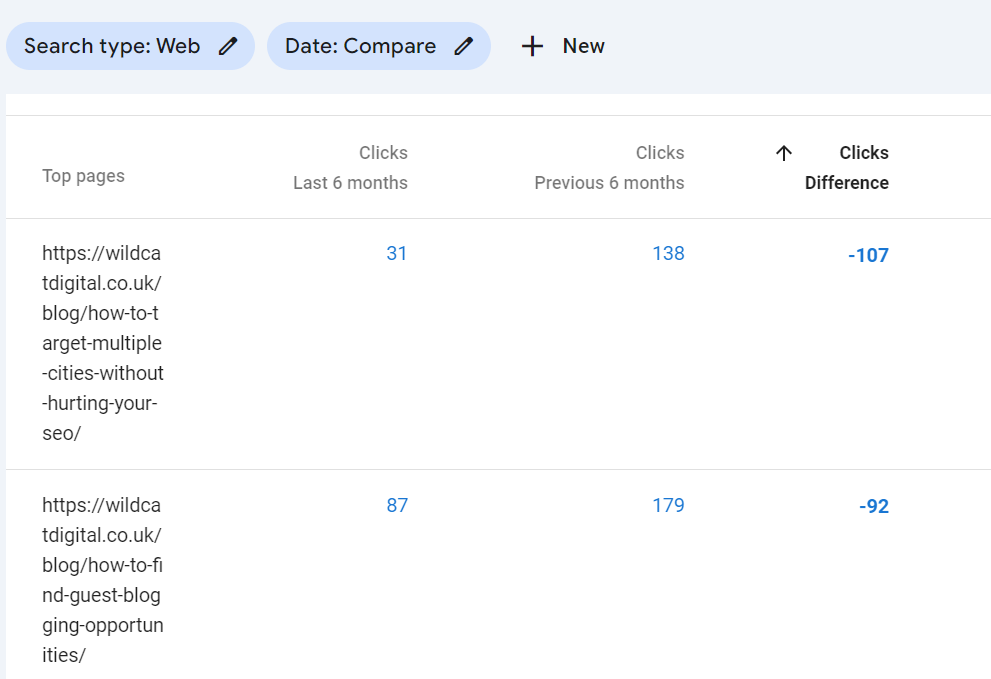
From here, you can see which pages have dropped in organic performance. If you think they have the potential to be updated, add them to your list to optimise. If you click on the URL, you can also navigate to the ‘Queries’ tab, where you can see which keywords in particular have dropped. Make a note of these, too.
Manual Content Audit
Data from Google Analytics or Google Search Console should form part of a wider content audit. After all, nobody knows your content like you do! We’d recommend manually looking through old blogs or landing pages (export the URLs using a tool like Screaming Frog), and manually flag any pages that you know contain outdated stats and statistics, or pages that your audience may consider to be old news.
How To Refresh Old Content For SEO
Content naturally decays over time as it becomes less relevant or outdated, so it is important to schedule in time for regular maintenance of older pages. Consider a ‘content cocktail’ strategy – for every three new blogs/pages you write, update at least one old one. Here’s how to get started:
Refresh the Written Content
Some blogs won’t necessarily need much work done to them, but may just require a few new links, updated stats, and a better call to action. Some pages, however, may need a full rewrite and restructure. Use your judgement here, but as a guide, here are some areas to consider when refreshing your old content:
- Adding new relevant stats and statistics
- Discussing trending topics
- Adding expert quotes or your own personal opinion
- Adding FAQs
- Updating pricing information
- Demonstrating basic E-E-A-T principles throughout
To learn more about writing content that Google loves, read this helpful blog: How Do You Write E-E-A-T Content?
Update Visual Elements
Even the most well-written content won’t get read by users if the page looks dull. Invest time into updating images on your blog or landing page, creating relevant infographics, or even video content to help convey your message. Ensure your content is visually on-brand and well-formatted.
Break up large blocks of text with images, use optimised headings and subheadings, and ensure the content is easy to scan by users.

Make it Better Than Your Competitor’s Page
There is no point in updating a page if it isn’t as good as what’s already on the web. Take a look at the keyword you have chosen for the page you’re updating. Pop it into Google and see which pages come up first. How many FAQs do they have? Are any interesting stats or case studies used? Are there any engaging videos used on the page?
Ensure you match, if not exceed, the on-page quality of the content that ranks first for your chosen keyword. Much like the SEO Skyscraper Technique, you must also be able to add more value to the user than what already exists on the web if you want a page to rank well. This includes adding new ‘golden nuggets’ of information from your own opinion and expertise in the area.
Update the MetaData
Revise meta titles and descriptions to reflect the updated content. Invest time in writing an engaging title tag and meta description, encouraging users to click on your new and improved page. Where you can, add your target query to the title tag, as this can improve rankings for that specific keyword.
Understand how metadata can impact your site’s rankings in one of our helpful blogs: What Is Metadata In Layman’s Terms?
Improve Internal Linking
A great way to encourage Google Bots to crawl your new and improved page is to improve the number of internal links. Using the ‘site:’ search function, look for pages that mention your target query. Where it makes sense, add an internal link to the recently updated page. You should also add a call to action encouraging people to click through to learn more.
When used strategically, internal links can also pass authority (sometimes called ‘link juice’), further boosting SEO rankings.
Request Indexing
Whilst it is likely that Google will eventually pick up the changes over the next few weeks or months, you can speed it along by ‘Requesting Indexing’ via Google Search Console. This pushes the page to the top of the Google Bot’s priority list and may help you see results just that little bit faster. Learn more about how Google reads your site in our recent blog: How Often Does Google Crawl My Site?
Whilst you’re in Google Search Console, do a quick review of your sitemap. Ensure the optimised URL is listed and not blocked by your robots.txt file.
Rinse & Repeat!
Refreshing old content for SEO isn’t a one-and-done task. Once you’ve made your changes, keep an eye on the results. Even if the new page performs really well, make it a regular task to review and update the page at least once annually. The same applies to every page across your website!

Get in Touch With Our Content Experts
If you feel like your content strategy has gone stale, get in touch with our content experts. With experience in B2B and B2C campaigns and a proven track record across a variety of industries, you can trust us to create a winning content strategy tailored to your business goals.
Get in touch today to arrange a free consultation and see how we can help you punch above your weight online.

Jasmine Savery
SEO Account Manager