
It may seem surprising but a lot of businesses we work with come to us having not yet set up or optimised their Google Business Profile (GBP). With GBPs being a free tool this seems like a missed opportunity, especially for small businesses. So, why is it so important? Why optimise your Google Business Profile?
Optimising your Google Business Profile has the following benefits:
- Increased visibility online
- Improved local listing
- Strengthened trust
- Better user experience
- Free to use
Keep reading to find out more about the benefits involved with optimising your GBP as well as how to do so.

What are the Benefits of Optimising a Google Business Profile?
Optimising your Google Business Profile can provide a variety of benefits to your business and online presence. Take a read below to understand the benefits our expert team have suggested will make all the difference to your business.
Increased Visibility Online
Optimising your Google Business Profile can help to increase your visibility online. Paired with an optimised website, having a GBP with all the correct company information, opening times, keywords, products or services and reviews will help Google to understand your business better.
When Google crawlers can clearly understand your GBP, it is more likely to rank you higher which in turn can increase your visibility online.
Improve Local Listing
Keeping your GBP up-to-date is also beneficial for businesses targeting customers local to their area. On most search engines, user searches are filtered relating to their area and often are displayed in the map pack. To achieve a ranking in this map pack you need to ensure your GBP is fully optimised.
If you are interested in finding out more about how to improve your local SEO, take a read of our informative blog: How Can I Rank in My Local Area?
Strengthened Trust
A GBP is also an excellent example of a trust signal which can help with encouraging conversions. When a user goes to your GBP and sees a variety of positive reviews they are going to feel more comfortable using your services or purchasing your products. Not only that, reviews are a genuine Google ranking factor, especially for local SEO.
To learn more about the main Google ranking factors including reviews, read our useful blog here: What are Google Ranking Factors and How Do They Impact SEO?
Better User Experience
Ensuring your GBP is optimised also improves user experience. Essentially the profile is a summary of all the information a user would need to understand your business and how to contact you without going on your website.
A user should easily be able to access your contact details, social profiles and website from the profile. By not doing so you are simply creating a potential unnecessary barrier for conversions.
Expert Comment – It’s Free!
“Another benefit of optimising your Google Business Profile that is often overlooked is the fact that it is a free tool. Unlike some other marketing channels, you don’t have to pay to set up a GBP or to have it appear in search results.
Not optimising it would simply be a missed opportunity to boost your online presence even further, especially if you are a SME with limited digital marketing budget.”

How Do I Get the Most Out of My Google Business Profile?
Now that you know the importance of optimising your Google Business Profile, the natural next step is to learn how to optimise it. Below we have detailed the key ways to get the most out of your GBP and give yourself the best chance of appearing in relevant user search results.
- Complete All Fields
Probably the simplest and most obvious way to get the most out of your GBP is to ensure you fill in all fields with the required information. Providing all the details will help Google to understand your business when crawling and determining how to rank your business. As well as this, it will help users to find what they need in order to convert.
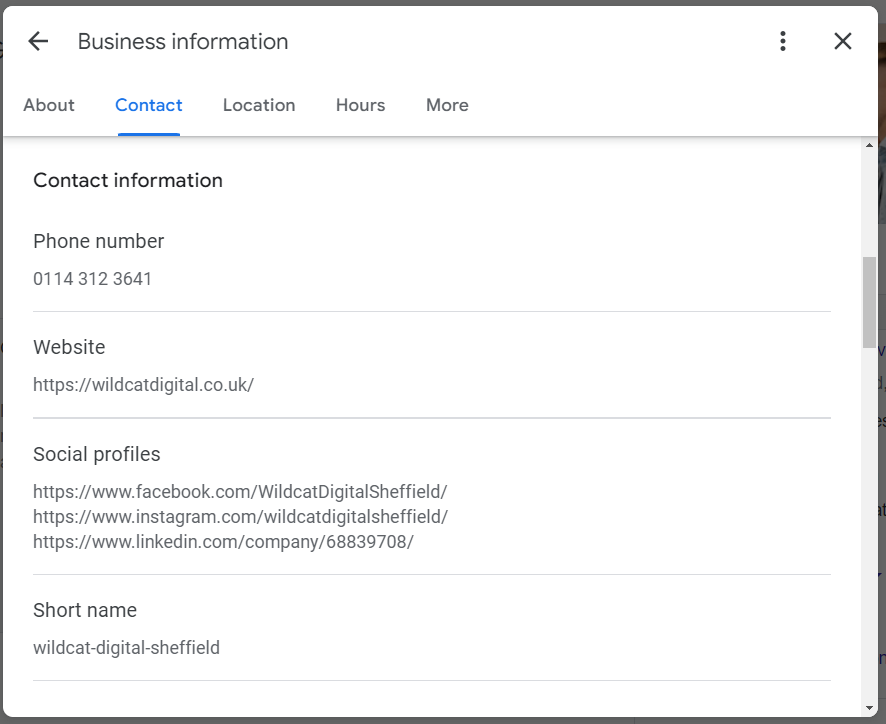
It is also important to double check that all of your contact details, social profiles, addresses and website links are up to date. The last thing you want is to leave inaccurate contact details on the profile so a user doesn’t manage to get in touch with you. Having inaccuracies may also confuse Google crawlers when trying to rank you based on location.
- Write a Business Description
Next you need to write a clear business description that demonstrates your core offerings. Google Guidelines make the following suggestions:
- Highlight what makes your business unique
- Avoid heavily sales oriented language
- Don’t display links within the description
- Use Relevant Keywords
In addition to this, it is recommended to use relevant keywords throughout your GBP as it has been proven to support local rankings for businesses. Examples of places in the profile that you can natural optimise for keywords include:
- Business category
- Business description
- Product descriptions
- Service descriptions
- Create Posts
Another useful feature of the GBP is that you can add updates or posts about your business. This can be a great way of demonstrating what your business has been up to or sharing a useful blog you have written. It can also encourage more users to click through to your website and act as a trust signal because it shows you are a legitimate business with events running or content being produced regularly.
Once verified by Google, your updates will then appear at the bottom of your GBP as seen below.

- Create Product/ Service Posts
Depending on the type of business you run you can also take advantage of the product and service posting features on GBPs. You can add individual products with descriptions, prices and links through to the website and similar options are available for services.
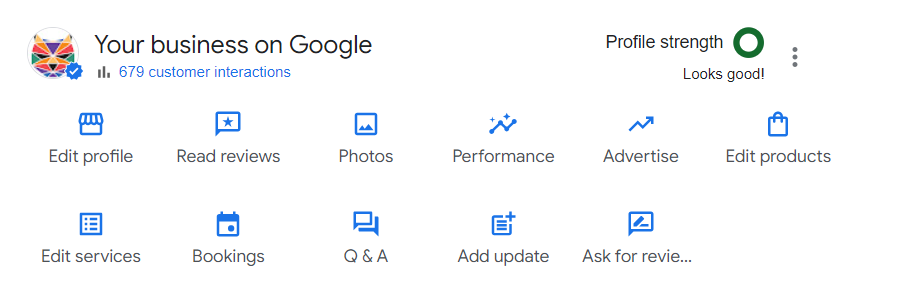
If a user can see your products or services from your GBP you may have a chance of attracting their interest onto your website for potential conversions so it seems like a missed opportunity to not take advantage of this feature.
- Respond to Customer Reviews
Whether a positive or negative review, we always recommend responding to your customer reviews. This is because it shows you are a real business that values customer feedback. Unfortunately, with GBPs you cannot delete bad reviews but how you handle it can make all of the difference.
If a user lands on your profile and can see you have responded to reviews including bad ones and have made an effort to resolve a tough situation, that may maintain your reputation compared to completely ignoring a bad review.
How to Add a Manager to My Google Business Profile
Optimising your Google Business Profile may be a task you wish to pass onto experts such as ourselves or someone else within your team. Therefore, to help you out we have provided you with clear steps on how to do so.
- Go to your GBP account
- Click the 3 dots next to profile strength
- Click Business Profile settings
- Click People and Access
- Click Add
- Enter the email address of the user you want to add to the profile
- Select the Manager option
- Click Invite
For a more visual guide on how to do this, take a look at the useful video below.
Elevate Your Online Presence with Wildcat Digital
Wildcat Digital is an award winning agency that helps businesses punch above their weight online. We deliver comprehensive SEO strategies that are bespoke to your business to help you improve your online presence. Contact us today to discuss how we can support you, including optimising your GBP.

Molly Sturgeon
Senior SEO Account Manager