Google Reviews are a core pillar of local SEO strategies because they provide one of the clearest indicators of trustworthiness and contribute to important EEAT ranking factors (Experience, Expertise, Authority, Trustworthiness). Users like them because Google Reviews feel authenticated by the very search engine they’re using to discover your business!
The same principle of trust applies for any kind of review, even if your business relies heavily on trade-specific review platforms like Trustpilot or recorded testimonials.
However, Google Reviews are uniquely important for local SEO because they are connected to your Google Business Profile (GBP). This means that as long as you have a GBP set up (and you should!), you can receive Google Reviews from customers whether you like it or not.
Our top tips for managing your Google Reviews to boost local SEO include:
- Aim for positive reviews as often as possible
- Aim for as many reviews as possible
- Aim to receive reviews frequently, not all at once
- Respond to all reviews, positive or negative
- Encourage customers to be thorough and include keywords when they review
Keep reading to learn more about the 3 Qs of Google Reviews, how you can integrate review management into your Google Business Profile strategy, and some common mistakes to avoid.
Jump to:
- Where to find Google Reviews
- Improving your Google Reviews
- Build a repeatable review generation process
- The 3 Qs of Google Reviews: Quantity, Quality, and freQuency
- Quantity
- Quality
- Frequency
- Integrate reviews into your wider Google Business Profile strategy
- Review response processes
- Common mistakes to avoid
- Google Review generation checklist
Where Users Find Your Google Reviews
Google Reviews are attached to your Google Business Profile, so you’ll need to set one up before you can receive and read your Google Reviews.
Once your organisation has a Google Business Profile (GBP), you will be able to see information about it when you search the brand name on Google. For example, when you search “Wildcat Digital”, you should see this sidebar that contains the ‘Reviews’ section:
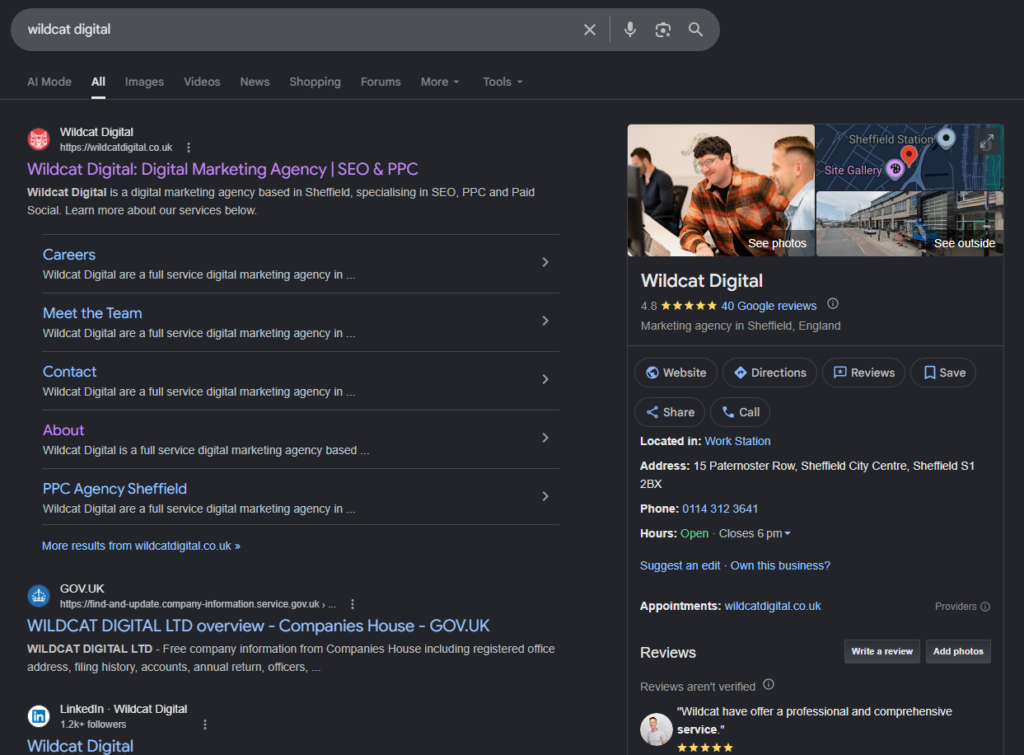
This is where users will usually read reviews for your organisation.
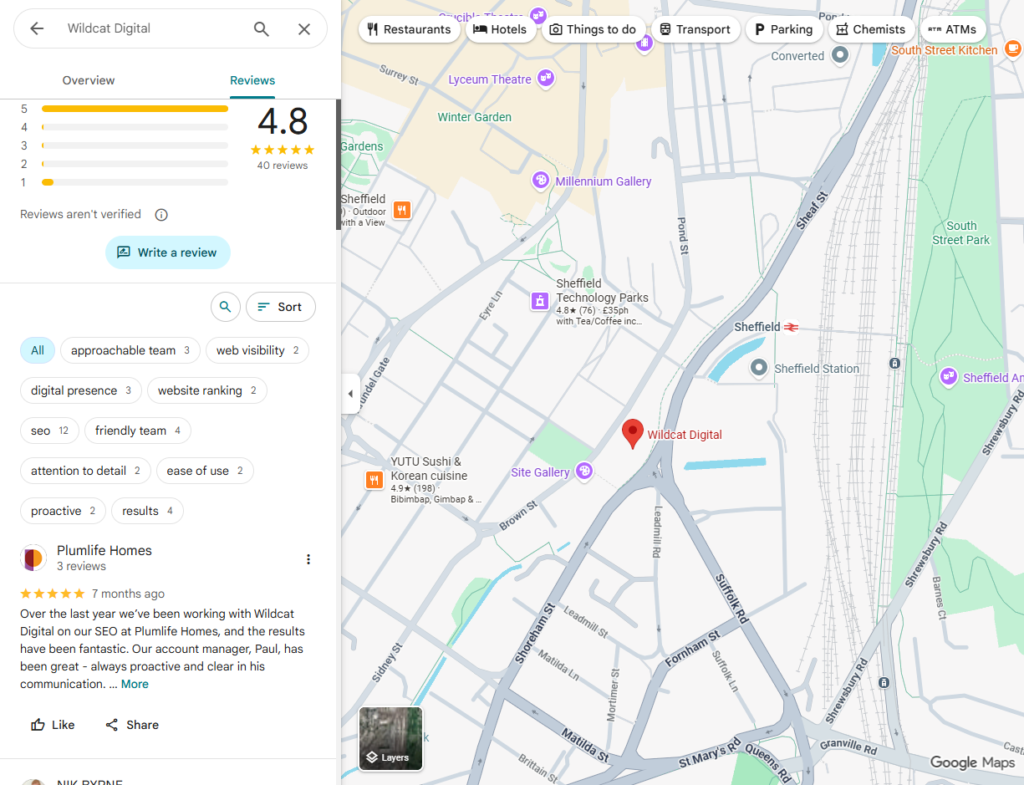
Alternatively, users can also view your Google Reviews on maps:
Improving Your Google Reviews
So now you understand the importance of good Google Reviews, but how do you actually improve them? Surely it’s out of your control, since the customer is the one who leaves the review? Think again! Here are Wildcat’s top techniques for improving your business’s Google Reviews:
- Understand the 3 Qs of good Google Reviews
- Build a repeatable process for review generation
- Integrate reviews into your wider GBP strategy
The 3 Qs of Good Google Reviews: Quality, Quantity, and freQuency
The main thing you need to remember is that Google’s local SEO ranking factors are more intuitive and human-led than you might think. In this way, there are three areas you must create consistency across to improve your Google Reviews and local SEO:
- Quality
- Quantity
- freQuency
Quality
The quality of your Google Reviews matters; 93–96% of consumers read reviews for businesses and products before making a purchase, and 58% of consumers are willing to pay more for businesses with strong reviews. Therefore, the more positive reviews, the better! You can improve the quality of your Google Reviews by:
- Offering good customer support
- Providing quality products or services
- Replying to positive and negative reviews
- Encouraging customers to be detailed and expressive in their reviews
Quantity
There is no correct number of reviews to aim for, but we all know that if two products are rated 4.5 stars on average, it feels safer choosing the one with 1000 reviews rather than the one with 4. Additionally, in 2026, 70% of consumers need at least five reviews before they feel they can trust a business.
Therefore, you should endeavour to have as many (positive) reviews as organically possible. The quantity implies experience, authority, and trustworthiness to Google, which results in boosted visibility on map packs and SERPs.
Improve the quantity of your Google Reviews by:
- Asking regular customers to leave a review
- Making it easy to leave reviews via your website with a CTA or button
- Following up with past customers to encourage feedback and reviews
freQuency
The frequency and recency of reviews on your Google Business Profile are indicators of how active and trustworthy your business is.
No reviews in five years? Is this business even open anymore? Lots of positive reviews in a short period, followed by nothing? I’m not sure these are real customers. One positive review every week for 6 months? That seems much healthier!
If potential customers are questioning the legitimacy of your reviews, then Google is too. Don’t let sporadic or historically negative reviews give users a bad first impression. Improve the frequency of your Google Reviews by:
- Encouraging customers to leave a review with every sale
- Gather testimonials (and consent) and leave reviews on behalf of customers
- Create an automated email encouraging reviews a week after purchase

Build a Repeatable Process for Review Generation
Now that we understand what makes a good review portfolio, we’re ready to start generating reviews frequently. Systemisation and automation will allow you to scale your review generation significantly at this stage.
When to Ask for Reviews
The best time to ask for a review is when the customer is most satisfied — this moment can differ between customers, products, and services, so you need to pick it carefully. Common moments of maximum satisfaction might include:
- After delivery of a product
- After completion of a service
- After a repeat purchase
- After a milestone or initial interaction
- After consistent engagement
How to Ask for Reviews
It’s easy to ignore generic review requests like “Please leave us 5 stars”; it’s a lot harder to ignore review requests that feel tailored, personal, and easy to engage with.
When you’re crafting your review requests, follow our expert guidance for maximum impact:
- Mention the specific product, service, or support provided: “Happy we could help with [service]”
- Makes your message feel intentional and personal
- Create a time expectation: “If you have 2 minutes”
- Reassures customers that you respect their time
- Remove friction: “Follow this link: [link]”
- Places zero burden on
- Remove the pressure: “Either way, thanks for your support.”
- Respects customers and encourages return visits
Simplify Review Submission
Humans hate friction — we’ve all abandoned a questionnaire because it asked too many questions — so let’s make submitting a review easy for customers. Reduce the number of required clicks and actions by including:
- Direct links and buttons: Link straight to the thing you want users to engage with, not the page containing it; use Google’s review link generator for Google Reviews.
- QR codes: You can rely on everyone carrying a smartphone now, so whack QR codes on receipts, packaging, vehicles, or anything!
- Pre-filled reviews/forms: Take the burden away from customers by auto-filling sections using information you already have about them, like ‘product purchased’, ‘location’, etc. If users can give a star rating, set it to 5 stars by default until they change it.
- Mobile-responsive design: Mobile users are 2x more likely to leave a quick review than desktop users, so make sure they can access your request and links without issue.
Reply to Reviews
Approximately 70% of users are more likely to leave a review if businesses actively respond, so replying to Google Reviews creates a great foundation of trust and accountability, particularly when replying to negative reviews.
Jump to the section below to learn about managing and responding to reviews.
Integrate Reviews Into Your Wider Google Business Profile Strategy
Your Google Business Profile (GBP) is the most important factor for local visibility and ranking in map packs, and reviews should feature heavily in that strategy. A wealth of high-quality, replied-to reviews adds trust and verification to the other elements you optimise. New users will find it easier to believe that your listed services are accurate when other real customers are reporting on the quality of said services.
Here are our top tips for optimising your Google Business Profile:
- Complete all fields
- Write a business description
- Use relevant keywords
- Create posts for products, services, and news
- Respond to customer reviews
Learn more about managing your GBP in our blog: Why Optimise My Google Business Profile?
Review Response Processes
Responding to reviews is more important than you may realise. In 2026, SQ Magazine reported that:
- 88% of consumers expect businesses to respond to reviews
- 56% expect a response within three days
- Approximately 70% of users are more likely to leave a review if businesses actively respond
With these statistics in mind, it’s clear that neglecting to reply to Google Reviews could be harming your conversions and reach. But replying in good time can be tricky, and requires some decent time investment to monitor and catch each one, so what should you do?
You have a couple of options for replying to reviews:
- Automated replies when a new review is received
- Manually check for and reply to new reviews
Automated Response Processes
With an automated process for responding to reviews, you don’t have to pay such close attention to the daily inbox, which is especially useful for larger companies. However, 56% of consumers prefer it when businesses actively manage their reviews, so if they can tell that you’re using automation to handle feedback, they’re unlikely to return even if they initially had a positive experience.
As a result, automation can be a double-edged sword: quick and efficient, but also impersonal and repetitive. The online marketing experts at Wildcat Digital advise against automating your review replies because the risk of it backfiring and harming your trustworthiness is too high.
Manual Response Processes
By dedicating time for someone on your team to comb through the reviews on your GBP — ideally someone with authority — you guarantee that every one is replied to authentically, which consumers prefer. To do this efficiently and effectively, you can standardise the process by following these tips:
- Set aside 15–30 minutes each day for checking reviews: This prevents you from missing any reviews.
- Use the reviewer’s name in your reply: This makes it feel more personal.
- Thank the reviewer for sharing their thoughts: Politeness goes a long way towards developing a good reputation.
- Keep it simple and specific: Just speak as you would in person; don’t get caught up in the context.
- Match the reviewer’s tone of voice: This helps your reply feel like part of an authentic conversation.
- For negative reviews, be genuine and gracious: People can be meaner in a review than they otherwise would be, so apologising genuinely shows customers that their thoughts matter.
- For negative reviews, wait a little before replying to get the full picture: This will prevent you from diving in defensively and looking foolish.
Common Mistakes to Avoid
It’s easy to slip up with managing your Google Reviews, but even seemingly small errors can cause potential customers to turn away permanently. Here are some common mistakes to avoid when managing your Google Reviews:
- Review gating
- Incentivising reviews
- Fake reviews
- Only replying to bad reviews
- Only replying to good reviews
Review Gating
Review gating is when you only offer verifiably satisfied customers the opportunity to submit a public review. This can result in a suspiciously positive review catalogue with sporadic entries, and it also breaches Google’s reviews policy.
Review gating is considered a black-hat SEO technique. When Google knows you are engaging in review gating, your Google Business Profile can be suspended or penalised.
Incentivising Reviews
Incentivised reviews are those created by users with the promise of rewards from the organisation they’re reviewing. Examples of rewards include:
- Discounts on next purchases
- Free shipping
- Loyalty points
- Entry in a sweepstakes
While incentivising good reviews might seem like a quick way to get a lot of positive reviews (particularly alluring for new businesses or new product launches), it can often do more harm to your SEO than good.
Knowledge that a reward was given for a review, even one that is completely genuine, can breed scepticism in new potential customers. Once customers start doubting the authenticity of your reviews, they fail to perform their basic function of social proof. It can even be seen as “buying” reviews, which can permanently harm your reputation.
Fake Reviews
Fake reviews are reviews from non-existent customers that have been paid for to create the illusion of good business (or bad business, in the case of an attack). Fake reviews violate Google’s reviews policy, so can be punished harshly. Because reviews feature keywords and trust signals, if fake reviews go unreported, they can have a disproportionate impact on your SEO, though Google is getting better at identifying and punishing accounts with fake reviews by the day.
To spot a fake review, look for these typical red flags:
- Suspicious timing, like a lot of reviews getting posted within minutes or hours
- No specific details, including no proof of transactions, names, or features
- Suspicious reviewer profiles, such as those with no (or an AI-generated) profile picture or hundreds of reviews for unrelated businesses, often globally
Only replying to bad reviews
By only replying to bad reviews, you neglect the customers who do sincerely like your business, which can result in them losing interest or never returning. When you reply to positive reviews with gratitude, you can turn a potentially apathetic customer into a new brand ambassador for absolutely no cost.
Only replying to good reviews
Alternatively, if you only reply to good reviews, it quickly starts to look like you’re sweeping the bad reviews under the rug, harming your brand reputation. Bad reviews can actually be good for business when they’re surrounded by good reviews because they set customer expectations. Still, you have to put the additional work in to appear accountable and gracious.
Google Reviews for Local SEO Checklist
Proficient management of Google Reviews for local SEO should look like this:
Boost Local SEO with Google Reviews Management from Wildcat Digital
Wildcat Digital’s expert marketing team can help you appear in Google’s map packs and search results for any kind of local keywords. Our strategies involve Google Business Profile optimisation and Google Reviews management to ensure that your business is as visible as possible. Discover our local SEO services online or get in touch to discuss your needs.