
TL;DR: A topic cluster is one main page on a subject (the pillar page) plus a small set of posts that each answer one narrower question, all linked to each other on purpose. It is a content-planning model from SEO practice, not a Google feature, so the benefit is practical: readers can find the next answer, and you stop publishing posts that overlap. For most businesses, the best first move is to pick one topic that matters commercially and check what you already have on it before writing anything new.
Most business blogs grow one post at a time, and each post makes sense on its own. A topic cluster is the alternative: you choose a subject, decide which page is the main answer, and give every other page on that subject a separate job. This guide explains the parts, shows what a good cluster looks like and covers the mistakes that most often undo one.
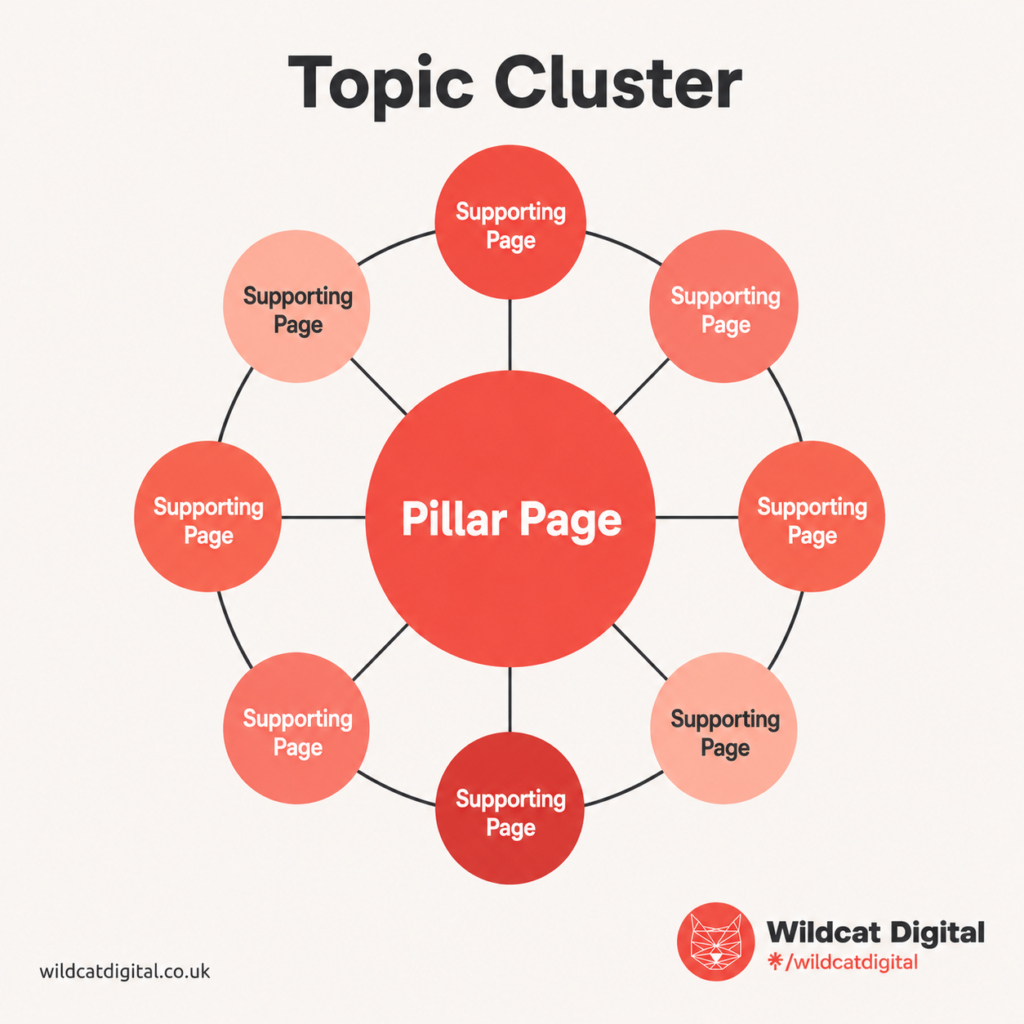
What Is A Topic Cluster In SEO?
A topic cluster is a group of connected pages built around one subject. A pillar page gives the broad overview. Supporting posts each go deeper on one question the pillar raises. Links join them together, so a reader on any page can reach the others.
Take a furniture retailer. Instead of publishing separate posts on sofa sizes, sofa materials and the cost of a sofa, it could build a cluster called How to Choose a Sofa: one guide as the pillar, with a supporting post on each of those questions.
The Three Parts of a Topic Cluster
| Part | Its job | How to check it |
| Pillar page | Covers the whole topic at an overview level and points to the detail. | Does each section hand off to a supporting post instead of trying to answer everything? |
| Supporting posts | Each answers one narrower question in depth. | Can you state the question in one sentence, and does the pillar leave it only partly answered? |
| Internal links | Join the pages so readers and search engines can move between them. | Does the pillar link to every supporting post, and does every supporting post link back? |
Supporting posts can also link to each other where it helps the reader. Use descriptive anchor text, such as “local SEO checklist”, not “click here”. Google says good anchor text is descriptive, reasonably concise and relevant to the page it is on and the page it links to (see its guidance on links). It also says every page you care about should have a link from at least one other page on your site. A page nothing links to is what we call orphaned content.
What Does a Good Topic Cluster Look Like?
Here is an illustrative cluster for a small business that wants to be found locally. The page titles are examples, not a recommendation of exact wording.
Pillar page: Local SEO Guide for Small Businesses. It explains what local SEO is and which areas matter most, and hands each area to a supporting post.
- Local SEO Checklist for Small Businesses: the key actions, in order.
- How to Optimise Your Google Business Profile: accurate details, categories, services, photos and posts.
- How to Find Local SEO Keywords: terms that combine a service, a location and what the customer wants.
- How Do Reviews Help Local SEO? How reviews support trust, visibility and enquiries.
- How to Create Better Location Pages: what to include without making the pages thin or repetitive.
The pillar links to each supporting post from the section where that topic comes up. Each supporting post links back to the pillar, ideally near the start or the end. Where there is a natural connection, supporting posts link to each other: the Google Business Profile post can point to the reviews post, because reviews are part of looking after a profile. The cluster works because every post answers a different question and every link has a reason to be there.
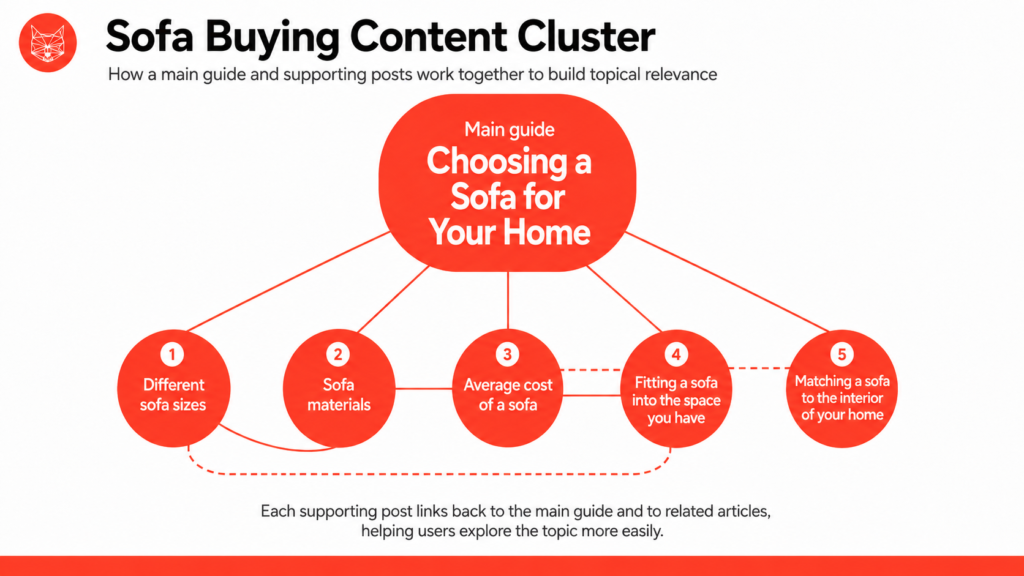
Take this blog for example. Throughout the content, you will find internal links to other related articles on the Wildcat website, including a link to the relevant pillar page. This topic cluster was created to provide deeper information into each subtopic the pillar page discusses. This way, readers can learn everything they need to know without leaving the Wildcat website or having to search for the information themselves. This is both great from a user experience perspective and SEO, as if someone leaves the site, there’s a chance they won’t return, especially if they find the answer they were looking for elsewhere.
In terms of SEO, this topic cluster approach worked well for us as it allowed us to provide more informative answers to specific questions without multiple articles competing against each other in the search results. It also allowed us to demonstrate our expertise in the area, as separate posts enabled us to create detailed explanations rather than brief answers, and we no longer bloated a singular post with lengthy text.
After publishing multiple articles that linked to one pillar page (and supporting posts where relevant), we noticed an uplift in organic rankings, in particular, an increase in those blog pages being the starting point for a customer to enter our site.
Do Topic Clusters Help You Rank?
Not as a ranking switch, as far as Google documents. Its guide to ranking systems lists the systems it uses, and topic clusters, pillar pages and topical authority are not among them. It also says its ranking systems are designed to work at page level, so a tidy structure is unlikely to rescue a weak page.
What clusters do help with is what Google does describe. It says it primarily finds pages through links from other pages it has already crawled (see its SEO Starter Guide), and a cluster gives every page you care about those links. For readers, it gives a next step that is not a return to Google. For most businesses, we think that is the practical case for building one.
Whether covering a subject in depth makes a site more trusted on it is a separate question. Our guide to topical authority covers the idea. Google lists no topical authority system, so treat it as a way to think about coverage, not a score you can measure.
Common Topic Cluster Mistakes
Supporting Posts With No Pillar
You may have plenty of useful posts and no page that ties them together. Readers do not know where to go next, and no single page is the obvious main answer. If you already have several related posts, check whether one of them can become the pillar before you write a new one.
Two Pillars for the Same Question
A site might have a Local SEO Guide, a Complete Guide to Local SEO and a What Is Local SEO? page, all answering the same question. Two pages like that tend to split links and updates between them, which is the problem behind keyword cannibalisation. Our guide to spotting and fixing cannibalisation shows how to find them. Choose one page as the pillar. Keep the others only if each answers something different, and merge them if they do not.
Supporting Posts That Add Nothing
A supporting post that repeats the pillar in slightly different words does not help readers, and it competes with the page it is meant to support. Before creating one, ask four questions: does it answer a specific question, does it go deeper than the pillar, does it target a different search intent, and would a reader find it useful? If any answer is no, update the pillar or an existing post instead. Publishing more is not the aim.
“I find that most businesses don’t internally link in their blogs at all before they start SEO, and most don’t use categories or tags either. One easy fix is to categorise each article, which on many CMS will automatically add them to a category page. You can then go through each category and add links to other relevant blogs within that topic, which provides a quick and easy start to your topic cluster.”
— Jamie Stowe, Senior SEO Account Manager
How to Map a Topic Cluster in an Hour
You do not need a large content strategy to start. A first rough map for one cluster can fit in an hour.
- Choose the topic. Pick one broad subject that matters to your business and that customers ask about.
- Check the search intent. Search the topic and look at what kinds of pages appear, so your pillar matches what people expect to find.
- List the questions underneath it. Write down the questions a customer would ask next. There is no set number; stop when the list runs out of genuinely different questions.
- Check what you already have. Match your existing pages to those questions. Anything already answered should be updated and linked, not rewritten from scratch.
- Map the links. Pillar to each supporting post, each supporting post back to the pillar, and supporting posts to each other where it helps the reader.
For what to do with overlapping pages and how to keep a structure current as you publish, see our guide to SEO content architecture and topical authority. For more on the links themselves, read our guide to how many internal links are good for SEO.
Top Tip: Read each section heading on your pillar page as a question. If answering it properly takes more than a paragraph or two, that section should be a supporting post. If a paragraph covers it, it stays on the pillar. This keeps the pillar an overview and stops you writing supporting posts that have nothing to add.
How Wildcat Handles Content Planning
Our content strategy and copywriting service starts with keyword research, mapping and strategy before a clear roadmap is created, and each piece of content is written from that roadmap. We can also overhaul your existing content so it works for SEO, which matters if you already have posts that could form a cluster.
If you are not sure where to start, get in touch to book a free consultation. We will discuss your business and challenges, and if we think we can help, we will send a tailored proposal covering recommendations, priorities and costs. We aim to come back to you within one working day.