
SEO content has never just been about publishing as many blogs as possible. However, the way people search is changing, and this has made structure even more important.
With AI Overviews, Search Generative Experience (SGE)-style results, and answer-led search becoming more common, users are not always clicking through to websites in the same way they used to. Search results are becoming more condensed, more competitive, and more focused on providing quick answers. This means your website needs to make its relevance clear quickly, both to users and search engines, because when users click less often, every page on your site now needs to work harder to demonstrate expertise clearly.
That does not mean every website needs to become overly technical or complicated. In fact, good SEO content architecture is often about making things simpler.
In this guide, we’ll explain how SEO content architecture and topical authority work together. We’ll focus on how to plan, organise, connect, and maintain your content so your website becomes a stronger source of information over time.
What Is SEO Content Architecture?
SEO content architecture is the way content is planned, grouped, and connected across your website. When done correctly, it can help readers move from one piece of content to the next, while still answering the questions they’re asking.
It looks at how your main pages, blog posts, guides, and supporting resources work together. Rather than treating every blog as a separate piece of content, SEO content architecture helps you create a structured content library where every page has a clear purpose.
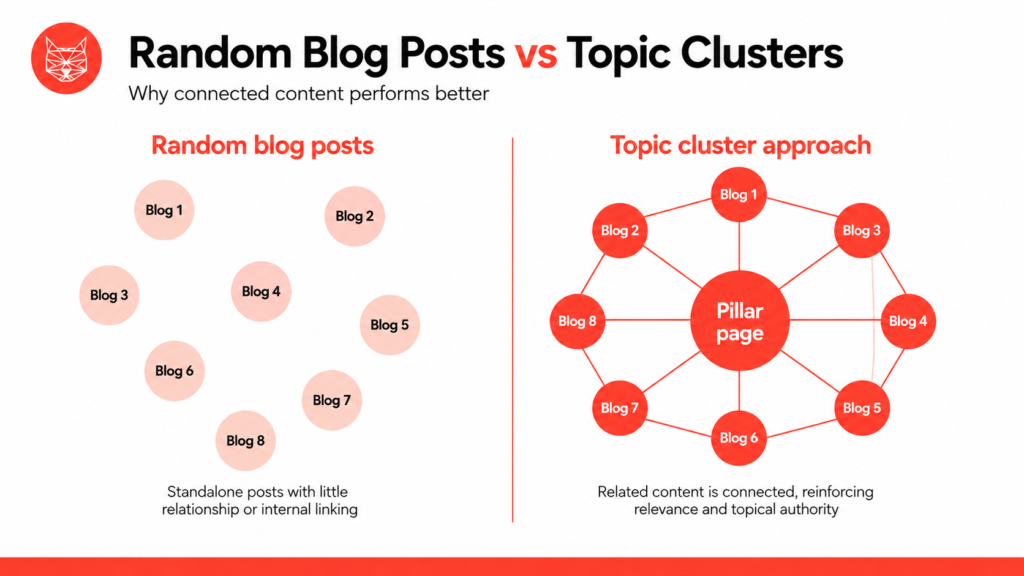
A random blog strategy might look like this:
- One blog about SEO tips
- One blog about PPC
- One blog about website design
- One blog about social media
- One blog about Google updates
- No clear relationship between them
This can still bring in some traffic, but it does not always build a strong picture of what your business is an expert on (topical authority), and it doesn’t allow customers to easily find other related blogs they may want answers to.
A structured content library works differently. It groups related topics together and links them in a logical way. For example, a website might have one main pillar page about content SEO, supported by blogs on keyword research, topic clusters, internal linking, content refreshes, and topical authority.
This creates a clearer structure, which can help with:
- Stronger relevance around key topics
- Better internal linking
- Easier content planning
- Reduced keyword cannibalisation
- Better user experience
- Easier scaling over time
The aim is not to make your blog look tidy for the sake of it. The aim is to help every piece of content support a wider SEO goal.
Why a Structured Content Library Is Better Than Random Blogs
Many businesses start blogging without a clear plan. This is understandable, especially if they have been told that “more content” is the answer to better SEO.
However, more content only works when it is useful, relevant, and properly connected.
If you publish lots of blogs without a structure, you can end up with several pages targeting similar keywords. This can lead to keyword cannibalisation, where your own pages compete against each other. When this happens, the search engines become confused about which blog to prioritise in the SERPs, which can result in both blogs performing poorly and not bringing in the results you expect. You may also accidentally create orphaned content, which means useful pages exist on the site but are not linked to from anywhere important, like related blogs.
A structured content library helps avoid this.
Each page has a clear role. A pillar page covers the main topic in depth, supporting posts answer more specific questions, and internal links connect the pages together, helping search engines and users understand the relationship between them.
This makes your content easier to manage, easier to expand, and easier to improve over time, while keeping users engaged with your site.
What Is a Topic Cluster?
A topic cluster is a group of related pages built around one central subject. This type of content benefits both users and search engines as it is easy to see which content is connected and allows them to quickly move from one related topic to the next.
Usually, a topic cluster includes:
- A pillar page that covers the main topic
- Supporting posts that explore subtopics in more detail
- Internal links that connect the pillar and supporting content
The pillar page acts as the main hub. It introduces the topic, explains the key areas, and links out to supporting guides where users can learn more. The supporting content dives deeper into specific questions or subtopics, providing more information than the pillar page. Supporting posts should link back to the pillar page and, where relevant, to other related posts within the cluster.
For example, if your pillar topic is SEO content architecture, supporting posts might cover topic clusters, topical authority, content depth, internal linking, and content maintenance. (Hint: this blog post does just that!)
To learn more about this structure and why it’s good for SEO and keeping users engaged, read our guide: What Is a Topic Cluster?
What Is Topical Authority?
Topical authority is the process of becoming a trusted source on a specific topic in your industry.
In SEO, this is built by showing consistent, useful, and relevant coverage across a subject area. It is not just about having one strong blog; it’s about proving that your website has the depth and range needed to answer multiple related questions that users and people interested in your industry/services want answers to.
For example, one blog about SEO content might help you rank for a specific query. However, a full content cluster around SEO content architecture, topic clusters, internal linking, content depth, and content maintenance gives search engines a much clearer picture of your expertise.
This is especially useful for websites that need to compete against larger domains. You may not be able to compete with every major website on overall domain strength, but you can become much more relevant within a focused topic area or your niche.
Topical authority is built through coverage and consistency. Backlinks can still help, but they are not the only factor. A well-planned content cluster can show that your site understands a topic in depth and can answer users’ questions from multiple angles. The more you can answer (correctly), the more online exposure in the SERPs, but more importantly, the trust users and search engines will develop in your website/brand.
For a deeper explanation, read our guide: What Is Topical Authority in SEO and How to Build It?

Content Depth vs Content Breadth in SEO
Publishing more content does not always mean better SEO results.
Content breadth: Covering a wide range of related topics. This can be useful when you need to show that your website covers a sector properly. However, if every page is thin (low content count) or only explains the basics, your content may still struggle to perform.
Content depth: Going further into a topic, where you answer more specific questions, add examples, provide practical guidance, and explain the subject in a way that is genuinely useful.
The strongest SEO content strategies usually need both.
For example, a broad content strategy might include several posts about SEO, PPC, social media, and website design. A deeper content strategy would take one of those topics, such as SEO content, and build a focused cluster around content architecture, keyword mapping, internal linking, content refreshes, and cannibalisation.
The key is to avoid publishing for the sake of it. Every page should either support a clear cluster, answer a useful query, or help users move closer to taking action, such as reaching out or making a booking.
To decide whether your content topic should go broader or deeper, you need to understand the reason for the content. For example, typically you should make your content broad if you want to build awareness and capture beginners. This type of content usually includes overviews and helpful guides. On the other hand, you should use deeper content such as tutorials and data analysis if you want to reach experts, establish your authority in the topic, and convert to leads.
To explore this further, read our guide: Content Depth vs Content Breadth in SEO.
Internal Linking for SEO Content Architecture
Internal linking is what turns a group of related pages into a real content cluster. Without internal links, your supporting posts are just separate pages. With the right internal links, they become part of a clear structure that search engines and users can follow. However, ensure that every link you create between each piece of content is relevant so that users can naturally move from one question to the next while still staying within the same topic cluster or topic.
For topic clusters, your internal linking should usually work like this:
- The pillar page links to each supporting post
- Each supporting post links back to the pillar page
- Related supporting posts link to each other where it is genuinely useful
- High-performing or authoritative pages link to important cluster pages
- Orphaned pages are found and linked back into the structure
Anchor text, the clickable text used for a link, is also important. Instead of using vague phrases like “click here”, use descriptive anchor text that tells users what they will find. For example:
Good anchor text: content maintenance and refresh strategy
Weak anchor text: read more
This helps users understand the link before clicking and gives search engines a clearer context about the destination page. However, internal linking should still feel natural. Do not force exact-match anchor text into every paragraph.
Avoiding Orphaned Pages and Weak Clusters
An orphaned page is a page with no internal links pointing to it. This is a common problem on sites that have published blogs for several years without a clear content architecture. The content may still be useful, but if it is not linked from anywhere, users may struggle to find it, and search engines may not understand its value.
Weak clusters often happen when:
- Supporting posts are published without a pillar page
- A pillar page exists, but does not link to the supporting content
- Several pages target the same intent
- Blog posts are only linked through the blog archive
- Older posts are never added to newer clusters
This is why SEO content architecture is not just a planning task; it also involves reviewing what already exists and deciding where each page should sit.
Sometimes, the right answer is to improve a page, while sometimes it’s best to merge two overlapping posts. In other cases, it may be better to redirect or remove content that no longer serves a purpose. You might also find that you already have enough content to start building multiple content clusters; you’ll just need to take time to organise it and place it into relevant topic clusters.
Planning a Future-Proof Content Cluster
A future-proof content cluster starts with a clear topic. The topic should be broad enough to support multiple pages, but specific enough to be relevant to your business. If the topic is too wide, the cluster can become unfocused, but if it’s too narrow, you may not have enough useful supporting content to build around it.
To choose the right pillar topic, think about the types of questions your customers ask. You’ll typically find that most of their questions are related to a single topic. Then think about your business expertise and whether or not the topic customers are asking about has enough breadth to support multiple, interlinking blog posts.
Start by choosing a pillar topic. Then map out the subtopics users are likely to search for. Each subtopic should have a clear intent and a clear role in the wider cluster.
Here’s a simple process:
- Choose the main pillar topic
- Research related keywords and questions
- Group similar queries by intent
- Decide which queries need their own page
- Identify which pages already exist
- Plan new supporting posts
- Map internal links before publishing
- Review the cluster regularly
The aim is to make sure every page earns its place.
Example SEO Content Architecture Cluster Map
Below is a simple example of a content cluster for SEO content architecture.
Pillar page:
SEO Content Architecture and Topical Authority
Supporting posts:
- What Is a Topic Cluster?
- What Is Topical Authority in SEO and How to Build It?
- Content Depth vs Content Breadth in SEO
- How Internal Linking Supports Topical Authority
- Content Maintenance and Refresh
- What Causes Keyword Cannibalisation?
- How to Plan an SEO Content Roadmap
- How to Refresh Old Blog Content for SEO
- How to Build a Content Cluster in 60 Minutes
- How to Use Search Intent in Content Planning
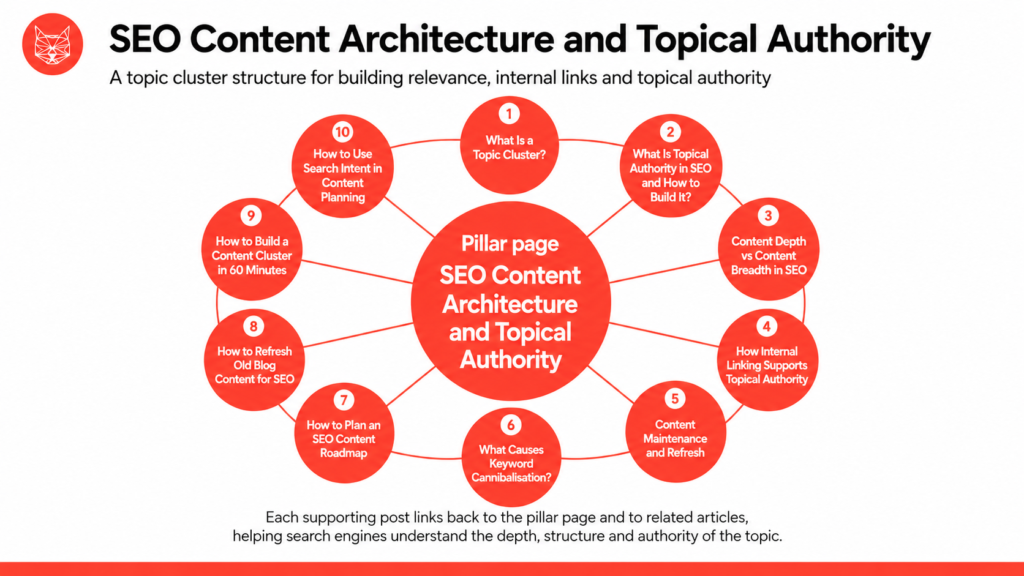
This structure gives the pillar page a clear purpose. It introduces the wider subject and links to more detailed posts, with each supporting post answering a specific query while strengthening the overall cluster.
Over time, this type of structure helps your website cover the topic more completely, while reducing the risk of overlapping content.
Content Maintenance for Topic Clusters
Putting your blog posts live does not mean you should forget and move on from your topic cluster. This is because search behaviour changes, competitors publish new content, search results shift, old statistics become outdated, and new opportunities appear.
This is why content maintenance is so important.
Content maintenance helps keep your clusters healthy by reviewing, updating, and improving existing pages. It also helps you spot problems before they affect performance.
When reviewing a cluster, look for:
- Pages with declining traffic
- Pages that rank on page two or three
- Posts with information that has become outdated
- Thin pages that need more depth
- Overlapping pages targeting the same intent
- Missing internal links
- Orphaned pages
- New keyword opportunities
- CTAs that need improving
Sometimes, a small update is enough. This might involve refreshing examples, improving the introduction, adding FAQs, or updating internal links. Other times, a bigger change is needed. You may need to merge two similar posts, expand a thin guide, or rebuild the pillar page so it reflects the cluster more accurately.
To learn more, read our guide: Content Maintenance and Refresh.
Where Ranking Factors Fit
Google ranking factors are the signals search engines use to assess the quality, relevance, and usefulness of web pages.
On its own, Content architecture is not a single ranking factor. Instead, it helps you demonstrate several important things at scale by showing relevance, improving internal linking, supporting user experience, and helping search engines understand how pages relate to each other.
A well-structured website is not guaranteed to gain rankings. You still need strong content, good technical health, useful pages, trust signals, and a website that works well for users. However, without a clear structure, even good content can become harder to understand, harder to find, and harder to scale.
Think of content architecture as the framework that holds your SEO content strategy together.
For more context, read our guide: What Are Google Ranking Factors and How Do They Impact SEO?

The WD Playbook: How to Build a Content Cluster
When building a content cluster, the key is to make sure every page has a purpose and every link supports the wider topic. Follow our steps below to help build your own.
1. Choose Your Topic
Start with a topic that is commercially relevant to your business. It should be something you want to be known for and something your audience is actively searching for. Choosing the right topic is important as it will not only increase your topical authority to prove you’re knowledgeable in your industry, but also drive the right type of audience to your site.
2. Map Search Intent and Subtopics
Group keywords and questions by intent. Some users may want definitions, while others want comparisons, examples, or step-by-step guidance. Each intent may need a different page. As everyone absorbs information differently, catering to multiple user types allows you to reach a larger breadth of audience.
3. Create the Pillar Page
Your pillar page should give a clear overview of the main topic. It should answer the key questions and link users to supporting content for more detail (like this page does). This is important so users can move from one question to the next easily, without straying from the topic they want answers on.
4. Publish Supporting Content
Create supporting posts that go deeper into each subtopic, but avoid repeating the same information across every post. Each one should add something useful. These posts will allow users to have a greater breadth of information on the topic and showcase your topical authority on the area.
5. Link Everything Correctly
Link from the pillar page to the supporting posts and link each supporting post back to the pillar. You should also add links between related supporting posts where it helps the user journey – this is especially important as it allows your users to move around the topic with ease.
6. Review and Refresh
Check the cluster regularly. Update old information, improve thin sections, fix weak links, and consolidate pages that overlap. This ensures your topic cluster will have the best chance at performing strongly.
Build Content That Scales Without Cannibalisation
SEO content architecture is what allows your content strategy to grow without becoming messy. It’s not about posting more content, but about helping every page have a clear purpose across the whole website.
Without structure, it is easy to publish too many similar pages, miss important subtopics, or leave useful content hidden with no internal links. Over time, this can weaken your SEO performance and make your site harder to manage, while deterring users from sticking around.
With a clear structure, your content becomes easier to understand, easier to scale, and easier to maintain.
- Pillar pages show the main topic
- Supporting posts add depth
- Internal links connect everything together
- Regular content maintenance keeps the cluster relevant.
Topical authority is not built overnight; it’s built by consistently publishing useful content, organising it properly, and ensuring it’s kept up to date.
If you want to build a content strategy that supports long-term visibility, reduces cannibalisation, and helps your website become a trusted source in your sector, Wildcat Digital can help.
Speak to our team today to find out how our SEO content strategy services can help you build stronger content architecture and improve your organic visibility.