
Much like other technical SEO features, the idea of implementing canonical tags for the first time can be intimidating. With the involvement of adding HTML code to your site and the effects this can have if done incorrectly, it’s important to understand the exact function of canonical tags and why they’re helpful before jumping in. So, how do canonical tags affect SEO?
Canonical tags tell search engines which of your URLs is preferred and, when there is duplicate or similar content, which should be prioritised in the results page. By preventing duplicate content issues and combining the ranking power of relevant URLs, canonical tags help to prevent your own pages from competing against each other and lets crawlers spend time on unique pages.
In this blog, we’ll take a deeper dive into canonical tags, their benefits, and when best to use them to get the most out of your online performance.

What Are Canonical Tags?
A canonical tag is a small piece of HTML code that directs search engines to the main or preferred version of one of your web pages. They are used when multiple URLs have duplicate or very similar content, and crawl budget would be wasted on content that has already been crawled on a different page.
This helps to reduce the performance issues that can come from duplicate content in search results, whilst leaving all pages accessible to the user.
In short: You’re telling Google which URL is your ‘master version’ and which one should be indexed as a priority.
How Do Canonical Tags Work?
Canonical tags function by being placed into the HTML head section of a webpage. When you add this tag, you’re specifying that this URL is the most authoritative version of this content.
Let’s take a quick look at the basics of how canonical tags work:
- Placement
You’ll insert a <link> element, with an attribute of rel=”canonical”, into the <head> section of the HTML for each of the pages that show duplicate or extremely similar content to the URL that you’d like to prioritise.
- Identification
The link element you’ve just inserted will point to the URL that you’d like to designate as your preferred version – also known as the canonical URL.
- Crawling & Indexing
When search engines crawl your website, they’ll recognise the canonical tag placed in the HTML. They’ll understand that the content on the specified URL (your canonical URL) should be considered the primary version and that it should be prioritised in rankings.
Canonical tags help search engines consolidate any ranking signals, like links, into the canonical URL. This ensures the preferred page maintains its ranking and visibility potential, while avoiding dilution due to duplicate content.
Why Are Canonical Tags Important?
Canonical tags are an important part of managing your online presence – helping to control the impact of duplicate content that is sometimes necessary on multiple URLs.
For example, you might have a product section on your site that requires multiple pages. These pages will have different URLs, as seen below, but will feature the same written content, just the next set of products.
You would use a canonical tag here to signal that the first page should be prioritised in rankings, and to prevent it from competing against all other pages in results. You would also be signalling that the content is the same on all of these URLs, so search engines shouldn’t use up valuable crawl budget on content it’s already seen.
What Happens If I Don’t Use Canonical Tags?
If you were to leave your pages with duplicate or very similar content without canonical tags, search engine crawlers may:
- Identify pages as duplicate content – splitting ranking signals, diluting link authority, and confusing search engines about which URL to display.
- Crawl and index content that isn’t necessary – wasting valuable crawl budget on content it has already crawled.
- Index the wrong pages – selecting pages that may not be the most helpful for your users.
What Are The Benefits Of Canonical Links For SEO?
When correctly implemented, canonical tags can have a number of benefits for the organic performance of your website and support the rest of your SEO efforts.
Crawl Direction
When canonical tags are in use, search engines will know which pages on your website to crawl and index. This means that the pages that are displayed to your users are given the best opportunity to rank and are those most beneficial to your users.
Link Equity
By letting crawlers know which of your pages should be prioritised, canonical tags can help to ensure that all link equity goes to one page, rather than being spread across multiple URLs, if you have multiple pages that are similar and could be interchangeably displayed for the same query.
Crawl Budget
Search engines like Google have a specific number of pages and URLs they can, and want, to crawl in a specific timeframe per website – also known as a crawl budget. By using canonical tags, your crawl budget won’t be wasted on pages that aren’t as important – like subsequent pages of a product collection. Instead, you’re leaving the most important content on your site with a higher chance of being indexed and, therefore, ranked.
Duplicate Content
Canonical tags allow you to control your content and ensure it isn’t flagged by crawlers or during audits as duplicate. It’s important to remember that Google values unique and high-quality content, so the more original and useful the content is to your users, the better.
When Should I Use Canonical Tags?
Canonicals are helpful, but shouldn’t be the go-to for all issues. They allow you to keep the pages with similar content visible, but explain to search engines that you would prefer your main page to rank for queries.
Every SEO campaign is different, and you can always consult experts like the Wildcat Digital team if you’re unsure, but there are a couple of occasions where canonical tags are the standard:
- Avoid Duplicate Content Flagging: Duplicate content can lessen the value of your site in the eyes of search engines and crawlers, potentially causing keyword cannibalisation and dilute link equity.
- Content Shared Across Websites: If, for example, you have an article on your site that someone else would like to repost on another site, you can use canonical tags to make sure search engines know yours is the original and will help your page to appear in results pages before the repost.
When Should A Canonical Tag Not Be Used?
It’s important to identify when canonical tags aren’t appropriate and where an alternative might be a better fit.
For example, you’ll want to use a redirect instead if you have a webpage that is being removed, whether its through redesign or updating the content and URL.
A canonical will only tell search engines which is the preferred page and means both will remain accessible to users, where a redirect would send the user automatically from the old page to the new one.
Why not check out our blog for more information: What Is Redirect Mapping?
Our Top Tip
Make sure that, when you’re linking to pages internally on your website, that you use the preferred canonicalised URL. This helps to prevent search engines from becoming confused and defines which URL you want to be indexed.
Should Every Page Have A Canonical Tag?
Whilst it’s not explicitly stated in Google’s guidelines around canonicalisation, we would recommend using them on every page to give stronger signals to search engines about which pages are of importance on your website.
It’s also important to ensure that your sitemap also only includes canonicalised pages, so:
- The search engine doesn’t crawl unnecessary page.
- Canonical tags are reinforced in their message to search engines that these are the pages that should be indexed and displayed.
How Do I Know If A Page Has A Canonical Tag?
Here’s a quick step-by-step guide checking if a page has a canonical tag within it’s HTML code:
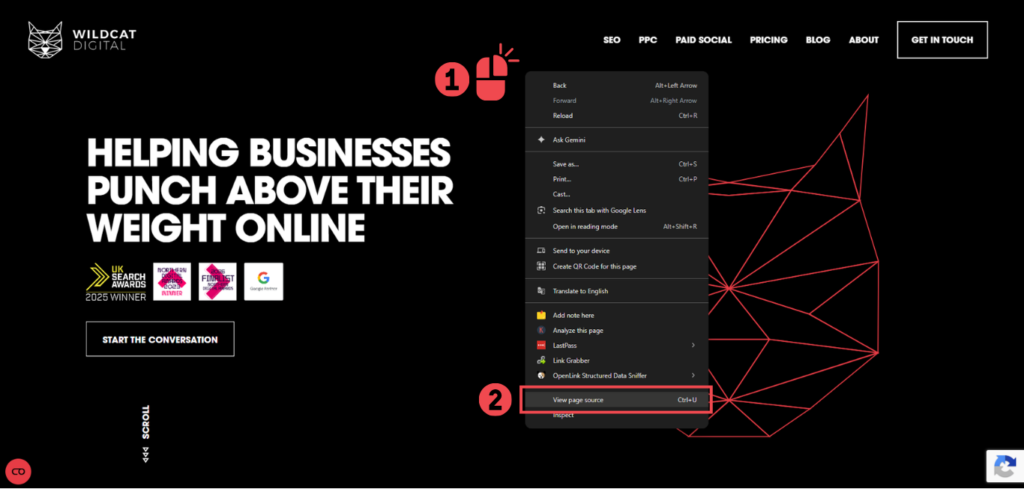
- Right click on the relevant page and click ‘view page source’.
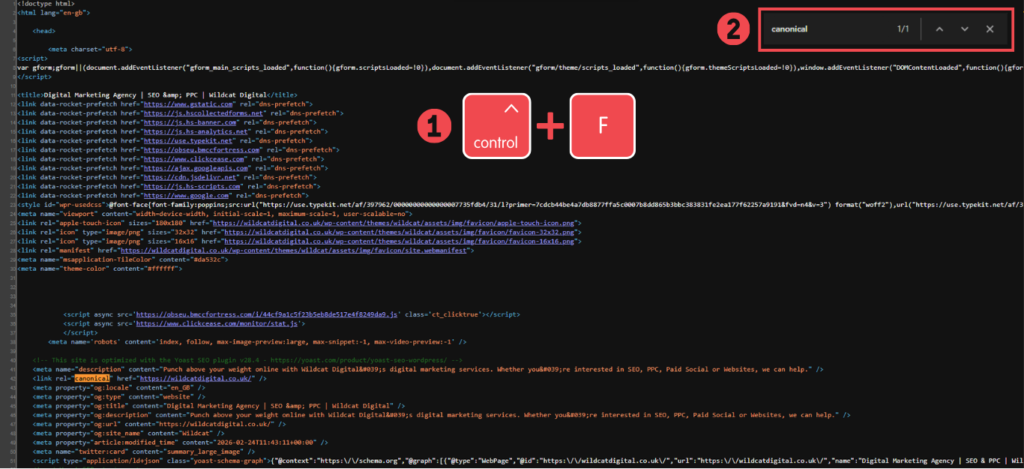
2. On Windows, press CTRL + F and search for ‘canonical’.
3. In the source code, you’ll see <link rel=”canonical” href=. This is then followed by the URL that has been set as the priority page.
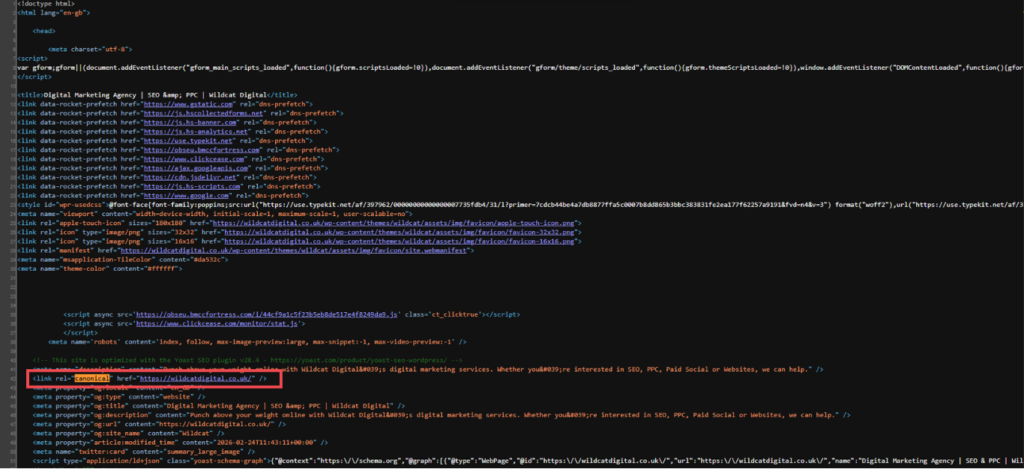
4. Ensure that there is only one canonical per page. If there are multiple, the directive will likely get ignored entirely.
Read: How To Audit Canonical Tags For SEO
Keep On Top Of Your Technical SEO With Wildcat Digital
Canonicals can be tricky to use and could be costly to your rankings if implemented incorrectly. This blog has covered the basics of their benefit in SEO, but this only scratches the surface.
If you need help implementing technical SEO measures like this, you’re in the right place! Our expert team includes technical experts that can get your website to function at it’s highest potential and transform your online visibility.
Get in touch with us today, or take a look at our pricing calculator.

Thea Chapman
SEO Account Manager