
Technical SEO is the structural foundation that supports content SEO and ensures that content can be crawled, indexed, ranked and cited by both search engines and AI systems. While content SEO is typically the most visible part of SEO, technical SEO should not be overlooked, as technical issues can create barriers that prevent a site from reaching its full organic potential
Quick-Fire Definition:
Technical SEO is the process of improving the technical foundations of a website so that search engines and AI systems can effectively crawl, understand, cite and index its content.
Key Takeaways
- Technical SEO provides the foundation for search visibility and discoverability.
- Crawlability, indexability and clear site architecture help search engines find and understand your content.
- Clean URLs, redirects and canonicalisation help manage duplicate content and consolidate signals.
- Site performance, mobile usability and Core Web Vitals support a better search experience.
- Structured data helps search engines understand your content and can enhance search appearance.
- Technical SEO supports international websites and migrations, helping protect organic visibility during major changes.
- Technical SEO can support AI search by making content easier to access, understand and interpret, but it cannot guarantee AI citations.
Wildcat Digital Insight:
“Technical SEO issues, from 404 errors to slow site speed, don’t always cause poor performance on their own – rather, they typically amplify existing content problems by making it harder for search engines to discover and understand your content.”
Kezia Humphries, SEO Account Manager
What is Technical SEO?
Technical SEO is the practice of optimising a website’s technical aspects to make it easier for search engines and AI systems to discover, crawl, index, and cite content. It’s the foundation of a strong online presence. Without strong technical SEO, your site will struggle to rank highly in the Search Engine Results Pages (SERPs), appear in AI Overviews or be cited by AI tools, such as ChatGPT.
Unlike content SEO, technical SEO focuses primarily on the underlying structure and technical elements of a website, including crawlability, indexing, site architecture, performance and code
Why is Technical SEO Important?
Technical SEO is vital to a site’s performance because it determines whether search engines and AI systems can access, understand, index and cite your content. Without a strong technical foundation, it doesn’t matter how unique or valuable your content is; it will struggle to rank highly in the SERPs and be cited by AI systems. It removes barriers between content and search engines or AI systems, helping to maximise your content SEO strategy.
However, it’s important to remember that technical SEO is designed to work alongside content SEO, rather than replace it. Technical SEO cannot:
- Improve thin or low-quality content
- Build topical authority and strong, authoritative backlinks
- Demonstrate expertise and credibility
- Replace a well-planned content strategy
- Guarantee rankings on its own
Think of your website as a library. Technical SEO makes sure search engines can find their way around the library, access the books and understand how everything is organised. Content SEO is required to ensure those books are useful, relevant and worth recommending.
Both content and technical SEO are required to build strong rankings, increase AI system citations and drive meaningful, relevant traffic to your site that’s likely to convert.
How Does Technical SEO Support AI Search?
Technical SEO can help AI bots easily crawl, read and understand your site’s content in order to feature it in generated answers. In particular, you should:
- Ensure your robots.txt does not block AI bots
- Add structured data to help AI systems understand your content more easily
- Use clear and concise URL slugs to help AI tools categorise your content
Importantly, technical SEO can make it easier for AI systems to understand and therefore cite your content, but it cannot guarantee AI citations.
What Are the Key Areas of Technical SEO?
Below are some key areas of technical SEO:
- Crawling and Indexing
- Website Architecture and Internal Linking
- URLs and Duplicate Content
- Structured Data and Search Appearance
- International SEO

Crawling and Indexing
Can search engines discover, crawl and index the pages you actually want to appear in the search results?
How Search Engine Crawling and Indexing Works
For a website to appear in the SERPs, search engines must be able to crawl and index its URLs.
A search engine, such as Google, crawls a website using a spider, which discovers the URLs on that website. Once a URL has been discovered and crawled, search engines can evaluate its content and decide whether and how it should be indexed. Carrying out a search is essentially browsing the index of a search engine.
To improve the technical SEO of your website, you must ensure that all content that you want to rank is both crawlable and indexable. This might involve:
- Making important pages crawlable
- Checking indexability
- Reviewing robots.txt
- Maintaining XML sitemaps
- Managing noindex directives
- Monitoring crawl errors
Find out more in one of our detailed blogs on crawling and indexing:
- What Is Crawling and Indexing in SEO?
- How to Manage Crawl Budget for Larger Websites
- What Does Google See When it Crawls Your Site?
Robots.txt
The robots.txt file is a plain text file located in your website’s root directory that tells search engine crawlers which pages they can and can’t access. You can view your site’s robots.txt by adding /robots.txt to the end of the domain name, e.g. https://wildcatdigital.co.uk/robots.txt.
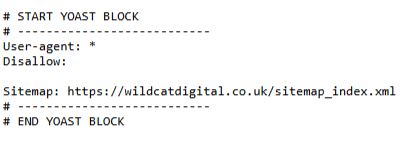
Learn more about Robots.txt by reading our detailed blog, ‘What is robots.txt?’.
XML Sitemaps
An XML sitemap is a structured text file that lists all of your site’s important URLs and helps search engines crawl and index all of your content and understand the hierarchical relationships between pages.
You can typically view your site’s XML sitemap by adding /sitemap.xml to the end of the domain name, e.g. https://wildcatdigital.co.uk/sitemap_index.xml. If this doesn’t work, you should check the robots.txt, which should include a link to the sitemap.
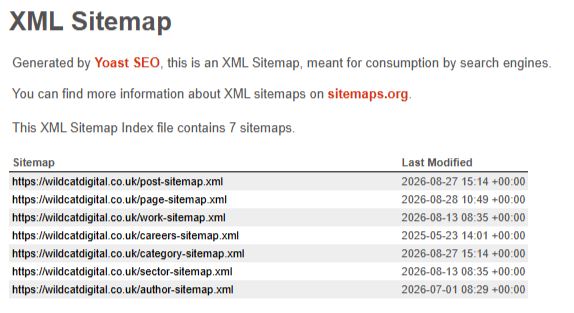
Find out more about sitemaps by reading one of our detailed blogs:
Noindex Tags
A noindex tag is a technical directive that tells search engines not to show a specific web page in the SERPs. When search engine bots crawl a page and read the noindex tag, they will remove the page from their search index. Users will still be able to see the page and navigate to it through internal links, but it will not appear in the search results.
Crawl Budget
Crawl budget is the number of pages a search engine bot can crawl on your site in a specific time frame. According to Google’s documentation, it is determined by both crawl capacity limit and crawl demand. While most small- to medium-sized sites don’t need to worry about crawl budget, it can become a concern for large sites, especially ecommerce sites, or sites with poor site speed.
Learn more about crawl budget in our helpful guides:
Website Architecture and Internal Linking
Can users and search engines easily understand and navigate your website?
Why Does Site Architecture and Links Matter in Technical SEO?
Website architecture and links form the structural foundation that helps search engines efficiently find, crawl and index your site, and pass ranking power between pages across your domain. Without a clear site structure and internal links, search engines will struggle to understand how your site is organised and the relationship between specific pages.
If search engines understand your site better, it’s easier for them to index pages, which in turn helps them rank higher in search.
Site Structure
Site structure is how a site’s pages are organised and linked together, so both users and search engines can easily navigate between pages and understand how they link to each other. A clear site structure helps ensure your crawl budget is not wasted and ensures that users can easily reach priority pages.
Find out more about how website structure affects SEO by reading our detailed blog: Is Site Structure Important for SEO?
Internal Linking
Internal linking is the process of connecting one page of your site to another using hyperlinks. Search engine bots use internal links to discover and index new or updated pages, so having these in place is vital for getting a new page indexed quickly or helping an existing page rank higher after an optimisation.
Internal links also:
- Help search engines understand the hierarchy of your site, e.g. the relationship between service and sub-service pages.
- Pass ranking signals from high-value pages to newer or less prominent pages on your site.
Learn more about internal linking through our dedicated blogs:
- SEO Link Building: How Many Internal Links are Good for SEO?
- What is The Difference Between Internal Links, Backlinks and External Links?
- What is Link Juice in SEO?
Navigation and Breadcrumbs
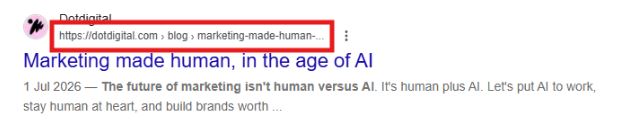
Breadcrumbs act as a secondary navigation tool that shows users their location within the site’s structure. They show users the path they took to get to that page, allowing them to easily navigate one step backwards in their navigation journey.

Breadcrumbs also help search engines to understand your site architecture and, when supported with appropriate structured data, can display as rich snippets in search results. Learn more in our blog, ‘Do Breadcrumbs Really Help SEO?’
Orphan Pages
Orphan pages are pages on a site that do not have any internal links pointing to them. This means it’s difficult for both users and search engines to find these pages, and these pages do not receive any ranking power from other pages on your site. Learn more in our blog, ‘What is Orphaned Content?’
URLs, Redirects and Duplicate Content
Does every important page have a clear, accessible URL that search engines know to prioritise?
Why Are URLs Crucial for Technical SEO?
A URL is the identifier that search engines use to crawl, index and rank your content, and assign ranking power to your pages. URLs are the core anchor for all SEO equity, including backlinks, internal links and ranking power.
URL Structure
When it comes to URL structure, you should follow the guidelines in Google Search URL Best Practices:
- Keep URLs concise and descriptive
- Use hyphens to separate words
- Use lowercase letters only
- Use descriptive words that clearly indicate what the page is about
- Avoid complex parameters (long strings of random numbers or symbols)
Learn more about URL best practices in our blog, ‘How Do I Format a URL for SEO?’
Canonical Tags
A canonical tag is a signal that indicates which URL should be treated as the preferred version when multiple URLs contain duplicate or substantially similar content. For example, if two pages have similar content but you want page A to rank above page B, you can canonicalise page B to page A. This will tell a search engine which page represents the master copy of a page, and the preferred page for indexing.
Read more about canonical tags by reading one of our detailed articles:
Redirects
A redirect is an instruction that sends both users and search engines from one URL to a different URL. Redirects help to:
- Prevent 404 errors – a redirect prevents users and search engines from encountering a ‘Page Not Found’ (404) error when URLs change, or pages are removed
- Preserve link equity – a redirect transfers authority from one page to another
- Improve the user experience – redirects ensure users are guided to the most relevant pages, rather than a 404 dead end
- Maintain crawl efficiency – redirects ensure that search bots don’t waste time on dead links

Find out more about redirects by reading one of our detailed blogs:
- Everything You Need to Know about Redirects
- Is a 301 or 302 Redirect Better for SEO
- What Is Redirect Mapping
- What Is Cloaking in SEO and What are Sneaky Redirects
Website Performance and Mobile Performance
Is the website technically fast, stable and usable?
Does Website Performance Affect SEO?
Website performance can affect both user experience and search performance. Google uses Core Web Vitals as part of its page experience signals, although meeting these thresholds does not guarantee higher rankings.
By auditing your website’s speed and performance, you can identify technical areas that require improvement. Making changes to your website that improve its performance not only enhances user experience, but can also help you to achieve higher rankings.
To run a quick test of your website’s speed, try using Google’s PageSpeed Insights.
Learn more about how to audit your site speed performance, or read one of our detailed guides on the topic:
Structured Data and Search Appearance
Can search engines understand what your content represents and how it should appear in search?
What Is Structured Data?
Structured data, commonly found in the form of schema, is a standardised format of information that can be added to your website and helps to improve a search engine’s interpretation of your content. For example, schema can be used to signify on-page FAQs, webpage information, product reviews and pricing, the business address and much more.
Structured data does not guarantee higher rankings or rich results. Instead, it provides search engines with additional context about the content and entities on a page, making it easier for them to interpret the information. Clear, machine-readable information can also contribute to how content and entities are understood across search and AI systems, although structured data does not guarantee inclusion or citation in AI-generated results.
Structured data can be added using Google Tag Manager, or by editing your website’s HTML. When adding schema to your site, you should always validate it using the Schema Markup Validator or Google’s Rich Results Test.
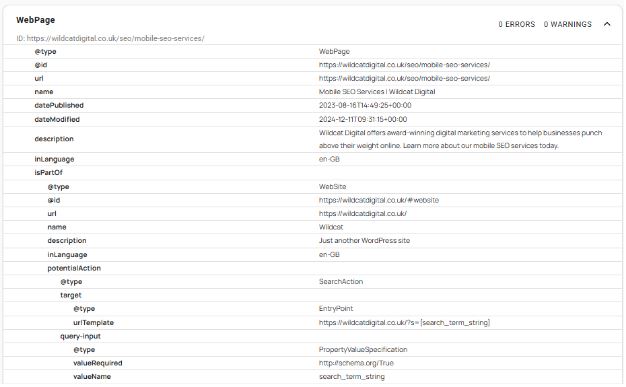
Find out more about structured data by reading one of our detailed blogs:
International SEO and Website Migrations
How can technical SEO help search engines understand different versions of your website and manage changes without losing visibility?
How Does Technical SEO Support International Websites And Migrations?
Technical SEO helps support large-scale site changes, for example, expanding internationally or migrating to a new domain, CMS or hosting service. Strong technical SEO foundations are essential to ensure search engines and AI systems can still correctly crawl, index and rank content across regions.
International SEO
For sites targeting multiple locations, hreflang tags or ‘attributes’ should be used to specify the language and geographical targeting of a website or page. By specifying this information to a search engine, you can ensure that the most suitable version is served to the correct users. For example, a French user would see a French-language version of the page in the search results, with pricing appearing in Euros.
Find out more about hreflang tags by reading our detailed guide:
Website Migration
A website migration refers to any major change to a site’s structure, URLs, platform or domain. If a migration is not handled correctly, it can lead to huge drops in ranking, traffic and revenue.
A successful migration will ensure that all rankings, authority, and indexing signals are preserved so that website visibility is not lost. To achieve this, you need to have experience with redirects and redirect mappings, as well as other site migration-specific checks.
Find out more about website migrations by reading our detailed blog: How Can I Migrate My Website Without Losing SEO?.
How Do You Check Your Website’s Technical SEO?
You should regularly review your site’s technical SEO performance through both weekly checks and more comprehensive technical audits. There are several essential tools that you can use to review your technical SEO.
| Tool | What it can help you check |
| Google Search Console | Indexing, search performance, sitemaps and Core Web Vitals |
| PageSpeed Insights | Page performance and Core Web Vitals |
| Screaming Frog | Crawlability, redirects, canonicals, internal links and status codes |
| Sitebulb | Site architecture, internal linking and technical issues |
Learn more about conducting your first technical SEO audit in our blog, ‘What is a Technical SEO Audit & Why is it Important?’
Technical SEO Checklist
Crawling & Indexing
- Important pages can be crawled
- Important pages can be indexed
- Robots.txt is correctly configured
- XML sitemap is accurate
- No unnecessary crawl waste
Site Architecture
- Logical site hierarchy
- Strong internal linking
- No important orphan pages
- Breadcrumbs implemented where appropriate
URLs & Duplicate Content
- Clean URL structure
- Correct canonicals
- No unnecessary duplicate URLs
- Redirects correctly implemented
Performance
- Core Web Vitals monitored
- Good mobile experience
- HTTPS implemented
- Page speed issues addressed
Structured Data
- Relevant schema implemented
- Schema is valid
- Structured data accurately represents page content
International & Migrations
- Hreflang correctly implemented where required
- International versions correctly configured
- Migration redirects mapped
- Post-migration indexing monitored
Contact Wildcat Digital for Technical SEO Support
At Wildcat Digital, our team is proficient in all aspects of technical SEO and can provide your website with the boost it needs to reach higher rankings. Contact us today to find out more and arrange a free consultation for SEO services.

Andy Blanchard
Senior SEO Executive