
If you’ve just started developing websites, or you work for a digital marketing company, you might have heard of ‘hrefang tags’ and their importance to your international strategy. If you haven’t heard of hreflang tags, the team at Wildcat Digital are here to dispel some myths, and try and provide some clarity for hreflang annotation.
So, what are hrefang tags, what do they do, and how do they help your website reach an international audience?
In short, hreflang tags are small snippets of annotated code placed hidden within a website’s internal structure. They inform search engines and their crawlers about the language and target audience of the content. For instance, if you offer your content in French for a French-speaking audience, hreflang tags help search engines serve this version to users in French-speaking regions.
There’s clearly quite a lot to unpack here, and we haven’t even touched upon some of the most important aspects of hreflang tag usage and implementation. So, without further ado…

What are Hreflang Tags?
Hreflang tags are <link> elements that sit in the <head> section of web pages. They also can sit in the HTTP header, or .XML Sitemap of your website too. However, as they typically sit after the HTTP header, inside the <head> section, we will review these versions of hreflang tags in this section.
Hreflang tags aren’t automatically generated by website platforms. For instance, with websites built in Wix, WordPress or Shopify, you have to request that the CMS builds hreflang tags for you, or download a plugin such as Polylang to do the tag insertion.
Placed in the <head> section of a webpage, hreflang tags are processed by search engines before the rest of the page is loaded. This section also contains other metadata like meta descriptions, meta pixels, and tracking codes (e.g., Google Analytics), which provide important information about the page to search engines and crawlers.
Hreflang implementation involves inserting links to alternate language or regional versions of a page within the <head>. This ensures that search engines and browsers direct users to the correct language version of a page. For example, a UK-based user might be directed to www.example.com/uk/, www.uk.example.com, or even www.example.co.uk.
This content is known as metadata, and it gives crawlers and search engines important information about the site or page before anything else is loaded.
Hreflang tag implementation is essentially the insertion of links to other pages within this section so that search engines, browsers and crawlers can navigate to the correct language version of the page before it shows the user the original document, which wouldn’t be a regional variant suitable to them.
Let’s take a look into how these regional pages might look, and how they can be built into your site to allow for internal traffic, whilst also avoiding creating duplicate content issues in the process.
What Does a Hreflang Tag Contain?
<link rel=”alternate” href=”https://www.apple.com/fr/iphone” hreflang=”fr-FR”>
Above is the hreflang tag from the iPhone page of the Apple website. There’s quite a lot to take in here, so let’s break down this element into its constituent parts, and learn what each section is telling us.
First of all, It’s a <link> element, primarily used to link external resources to the HTML document or, in this case, the webpage. The link section starts with ‘<link’ and is closed by the surrounding red ‘>’ at the end of the element.
Next, the rel=”alternate” indicates that the linked resource is an alternate version of the current page. In this case, it points to a version of the page translated or localised for a different audience.
‘href=”https://www.apple.com/fr/iphone/’ is the URL of the alternate resource. It points to the Apple iPhone page for France. This is indicated to us by the subfolder /fr/ within the URL. ‘fr’ is the alpha-2 country code for France in the ISO 3166-1 standard.
‘hreflang=”fr-FR”’ specifies the language and region for the alternate version, further confirming that it’s for French speakers in France. French speakers in Senegal may be given ‘fr-SN’, showing the language and location for that particular area and language.
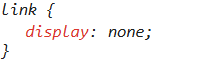
Contained within this snippet is something called a ‘cascading style sheet’, or CSS for short. CSS tells the browser and search engines (and us in this particular case) how the element should be displayed to the user. In this case, as it is an element contained within the <head>, we don’t want it to appear on the website itself. So this element is hidden through the CSS.
Understanding x-default for Href Lang Tags
The ‘x-default’ value is used when a webpage does not target a specific language or region but acts as a fallback option for users. It’s useful for language selector pages and global pages without regional content.
Here’s how it might look:
<link rel=”alternate” href=”https://www.apple.com/fr/” hreflang=”x-default”>
This tag signals search engines to direct users to this page when no other hreflang matches the user’s language or location.
Hreflang vs. Canonical Tags
While hreflang tags indicate alternate versions of a page for different audiences, a canonical tag is used to specify the preferred version of a page.
For example, if you have multiple URLs with very similar content, such as:
- https://wildcatdigital.co.uk/page/
- https://wildcatdigital.co.uk/page/?ref=ad
You might use a canonical tag to tell search engines that the 1st URL is the primary version. You therefore need to insert a canonical tag to the 2nd URL, canonicalising it to the 1st.
<link rel=”canonical” href=”https://wildcatdigital.co.uk/page/”>
If hreflang tags are implemented, canonical tags must be consistent across all versions of the page to avoid confusing search engines and potentially creating redirect loops. This is because, when canonical tags and hreflang tags are incorrect, search engines may try to resolve these conflicts by redirecting between different versions.

Where To Implement HrefLang Tags
Implementing hreflang tags can be tricky depending on the functionality of your website. That said, as the hreflang tag itself needs to be located by search engines and browsers in a particular location, implementing them can be quite straightforward.
In short, there are 3 locations where hreflang tags can be implemented:
- In the HTML <head> section.
- In the HTTP header.
- In an XML sitemap.
Each method is a little different and requires different tools depending on your CMS functionality, your technical ability, and other special requirements. Let’s dive into each, to see how each of the above 3 methods can help you implement href tags and market your products to an international audience.
HTML Hreflang Tag Implementation
As detailed in our ‘What Does a Hreflang Tag Contain?’ section, hreflang tags are best placed within the <head> section of your website.
Editing the <head> section can be daunting; mistakes here can disrupt your search engine optimisation efforts. To avoid potential issues, we recommend auditing your website both before and after implementation. Always save backups of your website prior to making any changes to ensure you can quickly restore your site if necessary.
Hreflang Tag Implementation for WordPress Sites
As a digital marketing agency, we aim to provide clear signals to both users and search engines for the content we create. Our goal is to achieve this while maintaining efficiency and staying within our budgets.
For WordPress websites, we often recommend using a plugin like Polylang to help us achieve the above. Polylang simplifies the implementation of hreflang tags and helps create duplicated international pages. It’s a user-friendly and reliable tool that ensures your hreflang tags are set up correctly. If you’re using WordPress, Polylang is one of the best options for implementing hreflang tags seamlessly.
Hreflang Tags for Wix and Shopify
Implementing hreflang tags on Wix and Shopify websites can be slightly more complex due to the limitations of these platforms. However, there are various effective methods to ensure your multilingual or regional content is properly indexed by search engines:
For Wix:
- Use the built-in multilingual feature to create language variants of your pages.
- Wix automatically generates hreflang tags for these pages, but it’s essential to double-check their accuracy to ensure they align with your target regions and languages.
For Shopify:
- Shopify does not natively support hreflang tags, so you’ll need to rely on apps like Langify or WeGlot for your implementation. If these are ineffective or cause issues, you may need to reach out to a web developer that has knowledge within this area.
- These apps allow you to create language-specific versions of your pages and manage hreflang tags automatically.
- If you prefer manual tag control, you can edit your theme’s code to include hreflang tags directly in the <head> section.
By using the right tools and carefully reviewing your implementation, you can optimise your site’s performance in international search results on both Wix and Shopify.
HTTP Header Implementation
Inserting hreflang tags in the HTTP header is a great way to add alternate language versions to web documents which aren’t served in HTML. Adding links with alternate language documents to HTTP headers is more immediate than adding them to HTML, as the HTTP response comes before any HTML is rendered to the client’s browser.
First, figure out where your file lives. Locate the server where your file is hosted (e.g., Apache, nginx, etc.). From here, access your server settings. For Apache, you need to open the .htaccess file. For nginx, you’ll need to edit the configuration file for your site. Then, insert the hreflang tag in the HTTP header.
XML Sitemap HrefLang Tag Implementation
Let’s break down the key components of an XML sitemap and how it can be used to include annotations like hreflang and canonical tags.
First, if you are new to .xml sitemaps, you can read more with our blog What Is a Sitemap and How Do Search Engines Use Sitemaps?
For your own reference, you can also view our .XML sitemap here.
An XML sitemap provides search engines with a structured list of all the pages on your website, helping them crawl and index your content more efficiently. Some information is given on this simple page to help crawlers understand the documents stored within the sitemap, including the last date that the page was modified <lastmod>, the frequency at which the page changes <changefreq>, and <priority>.
To implement the hreflang tags, we are going to add additional information to this brief list which will allow crawlers to understand that there is an alternate version of the page available for international users.
This may look like this:
<url>
<loc>https://wildcatdigital.co.uk/fr/</loc>
<xhtml:link rel=”alternate” hreflang=”fr” href=”https://wildcatdigital.co.uk/fr/” />

Subdomains vs. Subfolders: Choosing the Right URL Structure
When creating multilingual or regional versions of your website, you have two main options for how you want your new URLs to appear for the user: in subdomains or subfolders.
If you are new to URL structure, then catch -up with our blog: How Do I Format a URL for SEO?
Subdomain URL Structure

Creating a separate subdomain for each language or region (e.g., fr.wildcatdigital.co.uk/blog/) is one of two possible URL structures that you might opt for when implementing hreflang tags. Subdirectory regional variations of your website have some notable advantages and disadvantages, however.
Advantages of Subdomain Creation for Hreflang Tags:
Branding: Subdomains can be beneficial for branding and regional targeting (e.g., https://fr.wildcatdigital.co.uk/ for the French market). This site clearly exists for a French audience.
Separate Analytics: Subdomain creation makes it easier to track traffic and performance for each region or language in Google Analytics. This means that you will have to create new properties for every regional variant of your website, however.
SEO Benefits: Potentially better for local SEO, especially if you’re targeting specific countries. With subdomain implementation, your site is solely targeting a single location, helping it show for the regions that it targets over an international variation of a single domain (i.e. Subfolder implementation).
Disadvantages to Subdomain Creation for Hreflang Tags:
Link Building and Domain Authority: Subdomain implementation can present issues which make it more difficult to build strong backlinks to each subdomain.
User Experience: Users may perceive subdomains as separate entities, which could negatively impact user experience.
Technical Challenges: Sometimes challenges with cookie management and cross-domain tracking are present when your business operates two separate domains.
Subfolder URL Structure

The Pros of a Subfolder for Hreflang Tags:
SEO Benefits/ Domain Authority: Subfolder URL creation is generally considered better for SEO, as all backlinks to the root domain benefit all subfolders. This is an aspect of Domain Authority, as keeping all links pointing towards the same domain is the only way to build this domain’s authority score.
User Experience: It is easier for users to navigate between different language versions of the site.
Technical Simplicity: It is easier to manage and maintain a subfolder from a technical standpoint.
The Cons of a Subfolder for Hreflang Tags:
Branding: Subfolder URLs may not be as effective for regional marketing and local SEO.
Analytics: It can be tricky to track traffic and performance for each region within a single Google Analytics account. You may need an advanced knowledge of GA4 to build regional reports.
CMS Limitations: You may prefer to blog on one CMS, and build your landing pages on another. In this case, you would work across two domains due to the lack of functionality with each.
Choosing the Right Approach
The best choice depends on a number of factors, including:
SEO priorities: Subfolders are recommended if you wish to maintain the SEO efforts between your pages.
Branding goals: If strong regional branding is crucial, subdomains might be a better option.
Technical resources: Consider the technical expertise available to manage and maintain the chosen structure.
As an SEO Agency, we strongly recommend the use of subfolder URL structure when implementing hreflang tags as this is the only method that helps maintain your domain authority.

How Do Hreflang Tags Help Your SEO?
Hreflang tags help your SEO by creating duplicate URLs that are intended for an international audience, whilst not splitting your SEO efforts across similar content URLs.
As mentioned, search engine optimisation is about creating clear signals for our content, products and services, allowing them to shine through and appear in search results. Creating many duplicate pages dilutes these efforts, causing rankings to potentially drop.
Creating hreflang tags allows you to create these duplicate pages without dilution. Hreflang annotation helps you reach these international audiences, without any losses in your rankings.
Validating Your Hreflang Tags
You can validate your hreflang tag implementation in a few different ways, namely via Google Search Console or a third-party checker such as Technical SEO from Dentsu.
If you have Google Search Console verified on your website, then you can check it through the ‘Enhancements’ section on the left-hand side of the screen. From here, GSC will tell you if there are any issues with your hreflang tag annotation.
Via a third-party site like Technical SEO, you can validate both your HTML and HTTP implementations and even XML sitemap implementations quickly. You can also alter the user agent, reviewing the implementation from the perspective of Googlebot, Googlebot Smartphone, AdsBot, Bingbot etc.

Going International with Wildcat Digital
If you want to branch your business’s website out to international audiences, and you are new to hreflang annotation, then you might need the help of a digital marketing agency.
Here at Wildcat Digital, our team helps many burgeoning businesses reach an international audience by implementing hreflang tags across their product, category and service pages. When you work with us, our dedicated SEO account managers and PPC specialists create campaigns with your business in mind. Often, this included hreflang tags, a vital part of taking your business global.
If you are interested in allowing our team to help map, create and implement hreflang annotation across your website, then don’t hesitate to get in touch today.

Jon Herdman
SEO Executive