
The way people search has fundamentally shifted over the last few years. According to a 2025 study by Bain & Company, “about 80% of search users rely on AI summaries at least 40% of the time”.
An effective content strategy has never just been as simple as ‘publish and forget’, but in the era of generative search, maintaining, refreshing and updating content is more important than ever.
Search engines prioritise content that’s:
- Updated regularly
- Reflects current data, trends and user intent
- Demonstrates ongoing relevance
Generative search doesn’t pull from one page – it pulls information from across your website. If your site has:
- Duplicate articles
- Conflicting advice
- Thin posts
- Outdated information
- Orphaned content
It can weaken your topical authority and reduce the likelihood of your site being cited in AI answers.
Continuous optimisation is key to maintaining visibility in AI summaries. Regular content maintenance helps you:
- Recover decaying content before rankings drop
- Capture new emerging queries
- Stay competitive against fresh SERP entrants
- Improve user experience and conversion rates
- Protect the authority you’ve already earned
Content should be treated as a living asset, not just posted and forgotten about.
In the rest of this guide, we’ll cover:
- What content maintenance is
- The core areas of content maintenance
- Your ultimate content health checklist
What is Content Maintenance?
Content maintenance is the ongoing process of reviewing, updating and optimising existing content to ensure it’s accurate, relevant and performs highly in the search results. When done effectively, content maintenance helps:
- Avoid traffic loss due to a decline in rankings by keeping content up-to-date, improving SEO signals and maintaining relevance to users’ search intent.
- Improve user experience and strengthen brand credibility by providing users with up-to-date information.
- Maximise ROI by extending the value of existing content rather than constantly creating new content from scratch.
Key Components of Content Maintenance
- Content Audits: Regularly review all website pages to identify underperforming, outdated or irrelevant content. This helps prioritise updates and improvements.
- Combatting Content Decay: Refresh old content that has lost search visibility or traffic, updating statistics, facts and examples to maintain relevance.
- Optimising Thin, Duplicate, and Overlapping Content: Improve or merge low-value content to enhance quality and prevent cannibalisation of search rankings.
- Fixing Orphaned Pages: Ensure all pages are linked within your site structure so search engines can discover and index them effectively.
- Planning Evergreen Content: Create and maintain content that remains relevant over time, requiring minimal updates while consistently attracting traffic.
We go over each of these core components in more detail below.
Content Audits: The Foundation of Content Maintenance
A content audit is the systematic process of reviewing all website content to assess its quality, relevance and performance.
Regular content audits ensure:
- Your website content remains accurate, up-to-date, and relevant.
- Engagement and user experience are maintained or improved.
- SEO performance is optimised, including search rankings and visibility.
- Outdated, thin, or duplicated content is identified and addressed.
- Content aligns with evolving business goals and user intent.
- Opportunities for updating, expanding or consolidating content are uncovered.
What’s Included in a Content Audit?
A comprehensive content audit should start by cataloguing all of your website content, including landing pages, blogs and other assets, in a spreadsheet. Each piece of content should then be assessed for quality, relevance and accuracy, helping you to identify outdated, under-performing, thin, duplicated or overlapping content.
Here’s an overview of the factors that you should look at for each page:
Performance:
- Traffic
- Bounce rate
- Engagement rate
- Conversion rate
- Keyword rankings
- Backlinks
Content:
- Quality and readability
- Relevance
- Accuracy (up-to-date facts, statistics and references)
- Aligned with user intent and business goals
- Optimised for keywords
- Content is not duplicated or overlapping
- FAQs included where relevant
- Page structure and formatting
- Internal and external links
- Optimised for AI and generative search
On-page elements:
- Title tags
- Meta descriptions
- Alt text
- H1s and other headings are used appropriately
As a result of your audit, you should have a clear list of actionable recommendations, highlighting which pages need to be optimised or refreshed to maximise SEO value and user engagement.
Learn more about the content audit process in our blog, ‘ ‘SEO Content Audit How and When To Review Your Content.’
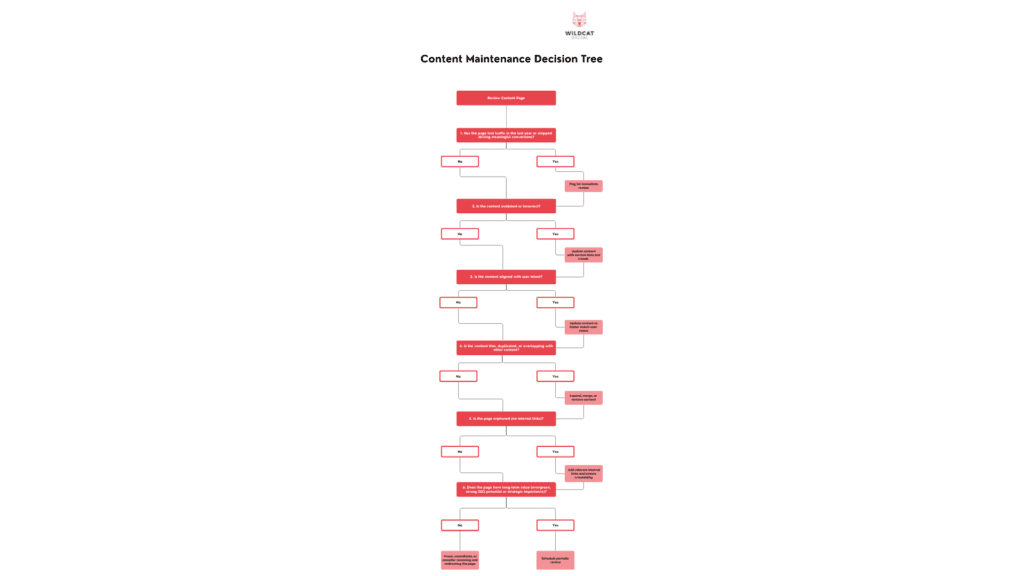
Content Maintenance Decision Tree: What Action to Take for Each Page
Although there are many factors to consider in a content audit, it can be difficult to understand how these factors help you to create actionable steps to take. This decision tree helps you systematically evaluate each page’s performance, relevance and SEO value to decide whether to update, optimise or remove it.
When Should a Content Audit be Completed?
Content audits should be completed regularly – ideally every six to 12 months. The content maintenance process should be built into your overall marketing and SEO strategy to ensure that content quality, accuracy and performance are consistently monitored.
Reactive vs Proactive Content Audits
Primarily, content audits should be conducted proactively and scheduled as part of your wider marketing strategy. However, there are instances where reactive content audits should be conducted in response to specific triggers, including:
- Traffic drops
- SERP shifts
- Algorithm updates
- New competitors
- Shifts in user intent
- Decreased engagement or conversions
- New industry regulations
- New business priorities
If you’d like a more in-depth explanation of when you should complete a content audit, check out our guide, ‘SEO Content Audit How and When To Review Your Content.’
Content Decay: Identifying and Reversing Performance Declines
Content decay is the gradual decline in a page’s rankings, traffic or engagement over time. It typically happens when older content becomes less relevant, competitors publish newer or higher-quality content, user behaviour changes, or the SERP landscape shifts. Even high-performing content can be vulnerable to decay if it’s not regularly reviewed, optimised and refreshed.
How to Measure Content Decay
To identify when a page is starting to decay, review metrics over a 6–12 month period:
- Organic traffic decline – Look for slow, consistent drops rather than sudden anomalies.
- Loss of keyword rankings – Especially if competitors have overtaken your content.
- Falling impressions in Google Search Console – A strong indicator that your content is no longer competitive in SERPs.
- Reduced engagement – Lower time on page, higher bounce rates, or fewer conversions.
- Decreased click-through rate (CTR) – Often caused by outdated titles/meta descriptions or new SERP features pushing your page down.
These are strong indicators that your content is decaying, and without intervention, your content’s performance will continue to decline.
Strategies to Reverse Content Decay
The best approach to combat content decay is to thoroughly review the page and then take steps to expand, improve, optimise or otherwise strengthen the page to improve its performance. Here are some of the most effective strategies to reverse content decay:
- Update outdated information:
- Expand thin sections or add new sections where relevant
- Improve topical depth by adding missing subtopics, supporting insights, definitions or step-by-step explanations. This helps meet modern search intent.
- Add FAQs if none exist
- FAQs help capture long-tail queries, answer People Also Ask questions and improve semantic coverage. They are also ideal for addressing user objections or clarifying key concepts. Learn more: ‘Are FAQs and FAQ Schema Good for SEO?’
- Re-optimise for current keyword opportunities
- Refresh title tags, H1s, meta descriptions and keyword placement to reflect updated search trends. Consider shifting the page’s focus slightly if user intent has evolved.
- Improve E-E-A-T signals
- Strengthen authority by adding expert quotes, case studies, external references, client examples, certificates or updated sources.
- Add or improve internal linking
- Add contextual internal links to relevant blog posts, service pages or related content hubs. This helps distribute authority, improve crawlability and reinforce topic clusters.
- Refresh page structure and readability
- Improve layout, break up large paragraphs, add headings and bullet points, update visuals and ensure the page is scannable. Google favours content that provides a strong user experience, and this also improves your content’s chances of being cited by LLMs. Learn more: ‘Creating LLM-Friendly Content Formats’.
- Add new multimedia elements
- Include images, diagrams, videos, charts or downloadable assets. Fresh media can increase engagement and provide additional context or value.
- Improve page speed and technical performance
- Content decay can be partially caused by slow load times, poor mobile optimisation or layout shifts. Fix Core Web Vitals issues to enhance overall performance.
- Update CTAs and conversion pathways
- Refresh outdated calls-to-action, add new internal CTAs or align them to current business priorities. Better-matched CTAs can improve performance.
- Consolidate overlapping content
- If multiple pages compete for the same keyword, merge them into a single, stronger page. Canonicalise or redirect weaker versions to strengthen overall topical authority.
- Add structured data
- Schema markup (FAQ, How-To, Article, Product, etc.) can help pages qualify for enhanced SERP features and increase visibility. Learn more, ‘What is Schema in SEO?’.
- Review competitor changes
Keyword Cannibalisation: How Competing Pages Hurt SEO
Keyword cannibalisation occurs when multiple pages target the same or very similar keywords, causing them to compete against each other in the search results. Instead of strengthening your authority, these competing pages can dilute your site’s authority, confuse search engines and make it harder for Google to determine which page should rank. This can lead to both pages performing poorly in the search results or keyword rankings fluctuating dramatically.
Why Keyword Cannibalisation Hurts Your SEO Efforts?
Keyword cannibalisation impacts performance in several important ways:
- Confuses search engines
- Splits ranking potential
- Instead of one strong, well-optimised page, authority, backlinks and behavioural signals are spread across multiple pages.
- Weakens topical authority
- Competing pages often provide overlapping information, making your site look less authoritative and more redundant.
- Wastes crawl budget
- Search engines repeatedly crawl similar pages without gaining new value, reducing crawl efficiency for genuinely important content.
- Reduces user experience
How to Detect Keyword Cannibalisation
There are a couple of different ways that you can check for keyword cannibalisation.
Using Google Search:
- Perform a site search (use site:yourdomain.com “your keyword”) to see all the pages on your site that rank for that term
- Check how many pages appear and if they have similar intent or overlapping content.
Using Google Search Console:
- Go to Performance and then the Search Results report.
- Filter by a query and input your target keyword.
- Click the pages tab to see all the URLs receiving impressions/clicks for that term.
- If there are multiple pages, investigate if the content overlaps.
Using a Keyword Tracking Tool:
- Look for multiple URLs rankings for the same keyword.
- Check if the URLs are fighting for the same keyword (e.g, the lines regularly intersect) – see the example below

To learn more about this topic, read our blog ‘What Causes Keyword Cannibalisation?’.
Thin, Duplicate & Overlapping Content: Why This Harms Your Domain Authority
Thin, duplicate, or overlapping content refers to pages that provide little value or repeat information found elsewhere on your site. In the AI-driven search era, where algorithms increasingly prioritise comprehensive, authoritative content, these pages can significantly undermine your site’s topical authority and overall SEO performance.
How to Deal With Thin, Duplicate and Overlapping Content
A key part of maintaining high-quality content across your website is knowing how to deal with thin, duplicate or overlapping content. Effectively addressing these issues ensures your website remains authoritative, relevant, and competitive in search results.
How to improve thin content:
- Merge or consolidate pages – Combine overlapping content into a single authoritative page.
- Expand thin sections – Add in-depth sections, examples, visuals, FAQs or case studies to improve value.
- Enhance readability and engagement – Use clear headings, bullet points, and structured formatting to make content easier to digest.
- Update outdated information – Refresh statistics, product details, or examples to maintain accuracy and relevance.
- How to Deal With Duplicated or Overlapping Content:
- Differentiate overlapping pages – If multiple pages must exist, clearly define unique angles, target keywords, and audience intent for each.
- Implement redirects or canonical tags – Redirect weak or duplicate pages to stronger ones, or use canonicalisation to signal the preferred version to search engines.
- Audit regularly – Schedule ongoing reviews to catch new instances of duplication or content overlap.
- Monitor internal linking – Ensure internal links point to the most authoritative versions of pages to consolidate link equity.
If you’d like to learn more about this topic, our blog, ‘Identifying Thin, Duplicate and Overlapping Content to Improve SEO’, covers everything you need to know.
Orphaned Pages: Fixing Content With No Internal Links
Orphaned pages are pages on your website with no internal links pointing to them. Because search engines rely on internal links to discover, index and understand content, orphaned pages are commonly overlooked, reducing their potential to perform well in the search results.
Why Orphaned Pages Harm SEO
- Reduced crawlability – Search engines may not find or index orphaned pages efficiently.
- Lost link equity – Orphaned pages cannot benefit from internal linking, limiting their authority.
- Weakened topical clusters – Without proper internal links, your site’s structure and content hierarchy are less clear to both users and search engines.
- Missed engagement opportunities – Visitors may never discover valuable content buried without links from other pages.
How to Surface and Re-Integrate Orphaned Pages
Using a Crawler:
- Use a crawling tool, such as Screaming Frog or Site Bulb, to crawl your site’s linked pages (the following steps are based on Screaming Frog).
- Integrate data from Google Analytics and Google Search Console into the crawler. Click on the “API Access” tab and connect your Google Analytics and Google Search Console accounts. Make sure you check the “Crawl New URLs Discovered In Google Analytics 4/Google Search Console”
- Run your crawl and then head to the “Links” tab and look in the “Crawl Depth” column. This tells you how many clicks it would take users to reach that page from the homepage. URLs with a blank crawl depth are orphan pages.
- You should also make a note of pages that are over 5 clicks away from the home page.
Using an SEO Tool:
- Use an SEO tool, such as SEMrush’s Site Audit tool.
- Set up a new project and enter your domain.
- Run the audit and navigate to the “Issues” tab, and then search for orphan pages.
- You can then see all of your site’s orphan pages.
Evergreen Content Planning: Keeping Your Best Assets Alive
Evergreen content refers to pages or posts that remain relevant over time, consistently attracting traffic and engagement. However, “evergreen” does not mean “set and forget.” Even your best-performing assets require regular attention to stay accurate, competitive and aligned with evolving user intent.
Strategies for Refreshing Evergreen Content:
- Conduct regular content audits to identify pages that need updates or expansion.
- Add new sections, FAQs, visuals, or examples to increase depth and value.
- Re-optimise for updated keywords or search trends.
- Review internal linking, ensuring evergreen content is connected to newer, relevant pages.
- Track performance metrics post-refresh to evaluate the impact on traffic, engagement, and conversions.
For a step-by-step guide to maintaining and optimising your evergreen content, check out our blog, ‘Evergreen Content Planning and Refresh Strategy’.
The WD Playbook: Your Content Health Checklist
Keeping your website’s content healthy is essential for maintaining strong SEO performance, user engagement, and overall site authority. Our Content Health Checklist provides a clear, actionable framework for auditing, updating, consolidating, and retiring content, ensuring every page contributes value and supports your marketing goals.
Audit
Update
Consolidate / Merge
Retire / Archive
Ongoing Monitoring
Maximise Your ROI with Wildcat Digital
Updating, optimising and consolidating content is the best way to ensure your best-performing pages continue to attract traffic, generate leads and drive conversions, while underperforming pages are either improved or retired strategically.
At Wildcat Digital, we specialise in helping businesses maintain healthy, high-performing content that drives measurable results. If you want expert support with content audits, refresh strategies, or ongoing maintenance, get in touch with our team today and maximise the value of every page on your site.

Kezia Humphries
SEO Executive