TL;DR: Start by confirming the drop is real, using Google Search Console rather than a one-off search. Then identify the pattern (whole site, some pages, or clicks only), check for technical and security problems, list what changed on your site, and only then look at Google updates and competitors. Avoid big changes until you know the cause.
A keyword that slipped from page one to page two feels urgent. But reacting before you know what happened can make a drop worse. This guide gives you a sequence to follow, so you diagnose the cause before you change anything.
It works for most sites. If you have a very large site or a drop that does not fit any pattern below, the checks still apply, but you may need specialist help to interpret the data.
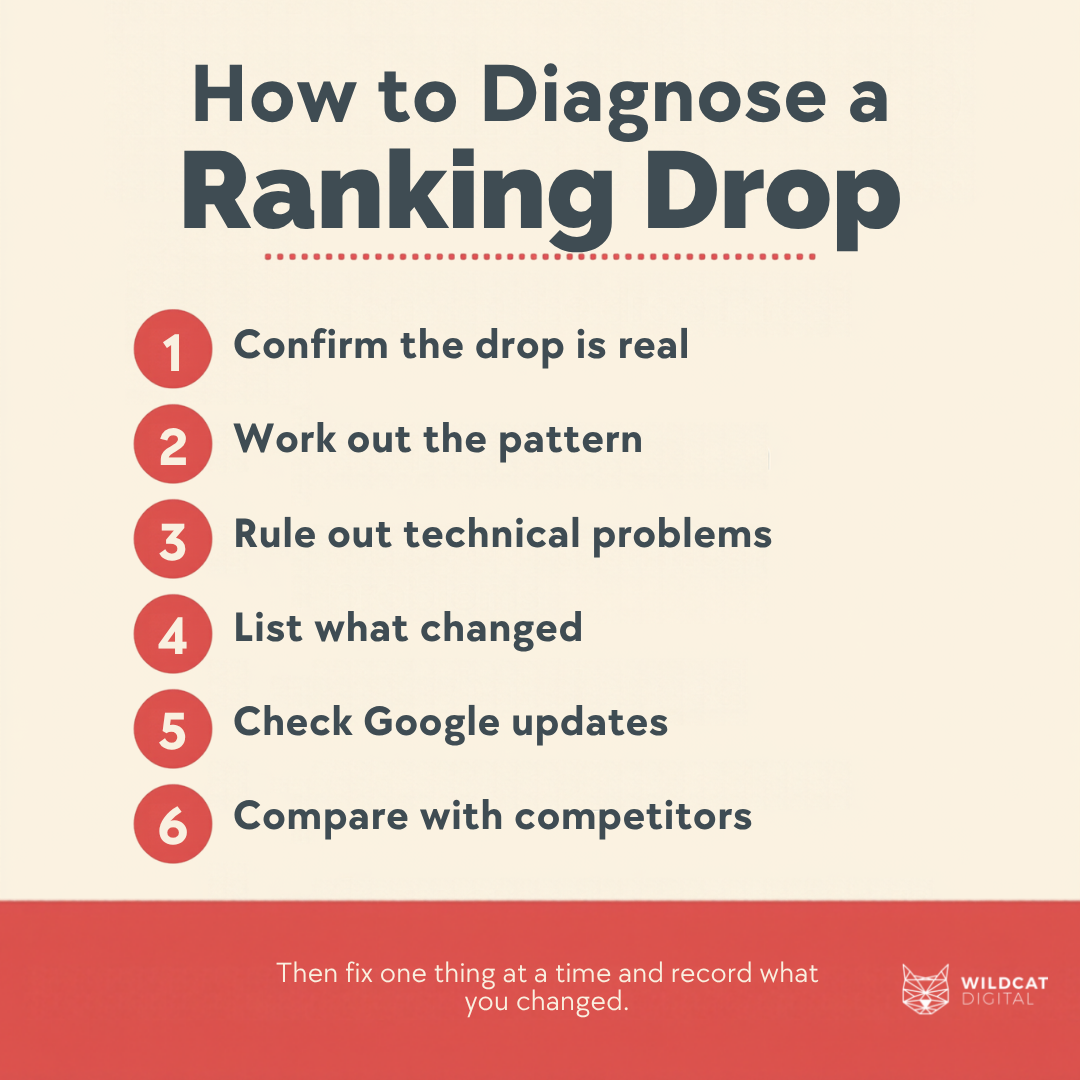
Step 1: Confirm the Drop Is Real
Do not rely on searching for your keyword yourself. Results vary with search history and location, and Google notes that a manual check can differ from what Search Console reports as average position, which is averaged across all the searches where your page appeared.
Instead, open the Performance report in Search Console and look at clicks, impressions and average position. Google’s guidance on debugging drops in search traffic points you to the Last 16 months view in the Performance report, so you can compare periods and see the drop in context.
Two further points on tools:
- Google’s guidance on third-party SEO tools says they do not have access to its internal ranking data and encourages using Search Console, so treat rank trackers as a guide and check them against Search Console.
- Google’s site: operator documentation says the operator does not necessarily return all indexed URLs, and recommends the URL Inspection tool if a URL does not show.
If you want a reliable routine, see our guide to tracking your keyword positions on Google.
Step 2: Work Out the Pattern
The shape of the drop tells you where to look first. Compare the dates, the pages and the queries affected.
| What you see | What it often points to | Where to check |
| A drop across the whole site that starts on one date | A technical or security problem, a site-wide change, or a Google update | Page indexing, Security issues and Manual actions reports; dates of any site changes |
| A drop on a few pages or one section | A change to those pages, an indexing or canonical problem, or a new competitor for those queries | URL Inspection; Performance report filtered by page |
| Impressions steady but clicks down | A change in how your result appears, such as the title, snippet or rich result | Performance report; compare your result in search with before |
| A gradual decline over several months | Stronger competitors, ageing content or changing demand | Same period last year; Google Trends for seasonality |
| Pages missing from results altogether | Pages blocked, set to noindex, removed or not indexed | URL Inspection; Page indexing report |
Top Tip: In the Performance report, compare the drop period with the period before it and sort by the change in clicks. The pages and queries at the top of that list are where most of the loss sits, so you diagnose those first instead of the whole site.
“The first thing I check is when the drop started and how widely it’s spread. Clients often blame their most recent website change, but on one account the decline began months before the relaunch and affected pages across the site, so the launch wasn’t the cause.”
Kezia Humphries – SEO Account ManagerStep 3: Rule Out Technical and Security Problems
Technical faults can cause sudden drops and are often fixable, so check them before anything else.
- Use URL Inspection tool on the affected pages to see whether Google can index them and which version it treats as canonical.
- Open the Page indexing report and look for a rise in pages that are not indexed, and the reasons given.
- Check the page source and your robots.txt for a stray noindex tag or a blocking rule, for example, after a site update. Our guides to robots.txt and auditing canonical tags explain what to look for.
- Check the Manual actions and Security issues reports for any message from Google.
- If you are an advanced user or run a large site, the Crawl Stats report shows how Google crawls your site. Google guidance states that sites with fewer than 1,000 pages generally do not need it.
These reports are not interchangeable. Page indexing shows which pages are indexed, URL Inspection checks one URL in detail, and Crawl Stats looks at crawling activity across the site. If crawling and indexing are unfamiliar, start with what crawling and indexing mean in SEO.
When a construction client’s website was rebuilt by a new developer, several changes went live without SEO checks. URLs were changed without redirects, so some top-ranking pages led to a 404 error. Title tags and meta descriptions were removed, and some pages ended up with duplicate H1s.
Average position slipped within days. Organic traffic held roughly level year on year, but in the two months around the change organic conversions fell by 40%, after more than doubling the year before. We crawled the site to list what had changed, restored the original URLs, then fixed the titles, descriptions and headings.
Within two months conversions were recovering, and once the tailored page content was reinstated, rankings and year-on-year clicks moved ahead of where they were before the changes.
Step 4: List What Changed on Your Site
If the technical checks are clean, write down everything that changed in the weeks before the drop: redesigns, new templates, migrations, URL changes, content edits, plugin or CMS updates, and changes to internal links or navigation. Align each change with the date the drop began.
Google notes that if you change the URLs of existing pages, you may see ranking fluctuations while it recrawls and reindexes your site. It also recommends avoiding radical changes if your page is already performing well, so hold off on big fixes until you know the cause. For more, see whether changing your website affects SEO and how to migrate a website without losing SEO.
Step 5: Consider Google Updates and Changes to Results
If nothing on your site explains the drop, look at whether it lines up with a Google update. Google’s guidance on core updates says that most sites do not need to worry about core updates, that you should wait at least a full week after an update finishes rolling out before assessing, and that you should compare against the week before. It also says it can take several months for its systems to confirm that a site is producing helpful content, and that some changes can take effect in a few days.
Changes to the results page can also change clicks without changing your rankings. If impressions held steady but clicks fell, compare how your listing appears now. Google says sites appearing in AI features such as AI Overviews and AI Mode are included in the overall search traffic in Search Console, reported in the Performance report under the Web search type.
Step 6: Compare With Your Competitors
Only once you have ruled out the causes above should you look at competitors. Search the affected queries, note who now ranks above you, and compare what they offer. Check whether the intent behind the query has shifted, for example from guides to product pages. Our guides on competitor research and search intent cover how to do this.

What to Do Once You Know the Cause
Fix the cause you found and make one change at a time, so you can tell what worked. Google says some changes can take effect in a few days but others take months, and suggests waiting a few weeks before analysing Search Console again. Keep checking the same Search Console view, and record what you changed and when.
If the cause is unclear after these steps, that is a sign to get a second opinion rather than to try more changes.
How Wildcat Investigates Ranking Drops
Wildcat’s technical SEO audit covers areas that can sit behind a drop: indexing, search engine appearance, URLs, structured data, duplicate content, crawlability, linking, redirects, security, site speed and mobile usability. Our SEO consultancy includes regular analysis and reporting, plus technical and advanced SEO support.
To help us investigate, it is useful to share read-only access to Search Console and the date you first noticed the drop. Get in touch to talk it through, or book your free 30-minute consultation.

Kezia Humphries
SEO Account Manager